Adding Hosts to a VLAN with Infoblox: Difference between revisions
Jump to navigation
Jump to search
No edit summary |
|||
| Line 3: | Line 3: | ||
= Basic Usage = | = Basic Usage = | ||
The infoblox website is located here: https://infoblox.triumf.ca. You log in with your TRIDENT credentials (without the "@triumf.ca" on your username). You will be presented with a rather empty status screen. The actions needed are taken from the "Data Management" tab, | == Adding a Host == | ||
The infoblox website is located here: https://infoblox.triumf.ca. You log in with your TRIDENT credentials (without the "@triumf.ca" on your username). You will be presented with a rather empty status screen. The actions needed are taken from the "Data Management" tab. See the below images and their captions on the steps to add a host, either with a static IP or using DHCP. | |||
[[File:Infoblox status.png|thumb|1000px|left|Infoblox status page. Most basic actions are accessed through the Data Management tab, highlighted in red.]] | [[File:Infoblox status.png|thumb|1000px|left|Infoblox status page. Most basic actions are accessed through the Data Management tab, highlighted in red.]] | ||
Revision as of 21:13, 10 April 2026
Infoblox is presented as a webpage which allows you to set DNS and DHCP settings for both network and host management.
Basic Usage
Adding a Host
The infoblox website is located here: https://infoblox.triumf.ca. You log in with your TRIDENT credentials (without the "@triumf.ca" on your username). You will be presented with a rather empty status screen. The actions needed are taken from the "Data Management" tab. See the below images and their captions on the steps to add a host, either with a static IP or using DHCP.


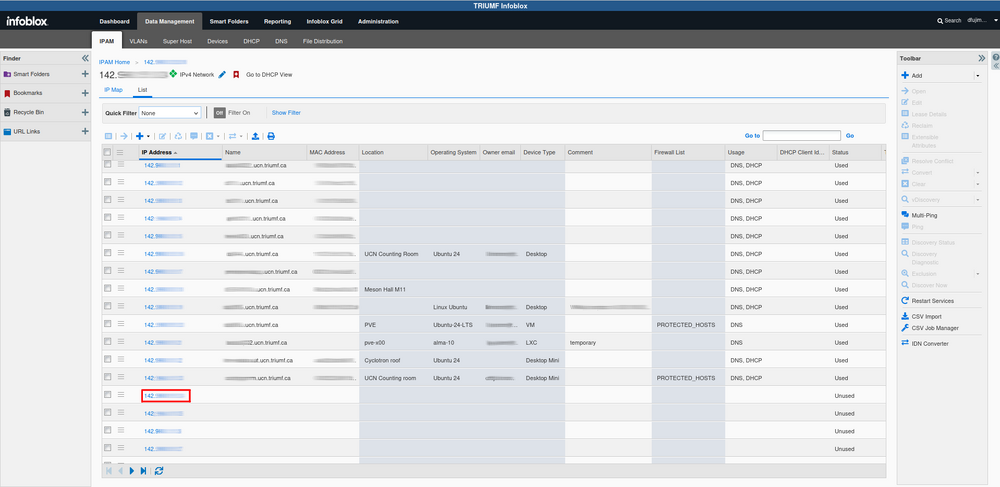
Infoblox IP selection and device list. From here you will see all the devices and their IP addresses. You can edit the columns shown by hovering over any of the column headers and selecting the down arrow. We can add a new host by selecting an IP address with no assigned hostname. To edit a host's details click on that host's IP address.


Note that we cannot yet see the DHCP logs, talk to kray or dthomson for logs and debugging if needed.