|
|
|
Back
Midas
Rome
Roody
Rootana
|
| Midas DAQ System |
Not logged in |
 |
|
|
|
Message ID: 3265
Entry time: 07 Sep 2026
|
| Author: |
Stefan Ritt |
| Topic: |
Info |
| Subject: |
ODB Browser Update |
|
|
A major update of the ODB Browser has been made in the last few days. Here are the new features:
- The browser supports now multiple tabs. You can open as many tabs as you like, and they stay persistent even if you navigate away and come back to the ODB page (unless you close the browser). This allows easily swiching between different subdirectories in the ODB.
- A "Live Indicator" on the top right corner indicates live updates from the ODB and an error should the current ODB values not be updated any more.
- A new "Duplicate" button lets you duplicate the current subdirectory. This can become handy if you want to clone an alarm for example.
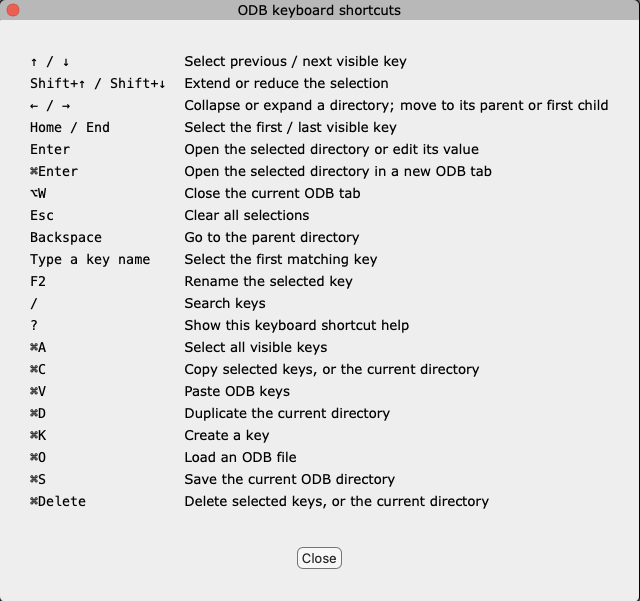
- A new Speed Selector lets you select ODB keys with the keyboard. Simply type the first few letters of a key and the selection will jump there. If it's a subdirectory and you press <enter>, you will traverse into that subdirectory. If it's a normal key, you will enter the edit mode for that key. The <backspace> key navigates up the hierarchy (parent direcotry). This way you can navigate and modify the ODB easily without using the mouse. Use cursor keys to navigate up and down. The full keyboard shortcuts help is available under ... -> Help... and attached below.
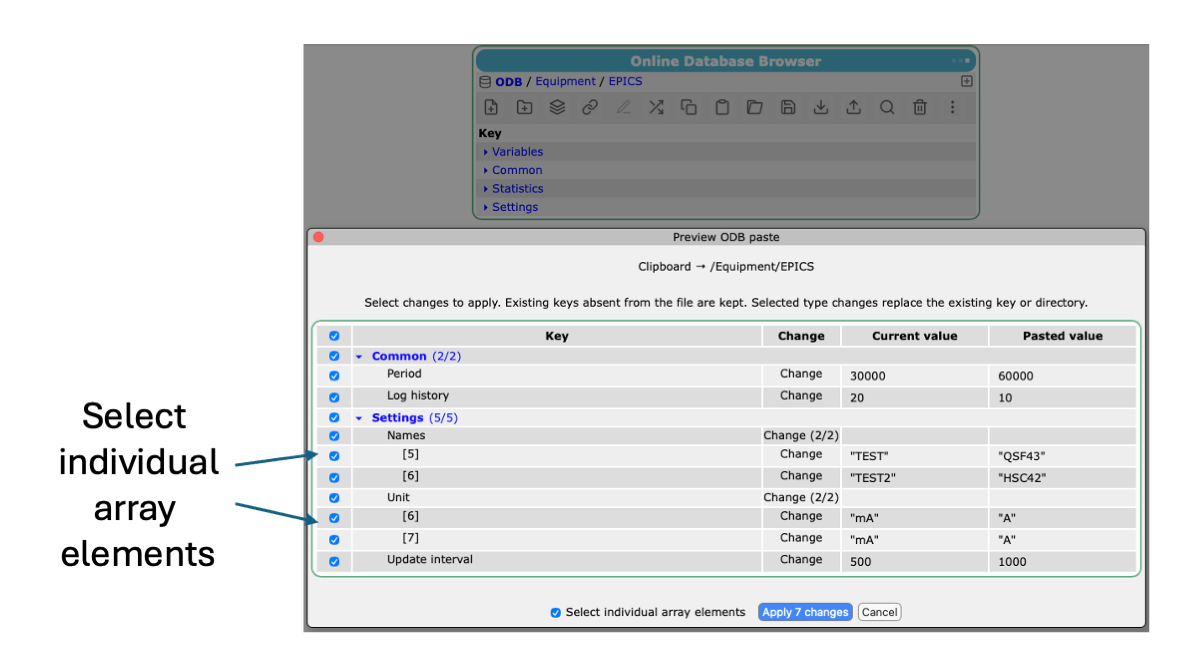
- Loading or importing or pasting keys into the ODB brings up the preview dialog. Here one can select which values actually go into the ODB. Subdirecories can be selected or unselected as a whole or via their individual keys. For arrays, one can select the whole array or individual array elements.
The attachments below show some of the new elements and how they can be used. Changes are committed to the develop branch of MIDAS.
Feedback welcome.
Stefan
|
|
|
|
|
|
|