|
|
|
Back
Midas
Rome
Roody
Rootana
|
| Midas DAQ System, Page 4 of 162 |
Not logged in |
 |
|
|
| New entries since: | Wed Dec 31 16:00:00 1969 | |
|
|
 02 Apr 2024, Zaher Salman, Info, Sequencer editor 02 Apr 2024, Zaher Salman, Info, Sequencer editor 
|
Dear all,
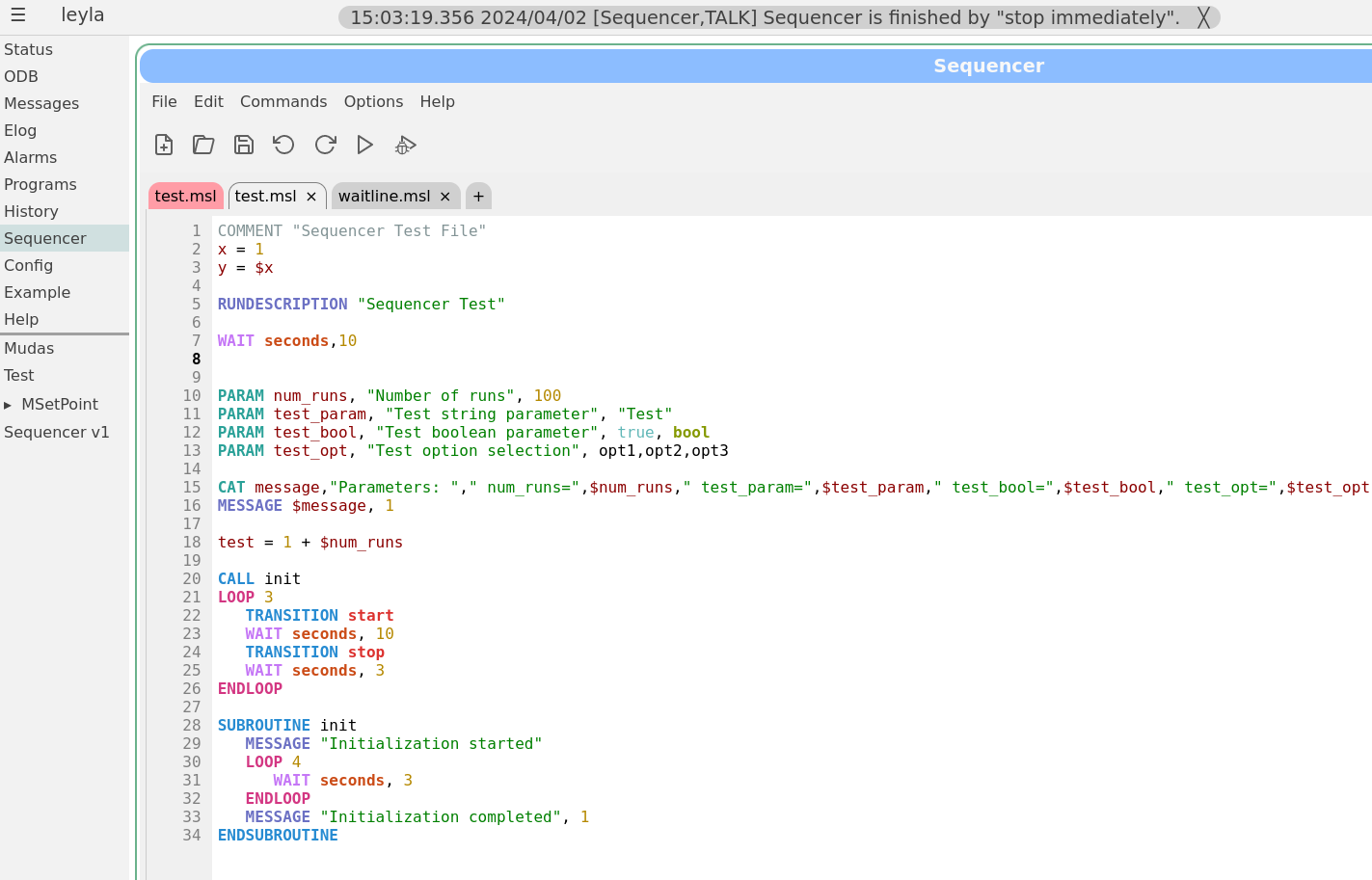
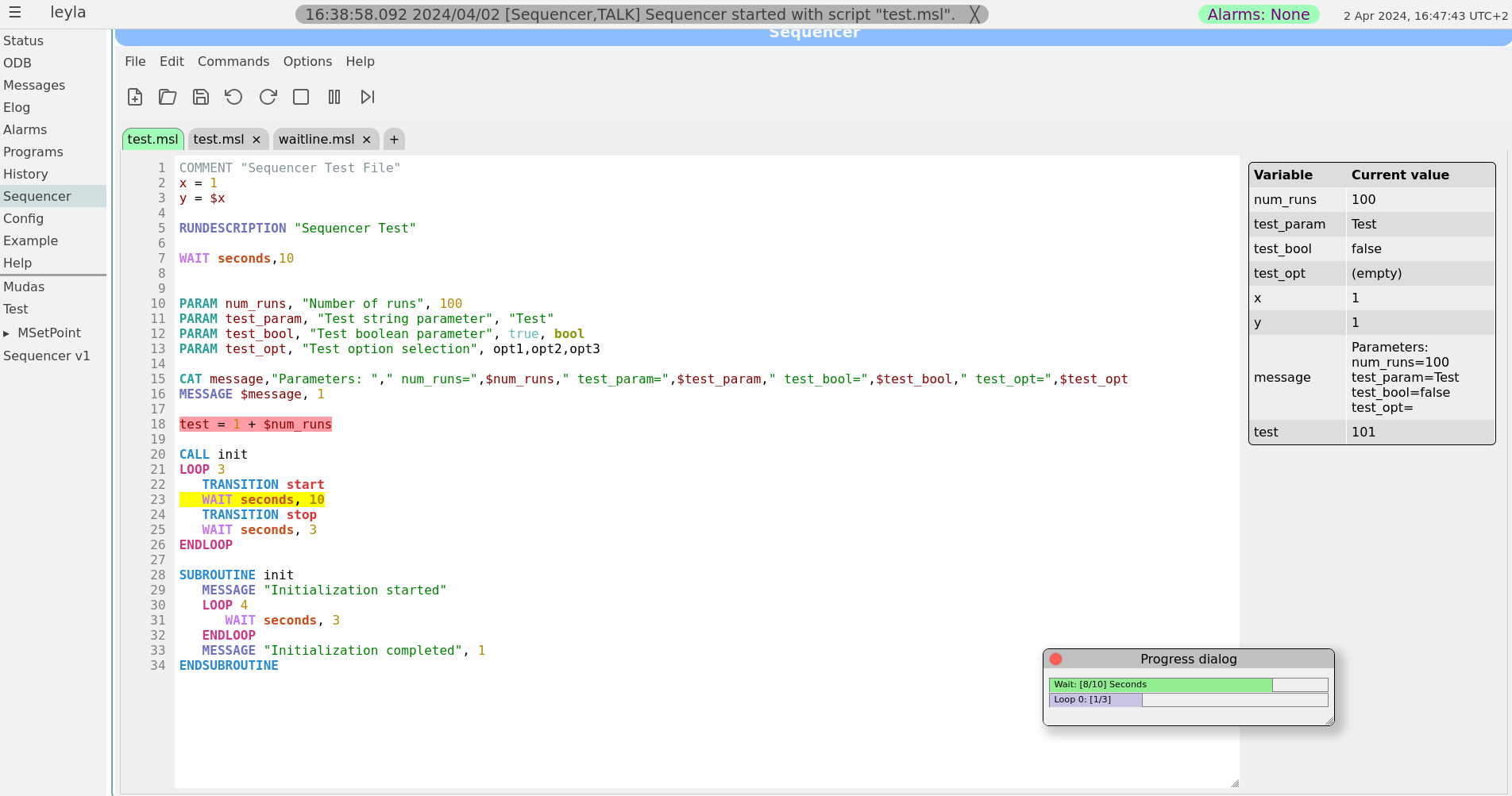
Stefan and I have been working on improving the sequencer editor to make it look and feel more like a standard editor. This sequencer v2 has been finally merged into the develop branch earlier today.
The sequencer page has now a main tab which is used as a "console" to show the loaded sequence and it's progress when running. All other tabs are used only for editing scripts. To edit a currently loaded sequence simply double click on the editing area of the main tab or load the file in a new tab. A couple of screen shots of the new editor are attached.
For those who would like to stay with the older sequencer version a bit longer, you may simply copy resources/sequencer_v1.html to resources/sequencer.html. However, this version is not being actively maintained and may become obsolete at some point. Please help us improve the new version instead by reporting bugs and feature requests on bitbucket or here.
Best regards,
Zaher
 |
 03 May 2024, Zaher Salman, Bug Report, Params not initialized when starting sequencer 03 May 2024, Zaher Salman, Bug Report, Params not initialized when starting sequencer
|
Could you please export and send me the /Sequencer ODB tree (or just /Sequencer/Param and /Sequencer/Variables) in both cases while the sequence is running.

thanks,
Zaher


> Good afternoon,
>
> After updating Midas to the latest develop commit
> (0f5436d901a1dfaf6da2b94e2d87f870e3611cf1) we found out a bug when starting
> sequencer. If we have a simple loop from start value to stop value and step
> size, just printing the value at each iteration, we see everything good (see
> first attachment). Then we included another script though, which contains
> several subroutines we defined for our detector, and we try to run the same
> script. Unfortunately after this the parameters seem uninitialized, and the
> value at each loop does not make sense (see second attachment). Also, sometimes
> when pressing run the set parameter window would pop-up, but sometimes not.
>
> The script is this one:
>
> >>>
> COMMENT Test script to check for a specific bug
>
> INCLUDE global_basic_functions
>
> #CALL setup_paths
> #CALL generate_DUT_params
>
> PARAM lv_start, "Start of LV", 1.8
> PARAM lv_stop, "Stop of LV", 2.1
> PARAM lv_step, "Step of LV", 0.02
>
> n_iterations = (($lv_stop - $lv_start)/$lv_step)
>
> MSG "Parameters:"
> MSG $lv_start
> MSG $lv_stop
> MSG $lv_step
> MSG $n_iterations
>
> MSG "Start of looping"
>
> LOOP n, $n_iterations
>    lv_now = $lv_start + $n * $lv_step
>    MSG $lv_now
>    WAIT SECONDS, 1
> ENDLOOP
> <<<
>
> and the only difference comes from commenting the line:
>
> >>>
> INCLUDE global_basic_functions
> <<<
>
> as global_basic_functions is defined as a LIBRARY and it includes 75 (!)
> subroutines...
>
> Is it possible that when loading a large script it messes up the loading of
> parameters?
>
> Thank you very much,
> Regards,
> Luigi. |
|
03 May 2024, Zaher Salman, Bug Report, Params not initialized when starting sequencer
|
I have been able to reproduce the problem only once. From what I see, it seems that the Variables ODB tree is not initialized properly from the Param tree. Below are the messages from the failed run compared to a successful one. As far as I could see, the javascript code does not change anything in the Variables ODB tree (only monitors it). The actual changes are done by the sequencer program, or am I wrong?

Failed run:
16:14:25.849 2024/05/03 [Sequencer,INFO]  + 3 *
16:14:24.722 2024/05/03 [Sequencer,INFO]  + 2 *
16:14:23.594 2024/05/03 [Sequencer,INFO]  + 1 *
16:14:23.592 2024/05/03 [Sequencer,INFO] Start of looping
16:14:23.591 2024/05/03 [Sequencer,INFO] (( - )/)
16:14:23.591 2024/05/03 [Sequencer,INFO]
16:14:23.590 2024/05/03 [Sequencer,INFO]
16:14:23.590 2024/05/03 [Sequencer,INFO]
16:14:23.589 2024/05/03 [Sequencer,INFO] Parameters:
16:14:23.562 2024/05/03 [Sequencer,TALK] Sequencer started with script "testpars.msl".


Successful run:
16:15:37.472 2024/05/03 [Sequencer,INFO] 1.820000
16:15:37.471 2024/05/03 [Sequencer,INFO] Start of looping
16:15:37.471 2024/05/03 [Sequencer,INFO] 15
16:15:37.470 2024/05/03 [Sequencer,INFO] 0.020000
16:15:37.470 2024/05/03 [Sequencer,INFO] 2.100000
16:15:37.469 2024/05/03 [Sequencer,INFO] 1.800000
16:15:37.469 2024/05/03 [Sequencer,INFO] Parameters:
16:15:37.450 2024/05/03 [Sequencer,TALK] Sequencer started with script "testpars.msl". |
|
03 May 2024, Zaher Salman, Bug Report, Params not initialized when starting sequencer
|
Thanks for the hint Stefan. I pushed a possible fix but I cannot test it since I cannot reproduce the issue.

> Ahh, that rings a bell:
>
> 1) JS opens start dialog box
> 2) User enters parameters and presses start
> 3) JS writes parameters
> 4) JS starts sequencer
> 5) Sequencer copies parameters to variables
>
> Now how do you handle 3) and 4). Just issue two mjsonrpc commands together? What then could happen is that 4) is executed before 3) and we get the garbage.
> You have to do 3) and WAIT for the return ("then" in the JS promise), and only then issue 4) from there.
>
> Stefan |
|
10 May 2024, Zaher Salman, Bug Report, Params not initialized when starting sequencer
|
I think that I finally managed to fix the problem. The default values of the parameters are now written first in one go, then the sequencer waits for confirmation that everything is completed before proceeding. Please test and let me know if there are still any issues.
Zaher |
|
21 May 2024, Zaher Salman, Bug Report, Params not initialized when starting sequencer
|
I traced the problem to a mjsonrpc_db_ls call where I read /Sequencer/Param... . It seems that this sometimes returns a status 312 (DB_NO_KEY) although I am sure all keys are there in the ODB.
I am still trying to solve this but I may need some help on the mjsonrpc.cxx code.
Zaher
| Thomas Senger wrote: | Hi all,
On develop, the issue seems to be still there and is not fixed.
The parameters are currently "never" correctly initialized, only as "empty". Tried several times.
Thomas |
|
|
21 May 2024, Zaher Salman, Bug Report, Params not initialized when starting sequencer
|
Hi Thomas,
I have a fix for the issue and I would be happy with testers if you are willing. Simply "git checkout newfeature_ZS" and give it a go. No need to recompile anything.
A change in /Sequencer/Param triggers a save of the values which is then used to produce the parameter dialog. This allows us to bypass the slow response in mjsonrpc calls just before the dialog.
Zaher
| Thomas Senger wrote: | Hi all,
On develop, the issue seems to be still there and is not fixed.
The parameters are currently "never" correctly initialized, only as "empty". Tried several times.
Thomas |
|
|
|
30 Aug 2024, Zaher Salman, Bug Report, Params not initialized when starting sequencer
|
The issue with the parameters should be fixed now. Please test and let me know if it still happens.
| Thomas Senger wrote: | Hi Zaher,
thanks for your help.
I just tried the bug fix, but it still seems not to work properly.
It seems that if the script is short, it will work, but if many SUBROUTINES are integrated, it does not work and the parameter are initialized empty.
Best regards,
Thomas |
|
|
04 Sep 2024, Zaher Salman, Bug Report, Params not initialized when starting sequencer
|
The problem here was that the JS code did not wait to msequencer to finish preparing the "/Sequencer/Param" in the ODB, so I had to change to code to wait for "/Sequencer/Command/Load new file" to be false before proceeding.
As for your problem I recommend that you handle in the following way:
mjsonrpc_db_paste(paths,values).then(function (rpc) {
if (rpc.result.status.every(status => status === 1) {
// do something
} else {
// failed to set values, do something else
}
}).catch(function (error) {
console.error(error);
});
alternatively (for a single ODB) you can use the checkODBValue() function in sequencer.js. This function monitors a specific ODB path until it reaches a specific value and then calls funcCall with args.
var NcheckValue = 0;
// What for ODB in path to have value
// If value is not reached, give up after 10s
function checkODBValue(path,value,funcCall,args) {
/* Arguments:
path - ODB path to monitor for value
value - the value to be reached and return success
funcCall - function name to call when value is reached
args - argument to pass to funcCall
*/
// Call the mjsonrpc_db_get_values function
mjsonrpc_db_get_values([path]).then(function(rpc) {
if (rpc.result.status[0] === 1 && rpc.result.data[0] !== value) {
console.log("Value not reached yet", NcheckValue);
NcheckValue++;
if (NcheckValue < 100) {
// Wait 0.1 second and then call checkODBValue again
// Time out after 10 s
setTimeout(() => {
checkODBValue(path,value,funcCall,args);
}, 100);
}
} else {
if (funcCall) funcCall(args);
console.log("Value reached, proceeding...");
// reset counter
NcheckValue = 0;
}
}).catch(function(error) {
console.error(error);
});
}
| Lukas Gerritzen wrote: | I think I have had similar issues in a custom page, where I wrote values to the ODB and they were not ready when I needed them. If you found a fix to such race conditions, could you maybe share how to properly treat this issue? If the solution reliably works, we could also consider including it in the documentation (midaswiki or example.html).
| Zaher Salman wrote: | The issue with the parameters should be fixed now. Please test and let me know if it still happens.
|
|
|
|
28 Feb 2025, Zaher Salman, Info, Syntax validation in sequencer
|
Hello,

I've implemented a very basic syntax validation in the sequencer GUI. Click the validation button to check the syntax in the current tab.

Please note that this does only a simple syntax validation, the correctness of the logic is still on you :) |
|
19 Mar 2025, Zaher Salman, Forum, LabView-Midas interface
|
Hello,

Does anyone have experience with writing a MIDAS frontends to communicate with a device that operates using LabView (e.g. superconducting magnets, cryostats etc.). Any information or experience regarding this would be highly appreciated.

thanks,
Zaher |
|
20 Mar 2025, Zaher Salman, Forum, LabView-Midas interface
|
Thanks Konstantin. Please send me the felabview code or let me know where I can find it.

Zaher

> > Does anyone have experience with writing a MIDAS frontends to communicate with a device that operates using LabView (e.g. superconducting magnets, cryostats etc.). Any information or experience regarding this would be highly appreciated.
>
> Yes, in the ALPHA anti-hydrogen experiment at CERN we have been doing this since 2006.
>
> Original system is very simple, labview side opens a TCP socket to the MIDAS felabview frontend
> and sends the numeric data as an ASCII string. The first four chars of the data is the name
> of the MIDAS data bank, second number is the data timestamp in seconds.
>
> LCRY 1234567 1.1 2.2 3.3
>
> A newer iteration is feGEM written by Joseph McKenna (member of this forum), it uses a more sophisticated
> labview component. Please contact him directly for more information.
>
> I can provide you with the source code for my original felabiew (pretty much unchanged from circa 2006).
>
> K.O. |
|
23 Mar 2025, Zaher Salman, Forum, LabView-Midas interface
|
Thanks Stefan, I would be very interested to see your code. At moment we have magnets and cryostats (3He and dilution) being delivered with Labview.


> > Hello,
> >
> > Does anyone have experience with writing a MIDAS frontends to communicate with a device that operates using LabView (e.g. superconducting magnets, cryostats etc.). Any information or experience regarding this would be highly appreciated.
> >
> > thanks,
> > Zaher
>
> We do have a superconducting magnet from Cryogenic, UK, which comes with a LabView control program on a Windows PC. I did the only reasonable with this: trash it in the waste basket. Do NOT use Labveiw for anything which should run more than 24h in a row. Too many bad experiences with LabView control programs
> for separators at PSI and other devices. Instead of the Windows PC, we use MSCB devices and RasperryPis to communicate with the power supply directly, which has been proven to be much more stable (running for years without crashes). I'm happy to share our code with you.
>
> Stefan |
|
07 Apr 2025, Zaher Salman, Suggestion, Sequencer ODBSET feature requests
|
| Lukas Gerritzen wrote: |
I also encountered a small annoyance in the current workflow of editing sequencer files in the browser:
- Load a file
- Double-click it to edit it, acknowledge the "To edit the sequence it must be opened in an editor tab" dialog
- A new tab opens
- Edit something, click "Start", acknowledge the "Save and start?" dialog (which pops up even if no changes are made)
- Run the script
- Double-click to make more changes -> another tab opens
After a while, many tabs with the same file are open. I understand this may be considered "user error", but perhaps the sequencer could avoid opening redundant tabs for the same file, or prompt before doing so?
Thanks for considering these suggestions! |
The original reason the restricting edits in the first tab is that it is used to reflect the state of the sequencer, i.e. the file that is currently loaded in the ODB.
Imagine two users are working in parallel on the same file, each preparing their own sequence. One finishes editing and starts the sequencer. How would the second person know that by now the file was changed and is running?
I am open to suggestions to minimize the number of clicks and/or other options to make the first tab editable while making it safe and visible to all other users. Maybe a lock mechanism in the ODB can help here.
Zaher |
|
13 Jul 2025, Zaher Salman, Info, PySequencer
|
As many of you already know Ben introduced the new PySequencer that allows running python scripts from MIDAS. In the last couple of month we have been working on integrating it into the MIDAS pages. We think that it is now ready for general testing.
To use the PySequencer:
1- Enable it from /Experiment/Menu
2- Refresh the pages to see a new PySequencer menu item
3- Click on it to start writing and executing your python script.
The look and feel are identical to the msequencer pages (both use the same JavaScript code).
Please report problems and bug here.
Known issues:
The first time you start the PySequencer program it may fail. To fix this copy:
$MIDASSYS/python/examples/pysequencer_script_basic.py
to
online/userfiles/sequencer/
and set /PySequencer/State/Filename to pysequencer_script_basic.py |
|
16 Nov 2025, Zaher Salman, Bug Report, broken scroll on midas web pages
|
Sorry about that. I could not figure out what was the reason for doing this. This was during the time I was working on the file_picker. I removed these lines and see no effect on the file_picker. I'll continue checking it affect anything else.

Zaher

> This problem was introduced by ZS in March 2023 with these commits:
>
> https://bitbucket.org/tmidas/midas/commits/25b13f875ff1f7e2f4e987273c81d6356dd2ff53
> https://bitbucket.org/tmidas/midas/commits/2a9e902e07156e12edecb5c2257e4dbd944f8377
>
> by setting
>
>  d.style.position = "fixed";
>
> which prevents the scrolling. I have no idea why this change was made, so it should be fixed by the original
> author.
>
> Stefan |
|
27 Nov 2025, Zaher Salman, Bug Report, Error(?) in custom page documentation
|
This commit breaks the sequencer pages...

> Indeed a bug. Fixed in commit
>
> https://bitbucket.org/tmidas/midas/commits/5c1133df073f493d74d1fc4c03fbcfe80a3edae4
>
> Stefan |
|
08 Dec 2025, Zaher Salman, Bug Report, Error(?) in custom page documentation
|
The sequencer pages were adjusted to the work with this bug fix.

> This commit breaks the sequencer pages...
>
> > Indeed a bug. Fixed in commit
> >
> > https://bitbucket.org/tmidas/midas/commits/5c1133df073f493d74d1fc4c03fbcfe80a3edae4
> >
> > Stefan |
|
29 May 2026, Zaher Salman, Info, ODBvalue timeout
|
Dear all, I implemented an optional timeout for the wait ODBvalue command. The way it works is similar to the standard wait command:

WAIT ODBvalue, /Equipment/HV/Variables/Measured[3], <, 100, timeout, 60

where the "timeout" keyword start a countdown in seconds. If the ODB condition is not met after 60 seconds the sequencer moves on to the next line.

To use this feature you must recompile the msequencer, delete /Sequencer/State and start the freshly compiled msequencer. This will add two ODBs to the /Sequencer/State: "Timeout value" (the countdown) and "Timeout limit" (the limit given in the wait command).

I suggest that we add something similar to the pysequencer using the same ODBs. |
|
29 May 2026, Zaher Salman, Info, ODBvalue timeout
|
>
> How can the MSL code figure out if the wait succeeded or timed out?
>
> Stefan

You get a message, something like:
17:52:12.293 2026/05/29 [Sequencer,INFO] WAIT ODBValue timeout after 10.0 seconds: /Equipment/Test/Variables/V < 1 not satisfied

Do we need something else?

Zaher |