| ID |
Date |
Author |
Topic |
Subject |
|
3265
|
07 Sep 2026 |
Stefan Ritt | Info | ODB Browser Update | A major update of the ODB Browser has been made in the last few days. Here are the new features:
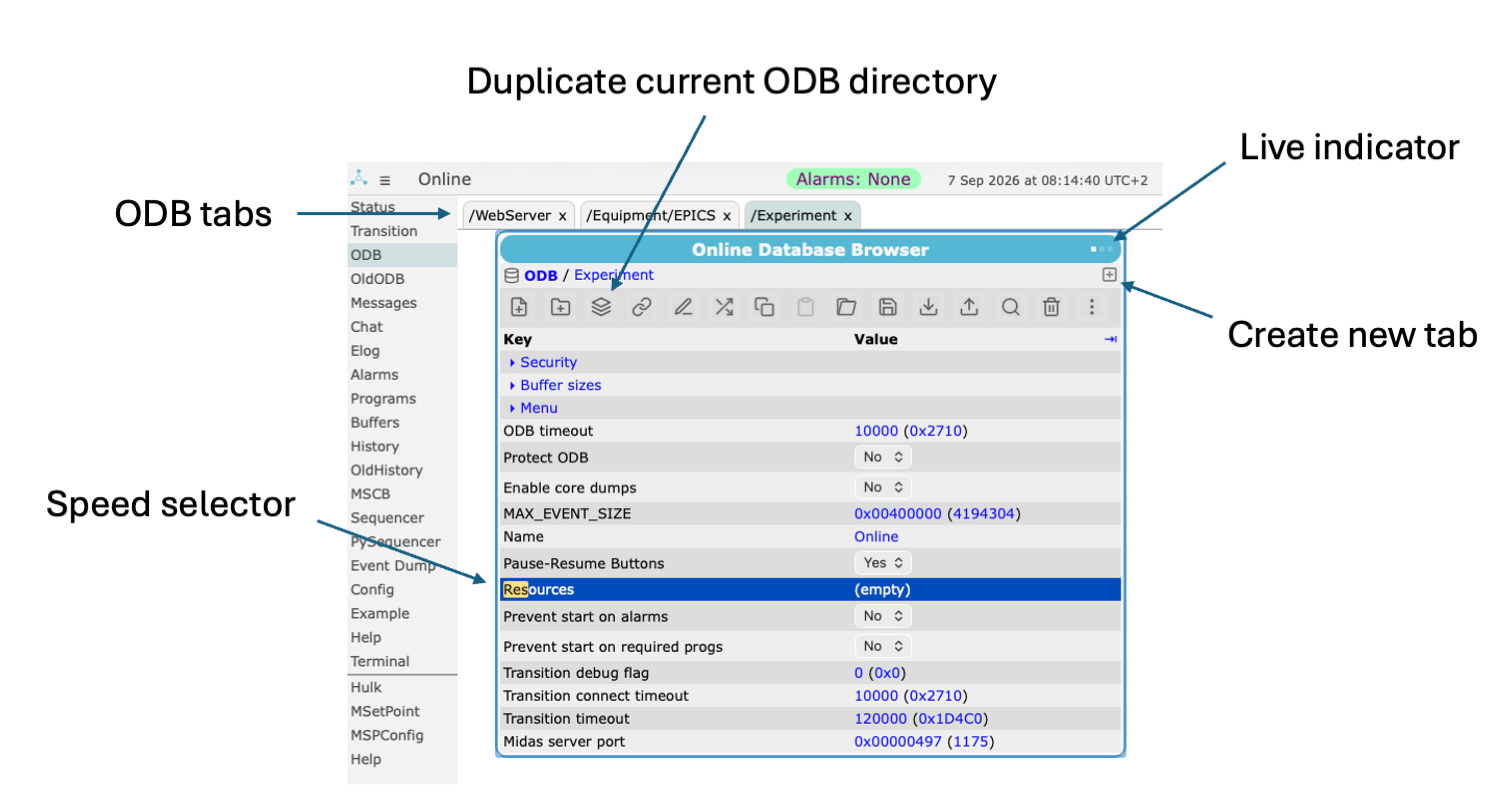
- The browser supports now multiple tabs. You can open as many tabs as you like, and they stay persistent even if you navigate away and come back to the ODB page (unless you close the browser). This allows easily swiching between different subdirectories in the ODB.
- A "Live Indicator" on the top right corner indicates live updates from the ODB and an error should the current ODB values not be updated any more.
- A new "Duplicate" button lets you duplicate the current subdirectory. This can become handy if you want to clone an alarm for example.
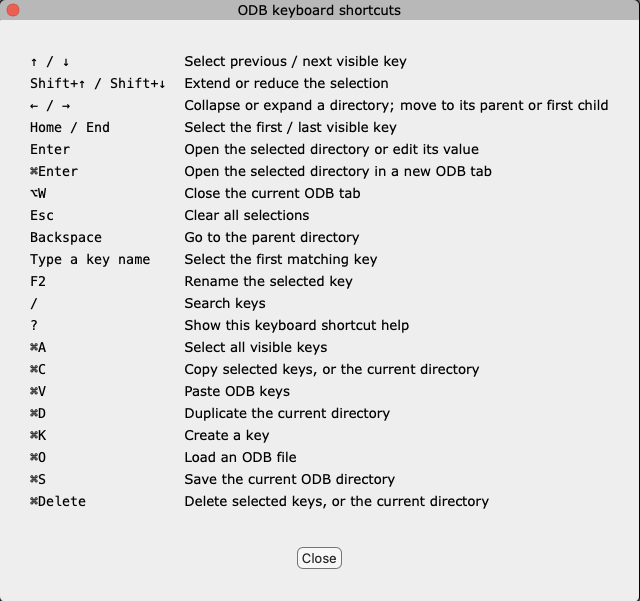
- A new Speed Selector lets you select ODB keys with the keyboard. Simply type the first few letters of a key and the selection will jump there. If it's a subdirectory and you press <enter>, you will traverse into that subdirectory. If it's a normal key, you will enter the edit mode for that key. The <backspace> key navigates up the hierarchy (parent direcotry). This way you can navigate and modify the ODB easily without using the mouse. Use cursor keys to navigate up and down. The full keyboard shortcuts help is available under ... -> Help... and attached below.
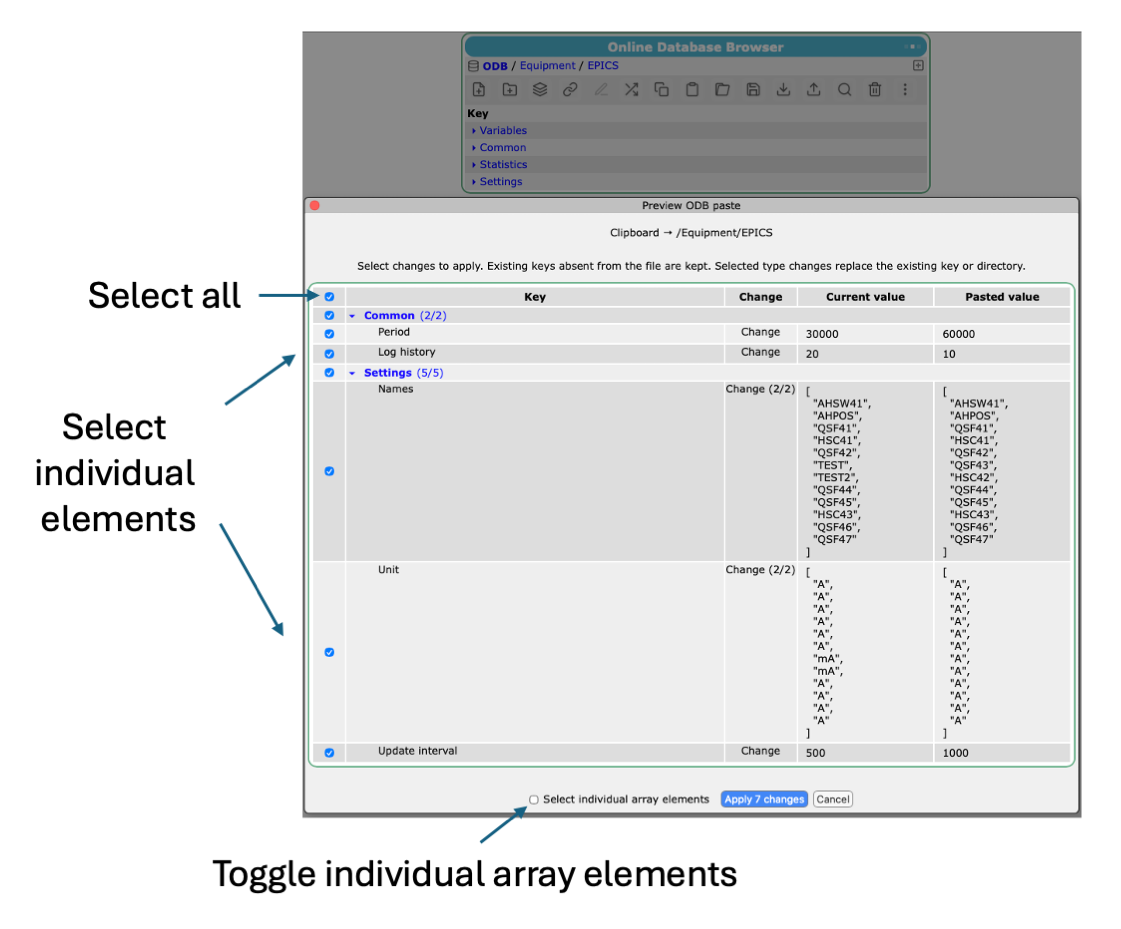
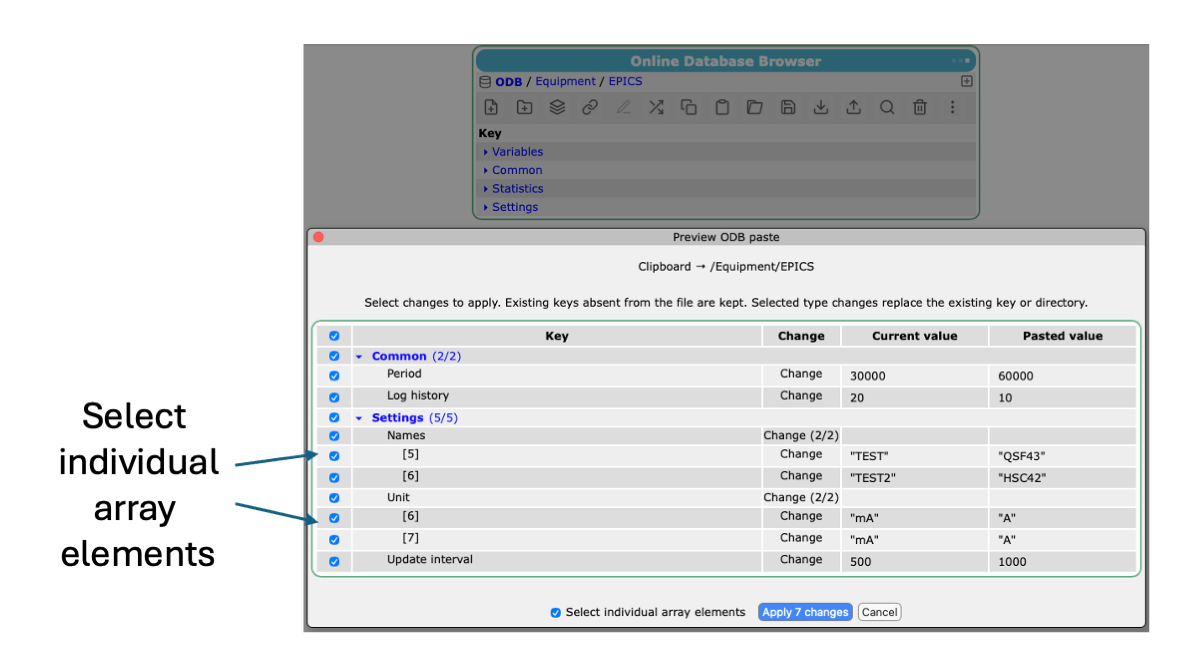
- Loading or importing or pasting keys into the ODB brings up the preview dialog. Here one can select which values actually go into the ODB. Subdirecories can be selected or unselected as a whole or via their individual keys. For arrays, one can select the whole array or individual array elements.
The attachments below show some of the new elements and how they can be used. Changes are committed to the develop branch of MIDAS.
Feedback welcome.
Stefan
|
| Attachment 1: ODBbrowser.png
|
|
| Attachment 2: ODBimport1.png
|
|
| Attachment 3: ODBimport2.png
|
|
| Attachment 4: Help.png
|
|
|
3264
|
01 Sep 2026 |
Derek Fujimoto | Info | Feature Release: Shift Scheduler | Motivation
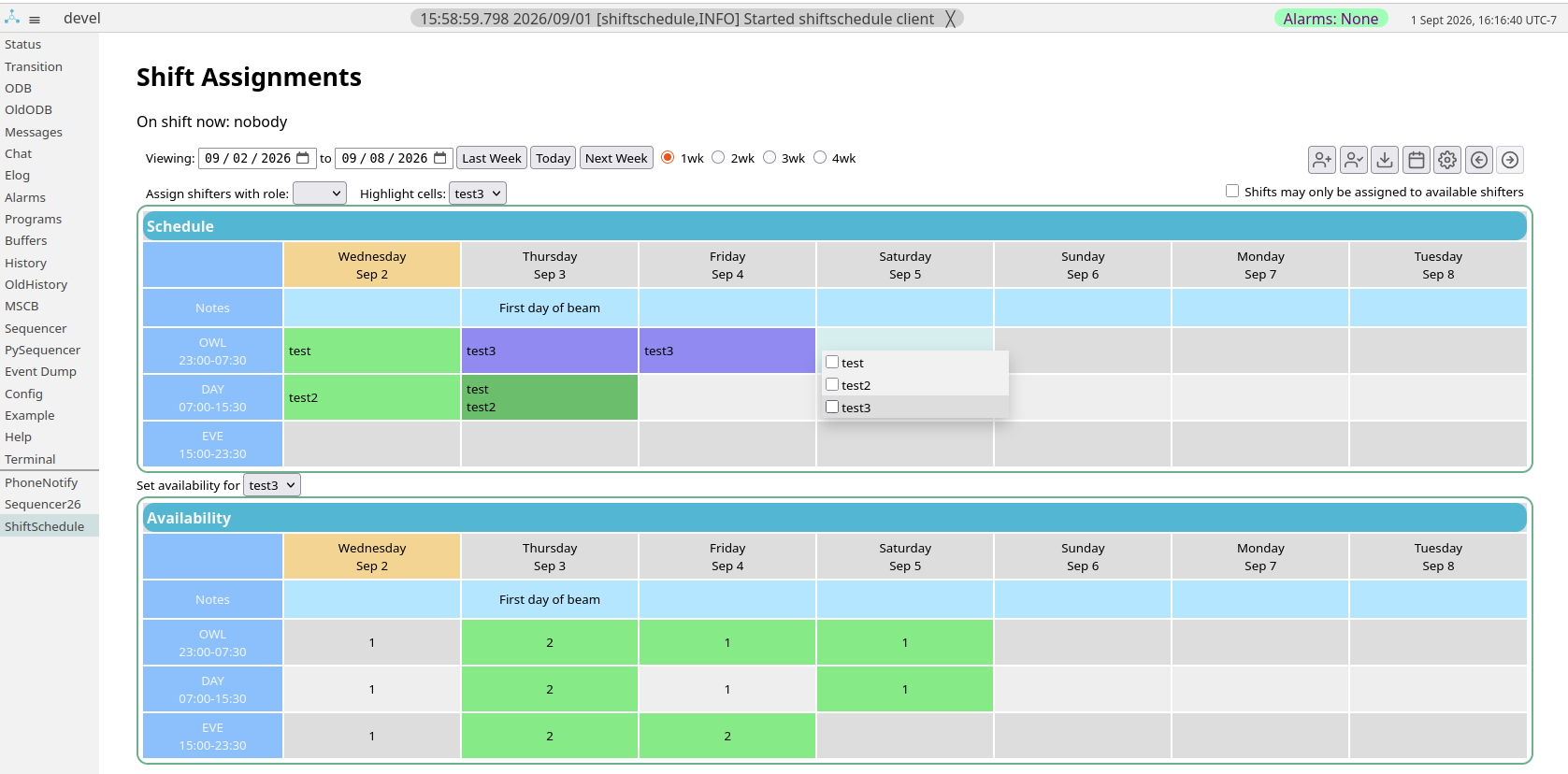
Most experimental groups, especially those that take beam, need to coordinate shifts. This addition addresses this need.
Main Features
- Main functionality
- Assign, or sign up for specific shifts (via drop-down menu)
- Indicate availability for complex scheduling tasks
- Force assignments only to available shifters
- Write notes for each day
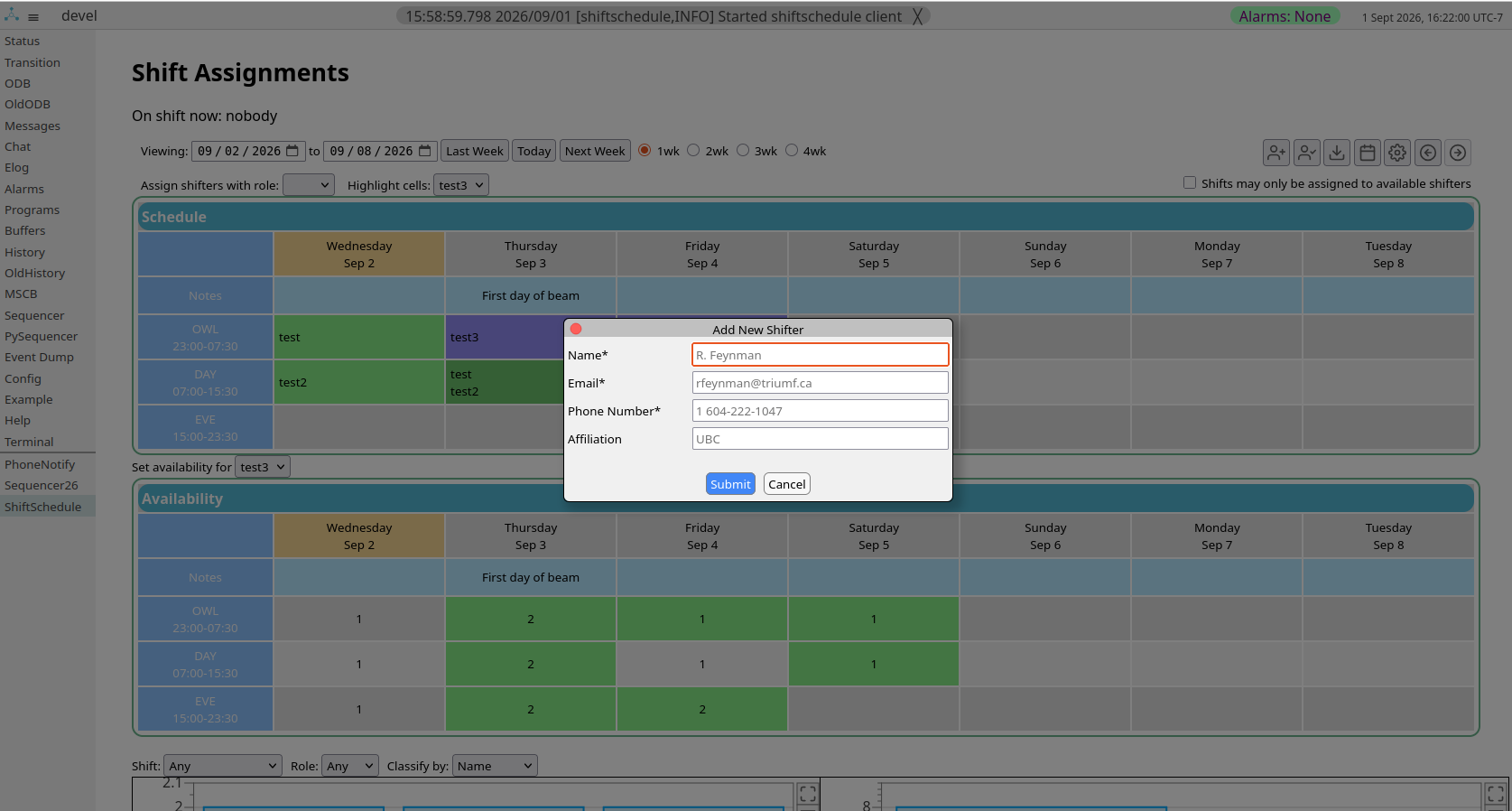
- Self-registration: input contact details and name
- Live synchronization between browsers
- Undo/redo buttons with the past 50 calendar states saved
- Highlight cells
- Auto-highlight shifts already assigned to a specific person when selecting
- Darken assignment cells with more shifters assigned
- Darken availability cells with fewer shifters available
- Customize
- Shift names, times, and number of shifts. Shifts can span multiple days (e.g. 23:00 - 06:00 the next day)
- Shifter roles (for different on-shift priorities)
- Minimum duration between assigned shifts (e.g. no repeat shifts within 7 hours)
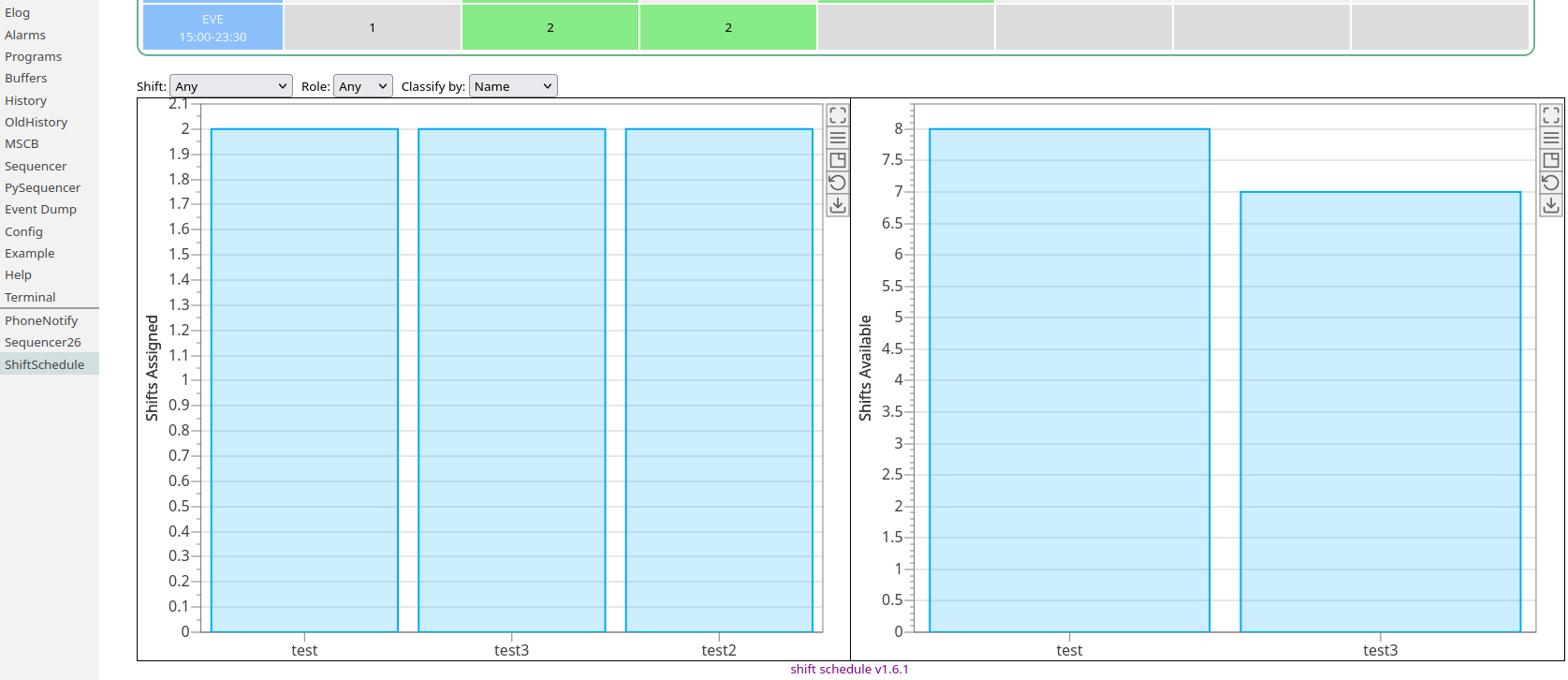
- Statisitcs
- Histograms showing who was assigned or was available for which shift (or any shift)
- Select by individual or institution
- Additionally select by role
- Download
- Shift data as csv
- Histograms as csv or png
- Calendar as ics
- Varying database backends (currently: csv and parquet)
- An ODB key indicating who is currently on shift
Getting Started
The shift scheduler requires python 3.9 or later
- Pull the most recent version of MIDAS
- Run the setup script
$MIDASSYS/shiftschedule/setup.bash
This will create the custom page, populate your ODB with the correct paths (/Shifts), and create links to the module
- If you've pulled MIDAS recently, the shiftscheduler was for a short time a submodule and has since been integrated into the main repo.
If there are errors during the pull, try first running git submodule deinit shiftschedule to decouple the submodule
Getting Help
For issues, feature requests, questions, and expressing general confusion, please first consult the README ($MIDASSYS/shiftschedule/README.md) then message me at dfujimoto[at]triumf[dot]ca.
|
| Attachment 1: Screenshot_from_2026-09-01_16-16-45.png
|
|
| Attachment 2: Screenshot_from_2026-09-01_16-19-42.png
|
|
| Attachment 3: Screenshot_from_2026-09-01_16-22-11.png
|
|
|
3263
|
17 Aug 2026 |
Konstantin Olchanski | Info | change in cm_shutdown and the Programs page | There was a bit of confusion on the MIDAS Programs page with programs that have
similar names. This confusion relates to the use of bUnique in cm_shutdown() and
cm_exist().
bUnique is now removed from cm_shutdown(), midas client name passed to this call
must match the client name exactly (as reported i.e. by odbedit "scl"). this is
same as calling cm_shutdown() with bUnique set to TRUE.
bUnique remains in cm_exist() for now. everybody calls it with bUnique set to
TRUE, except for the "program not running" alarm and for the "start program"
code on the MIDAS Programs page. After they are updated, bUnique will be removed
from cm_exist() as well. it will require the exact client name, same as calling
it with bUnique set to TRUE.
the related confusion on the MIDAS Programs page was caused by the code for
matching client entries in /System/Clients to program pages in /Programs. This
is needed to report Alarm conditions, "start" and "stop" buttons, etc.
the MIDAS Programs page is constructed from ODB /Programs, each program entry
gets one line on the web page. (non-running, non-required programs are omitted).
normally, there is only 1 copy of each MIDAS program running (i.e. mhttpd,
mlogger, mserver, vme frontend, etc) and the client name is the same as the
program name in /Programs, matching them is easy and they are always shown on
the correct line on the web page.
some programs can be started with many copies, i.e. odbedit, mdump, etc. the
client names will be "program name" plus a number, i.e. odbedit, odbedit1,
odbedit2, etc. these programs are grouped together on one line of the web page.
grouping is done by matching client names against entries in ODB /Programs and
this test sometimes misfires.
for example if there is an entry for "/Programs/odb", odbedit, odbedit1 & co,
will show up on two lines of the web page, the normal "odbedit" line and the
unexpected "odb" line. this is because name matching used truncation instead of
a check for "program name plus a number".
similar malfunction happens if experiment has 2 frontends named "frontend" and
"frontend_for_vme_readout". there will be 2 lines on the web page, one for each
frontend, and "frontend_for_vme_readout" will show up on both lines (name check
is done by truncating the name to "frontend".
this is now fixed by using the correct check for client name: "program name plus
a number".
similar thing happens for indexed frontends ("frontend -i 1"), depending on how
frontend equipments are setup, the client name will be "program name plus
frontend index". the MIDAS Programs page may or may not match all such indexed
frontends as one group and provide a common "stop" button for all of them. I am
not sure if this accidental feature survives the current update.
the last malfunction happens with the Programs page "stop" button, it called
cm_shutdown() with bUnique set to FALSE, and in the above example, shut down
both programs, "frontend" and "frontend_for_vme_readout". Unexpected and
undesired.
removal of bUnique from cm_shutdown() fixed this. to shut down multiple clients,
the Programs page now makes a separate call for each one of them.
K.O. |
|
3262
|
14 Aug 2026 |
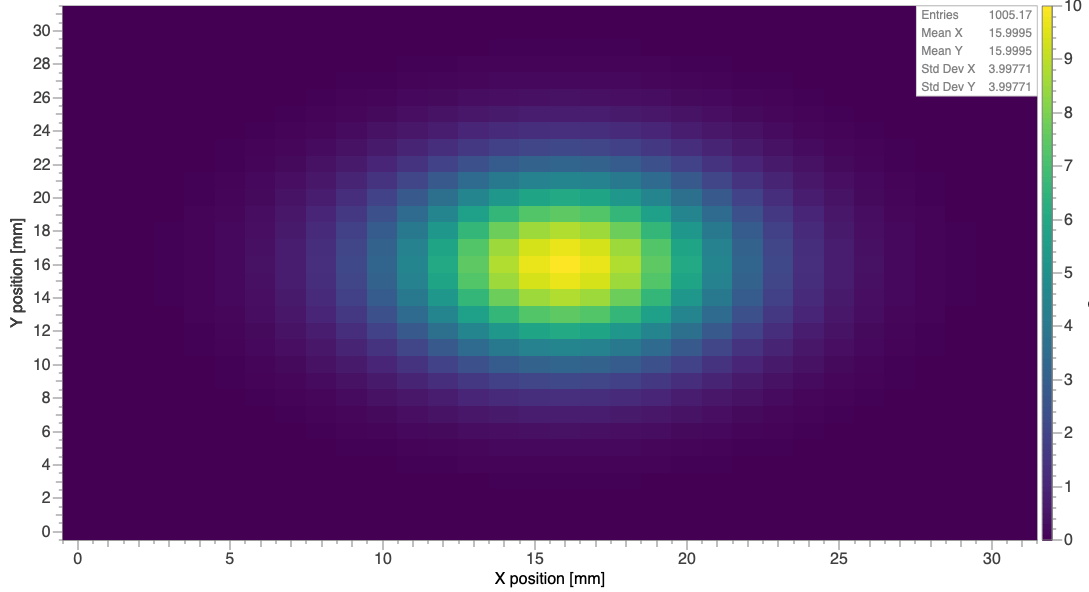
Stefan Ritt | Info | mplot.js: viridis colour scheme for 2D plots | Here is an example how a 2D plot looks like.
Stefan |
| Attachment 1: 20260814-172355.png
|
|
|
3261
|
14 Aug 2026 |
Julian Wollrath | Info | mplot.js: viridis colour scheme for 2D plots | Dear all,
please do not be surprised if your 2D plots start looking different: The default
colour scheme changed to the (now kind of standard one) 'viridis' from
matplotlib to have perceptually uniform sequential colour scheme. So if you
print your plots in black and white or have problems colour vision deficiency
the plots should not have artificial artifacts anymore.
Cheers,
Julian |
|
3260
|
06 Aug 2026 |
Konstantin Olchanski | Suggestion | Multithreaded PySequencer | > > > I was wondering if one can use multiple pysequencers at the same time and if not
> > > if this feature is planned in the future? Our experiment (mu3e) has one frontend
> > > per detector and each sequencer would only access a subset of ODB entries.
> >
> > I believe sequencer design supports this, same as mlogger supports multiple output
> > files and mhttpd supports multiple listener ports.
> >
> > But how to do this with pysequencer, I am not sure. Simplest is to wait a few more
> > weeks for Ben to return from vacation.
> >
> > K.O.
>
> I looked into this, and it has been possible for at least a year. Just start the sequencer with `-c MyUniqueName` and
> then all of the state etc. can be controlled from the ODB location `/PySequencerMyUniqueName/`.
> And obviously use different names for each instance.
that's what I remember, too. but was not sure. K.O. |
|
3259
|
03 Aug 2026 |
Mark Grimes | Suggestion | Multithreaded PySequencer | > > I was wondering if one can use multiple pysequencers at the same time and if not
> > if this feature is planned in the future? Our experiment (mu3e) has one frontend
> > per detector and each sequencer would only access a subset of ODB entries.
>
> I believe sequencer design supports this, same as mlogger supports multiple output
> files and mhttpd supports multiple listener ports.
>
> But how to do this with pysequencer, I am not sure. Simplest is to wait a few more
> weeks for Ben to return from vacation.
>
> K.O.
I looked into this, and it has been possible for at least a year. Just start the sequencer with `-c MyUniqueName` and
then all of the state etc. can be controlled from the ODB location `/PySequencerMyUniqueName/`.
And obviously use different names for each instance. |
|
3258
|
23 Jul 2026 |
Konstantin Olchanski | Bug Fix | repair of corrupted ODB free lists | > > I finished debugging the code I wrote to check and repair the ODB key area and data area free lists, this
> > should fix the famous "ODB is full" error.
>
> commit 67c2160891c2688a956189752e00ae1acb7b531c
>
> develop branch before this merge tagged midas-2026-07-a
>
> K.O.
first bug is in, incorrect calculation of data free space of empty ODB, reported by "make test".
commit bae880f1b793496a6f341054a8618dbdb9cc3b2c
K.O. |
|
3257
|
23 Jul 2026 |
Konstantin Olchanski | Info | ODB links to array elements explained | this is a draft message, it will be updated with additional information. K.O.
Back in 2007, Stefan implemented the very useful feature, ODB links to array elements,
https://daq00.triumf.ca/elog-midas/Midas/418
This is handy for "Edit On Start", for history links, for feepics and other places.
If you have an array in ODB:
ia5 INT32 5 4 12m 0 RWD
[0] 10
[1] 11
[2] 12
[3] 13
[4] 14
a normal ODB link works as a UNIX filesystem symlink, whereas an ODB link that includes an array index refers to just one element of the link target array:
symlink_to_ia5_2 -> /test_odb/ia5[2]
INT32 1 4 12m 0 RWD 12
Because there was some confusion over how it works and how it is actually implements,
some ODB functions do not implement this feature consistently.
Here, I explain how it actually works:
0) expected syntax is: "link name" -> "/link/target/array[12345]":
- "/link/target/array" is the absolute ODB path to the link target (must start with "/", relative links are not permitted)
- array index "12345" should be an integer (converted using atoi())
- there should be nothing after final "]"
- there should be nothing between the "[" and the array index decimal numeric value
1) db_get_data():
- before calling db_get_data() we must call db_find_key()
- db_find_key() will resolve ODB links and return the final destination (or an error if dangling link or circular link or too many nested links)
- db_get_data() will return the data from this ODB key. this is the path for normal symlinks.
- if db_find_key() encounters an ODB link to an array element (target path contains "["), it returns this key (of type TID_LINK).
- db_get_data() checks the key type (normally it would be TID_INT, TID_STRING, etc). if it is TID_LINK, it means we have a link to an array index (as identified by db_find_key())
- in this case, ODB link is resolved using db_find_key(), array index is extracted from the link
- and db_get_data() returns data for the corresponding array element
If db_get_data() is called using an hKey returned by db_find_link() (instead of db_find_key())
and it happens to be an ODB link (TID_LINK), we have an inconsistent result:
- if it's a normal link, db_get_data() will return a type mismatch error
- db_get_data(TID_LINK) will return the link target string (NUL-terminated)
- if it's a link to an array element, db_get_data() will resolve it and return data from the link target array element.
- db_get_data(TID_LINK) will return a type mismatch error because it will resolve the link, then fail the type check as link target cannot be TID_LINK
2) db_get_value(), db_get_data_index()
- normal links work, resolved by db_find_key()
- links to array elements not implemented, will return a type mismatch error (i.e. TID_LINK vs user requested TID_STRING, TID_INT, etc)
3) mhttpd obsolete "jcopy"
- broken, returns malformed json (old code), returns the complete array, not just the linked array element (new code)
4) odbedit save odb.json
- broken, output file odb.json is empty (new code)
K.O. |
|
3256
|
22 Jul 2026 |
Konstantin Olchanski | Forum | midas forum elog crashed, restarted | > crashed again, restarted. gcc address sanitizer disables core dumps by default, to enable, do this:
> export ASAN_OPTIONS=abort_on_error=1:disable_coredump=0:unmap_shadow_on_exit=1
midas forum elogd would not stay up, bot traffic crashes it within hours.
as temporary mitigation:
- elogd is now running from an autorestart script (15 second delay between restart attempts)
- address sanitizer and core dumps enabled to collect and fix crashes as they are identified (I fixed 4-5 crashers, so far)
K.O. |
|
3255
|
21 Jul 2026 |
Konstantin Olchanski | Forum | midas forum elog crashed, restarted | crashed again, restarted. gcc address sanitizer disables core dumps by default, to enable, do this:
export ASAN_OPTIONS=abort_on_error=1:disable_coredump=0:unmap_shadow_on_exit=1
K.O. |
|
3254
|
20 Jul 2026 |
Konstantin Olchanski | Forum | midas forum elog crashed, restarted | Also a crash soon after startup:
https://elog.psi.ch/elogs/Forum/69934
K.O. |
|
3253
|
20 Jul 2026 |
Konstantin Olchanski | Info | c++ exceptions, follow up | > Looks like the code formatting got messed up by the elog... here it is in the attachment instead.
unfortunately, your code does nothing because you do not call "i2c_set_bit(10, 1);".
if you add it in the destructor:
~i2c_temp_bit() {
std::cout << "Bit " << bit << " set to " << oldval << "\n";
i2c_set_bit(10, 0);
}
you will burn the kitchen down if "std::cout" and "<<" throw an exception (as we know they do). (I
always use printf(), instead of c++ exceptions, it can throw the SIGPIPE signal, so main() must
always have signal(SIGPIPE, SIG_IGN);).
also if usleep() throws an exception, the water does not get boiled to 100 degC, important for food
safety.
also there is a logic error, if you are at a high enough elevation (Mount Everest), water starts
boiling well below 100 degC, so the loop never ends, probably until all water is gone and the empty
kettle is heated to 100 degC, at this point, both kettle and heater are probably damaged. the
infinite loop should have some kind of safety limit.
K.O. |
|
3252
|
20 Jul 2026 |
Konstantin Olchanski | Forum | midas forum elog crashed, restarted | > I updated the midas forum elog to the latest version from git: 083448f7
>
> Also investigated elogd failure to start on reboot,
> it turned out to be a crasher bug, see
> https://elog.psi.ch/elogs/Forum/69919
>
Also investigating elogd crash last Friday, looks like an elog bug, see
https://elog.psi.ch/elogs/Forum/69933
K.O. |
|
3251
|
20 Jul 2026 |
Konstantin Olchanski | Bug Fix | repair of corrupted ODB free lists | > I finished debugging the code I wrote to check and repair the ODB key area and data area free lists, this
> should fix the famous "ODB is full" error.
commit 67c2160891c2688a956189752e00ae1acb7b531c
develop branch before this merge tagged midas-2026-07-a
K.O. |
|
3250
|
17 Jul 2026 |
Konstantin Olchanski | Bug Fix | repair of corrupted ODB free lists | I finished debugging the code I wrote to check and repair the ODB key area and data area free lists, this
should fix the famous "ODB is full" error.
I have one computer that runs MIDAS that seems to have a hardware problem and crashes about every 1-2
weeks. After each crash MIDAS ODB is always corrupted and I started writing the (long desired) free list
checker as a way to try to understand the nature of the corruption. (more on that at the end)
Once I had a reliable checker and I remembered how the ODB free lists work,
writing the repair code was easy.
I tested it on my collection of corrupted .ODB.SHM files, and in each case,
after repair, I can start odbedit, look at ODB data and save it to JSON file.
Of course every corruption loses some data, for full recovery, ODB must be reloaded from a backup. But at
least one does not have to kill ODB and recreate it from scratch anymore (in theory).
One type of corruption I cannot fix: if two ODB entries seem to overlap, in the key area (I cannot repair),
or in the data area (I delete one of the overlapping entries).
Because repair of the ODB free list can be dangerous, I disabled it by default.
To run odbedit in "repair" mode, do this (we could also make it an odbedit option)
MIDAS_ODB_REPAIR_FREE_LIST=1 ./bin/odbedit
While looking at corrupted ODB files, I fixed two more buglets:
1) if ODB entry has num_values set to 0 (unusual, but not an error), save odb.json produces invalid JSON
2) if /Experiment/Buffer sizes/SYSMSG has a bogus value (I tend to see "0"), odbedit would not start and I
cannot edit ODB to fix the problem.
I have this code on a private branch and I will merge and push it in the next few days.
P.S.
Cause of corruption is still not clear, best guess is that there is a hardware memory failure, but this
explanation requires a difficult sequence: memory goes bad, ODB is corrupted, linux and ZFS still running,
MIDAS writes corrupted ODB to file .ODB.SHM, linux and ZFS still running, more memory corruption, linux
dies, reboots/resets.
Alternatively, memory corruption affects the ZFS cache, ODB in RAM is okey, but .ODB.SHM in ZFS cache is
corrupted, but still gets written to disk, then more memory corruption kills linux. The ZFS volume itself
does not show any corruption, "zfs scrub" comes back clean.
Garden variety "buggy midas frontend corrupted ODB" is not good enough to explain computer reset/reboot.
K.O. |
|
3249
|
16 Jul 2026 |
Yiwen Yang | Suggestion | Multithreaded deferred transitions | > > (main clock) process to make sure the logger has finished logging all events before continuing to stop readout
>
> of other frontends. There is also a timeout, in case sometimes an event goes missing, to proceed with the run
> >
stop without getting stuck waiting for the logger.
>
> yes, that's right, if trigger control and run control are in
the same frontend, you run into this trouble:
>
> user pushes run stop button
> you get the run stop callback
> you
stop the trigger
> but have to wait for all the data to flush down the pipes all the way to mlogger
> but cannot
wait, must return from the callback otherwise run transition is stuck
>
> if trigger control and run control are in
different frontends, things are simpler:
>
> user pushes run stop botton
> trigger control frontend disables the
trigger, returns without waiting for anything
> data frontend (i.e. FGD, TPC), flush all the hardware FIFOs, etc to
MIDAS SYSTEM buffer (trigger is already
> disabled, there is no new data)
> mlogger flushes SYSTEM buffer to disk
>
run control frontend reports successful run stop to the run database (and whatever else).
>
What do you mean by
the run control frontend in this case? Usually the run stops are issued from the mhttpd interface, which I thought
meant that mhttpd is in charge of run transitions.
From what I understand, deferred transition means that whichever
frontend registered the deferred transition will take over the run transition. So, if there's no deferred transition
in the first place then this should not be a problem? |
|
3248
|
16 Jul 2026 |
Yiwen Yang | Info | c++ exceptions, follow up | Looks like the code formatting got messed up by the elog... here it is in the attachment instead. |
| Attachment 1: main.cpp
|
#include <iostream>
#include <unistd.h>

void i2c_set_bit(int bit, int val) {
	std::cout << "Bit " << bit << " set to " << val << "\n";
}

class i2c_temp_bit {
	int bit; /* which bit */
	int newval; /* value to set bit to */
	int oldval; /* value to reset bit to */
public:
	i2c_temp_bit(int b, int nv, int ov)
		: bit{b}, newval{nv}, oldval{ov}
	{
		std::cout << "Bit " << bit << " set to " << newval << "\n";
	}
	~i2c_temp_bit()
	{
		std::cout << "Bit " << bit << " set to " << oldval << "\n";
	}
	i2c_temp_bit(const i2c_temp_bit&) = delete;
	i2c_temp_bit(i2c_temp_bit&&) = delete;
	i2c_temp_bit& operator=(const i2c_temp_bit&) = delete;
	i2c_temp_bit& operator=(i2c_temp_bit&&) = delete;
};

int check_kettle_temp() {
	static int callnum = 0;
	if (++callnum > 5) {
		return 100;
	}
#ifdef BADNUM
	else if (callnum == 4) { /* Don't like this number */
		throw callnum;
	}
#endif
	else {
		return 25;
	}
}

void foo() {
	std::cout << "Waiting for kettle to boil" << std::endl;
	do { /* Check every 100 ms */
		usleep(100000);
	} while (check_kettle_temp() < 100);
	std::cout << "Water is boiled!" << std::endl;
}

void boil_kettle()
{
#ifdef RAII
	i2c_temp_bit temp(10, 1, 0);
	foo();
#else
	i2c_set_bit(10, 1); // bit 10 is stove heater control, turn it on
	foo(); // wait for kettle to start boiling
	i2c_set_bit(10, 0); // turn heater off
#endif
}

int main()
{
	try {
		boil_kettle();
	} catch (...) {
		std::cerr << "Abnormal termination\n";
	}
}
|
|
3247
|
16 Jul 2026 |
Yiwen Yang | Info | c++ exceptions, follow up | Thanks for sharing the videos, Konstantin.
> Unpredictable code can be dangerous:
>
> void boil_kettle()
>
{
> i2c_set_bit(10, 1); // bit 10 is stove heater control, turn it on
> foo(); // wait for kettle to
start boiling
> i2c_set_bit(10, 0); // turn heater off
> }
>
> If foo() starts throwing exceptions, I
will likely have a fire in my kitchen!
>
Indeed, that would certainly be problematic. However, there is a
way to get around this while not having to wrap everything in try ... catch ... blocks with more C++
machinery using the catch-all handler and RAII.
To quickly expand upon your example:
=== main.cpp ===
#include <iostream>
#include <unistd.h>
void i2c_set_bit(int bit, int val) {
std::cout << "Bit " << bit <<
" set to " << val << "\n";
}
class i2c_temp_bit {
int bit; /* which bit */
int newval; /* value to set bit
to */
int oldval; /* value to reset bit to */
public:
i2c_temp_bit(int b, int nv, int ov)
: bit{b},
newval{nv}, oldval{ov}
{
std::cout << "Bit " << bit << " set to " << newval << "\n";
}
~i2c_temp_bit()
{
std::cout << "Bit " << bit << " set to " << oldval << "\n";
}
i2c_temp_bit(const i2c_temp_bit&) =
delete;
i2c_temp_bit(i2c_temp_bit&&) = delete;
i2c_temp_bit& operator=(const i2c_temp_bit&) = delete;
i2c_temp_bit& operator=(i2c_temp_bit&&) = delete;
};
int check_kettle_temp() {
static int callnum = 0;
if
(++callnum > 5) {
return 100;
}
#ifdef BADNUM
else if (callnum == 4) { /* Don't like this number */
throw callnum;
}
#endif
else {
return 25;
}
}
void foo() {
std::cout << "Waiting for kettle to boil"
<< std::endl;
do { /* Check every 100 ms */
usleep(100000);
} while (check_kettle_temp() < 100);
std::cout << "Water is boiled!" << std::endl;
}
void boil_kettle()
{
#ifdef RAII
i2c_temp_bit temp(10, 1,
0);
foo();
#else
i2c_set_bit(10, 1); // bit 10 is stove heater control, turn it on
foo(); // wait for
kettle to start boiling
i2c_set_bit(10, 0); // turn heater off
#endif
}
int main()
{
try {
boil_kettle();
} catch (...) {
std::cerr << "Abnormal termination\n";
}
}
=== main.cpp ===
When we run
this:
$ g++ -o main main.cpp && ./main
Bit 10 set to 1
Waiting for kettle to boil
Water is boiled!
Bit 10
set to 0
This is as expected, of course.
But indeed as you say, when foo() can throw an exception, we get a
problem:
$ g++ -DBADNUM -o main main.cpp && ./main
Bit 10 set to 1
Waiting for kettle to boil
Abnormal
termination
The exception is caught by the catch-all handler, but because boil_kettle() never finishes
execution, bit 10 never gets reset to 0 and that's a big problem.
With RAII however, we get this instead:
$
g++ -DBADNUM -DRAII -o main main.cpp && ./main
Bit 10 set to 1
Waiting for kettle to boil
Bit 10 set to 0
Abnormal termination
Because the i2c_temp_bit object is destroyed upon unwinding the boil_kettle() function,
it calls the destructor which resets the bit.
For closure, it does behave identically to the non-RAII
implementation when there are no exceptions:
$ g++ -DRAII -o main main.cpp && ./main
Bit 10 set to 1
Waiting
for kettle to boil
Water is boiled!
Bit 10 set to 0
Personally, I don't like this as it adds way too much
complexity to the code in order to avoid C++ foot-guns (see how the copy and move constructors etc. need to
be deleted, or else requires a bit of thinking to implement properly).
But, it is an alternative that exists
to safely handle these situations. |
|
3246
|
16 Jul 2026 |
Konstantin Olchanski | Info | c++ exceptions, follow up | > If you did not want to use exceptions before watching this talk, you will after!
Not me. One issue, exceptions are unpredictable, for example, does this code always print "hello, world"?
#include <stdio.h>
#include "foo.h"
int main(...)
{
foo();
printf("hello, world\n");
return 0;
}
I can wrap foo() (and each and every function call) in try/catch.
I can check if today's version of foo.h declares foo() as "nothrow" (but what if tomorrow's foo() start
throwing?)
Unpredictable code can be dangerous:
void boil_kettle()
{
i2c_set_bit(10, 1); // bit 10 is stove heater control, turn it on
foo(); // wait for kettle to start boiling
i2c_set_bit(10, 0); // turn heater off
}
If foo() starts throwing exceptions, I will likely have a fire in my kitchen!
K.O. |
|