![[Contents]](icons/contents.gif)
![[Index]](icons/index.gif)
![[Top]](icons/top.gif)
![[Prev]](icons/prev.gif)
![[Next]](icons/next.gif)
Diskettes formatted using the dosFs file system are compatible with MS-DOS diskettes up to and including release 6.2. Hard disks initialized by the two file systems have slightly different formats. However, the data itself is compatible and dosFs can be configured to use a disk formatted by MS-DOS.
The dosFs file system offers considerable flexibility appropriate to the varying demands of real-time applications. Major features include:
The MS-DOS/dosFs file system provides the means for organizing disk data in a flexible manner. It maintains a hierarchical set of named directories, each containing files or other directories. Files can be appended; as they expand, new disk space is allocated automatically. The disk space allocated to a file is not necessarily contiguous, which results in a minimum of wasted space. However, to enhance its real-time performance, the dosFs file system allows contiguous space to be pre-allocated to files individually, thereby minimizing seek operations and providing more deterministic behavior.
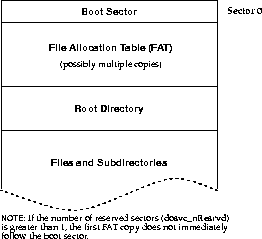
The general organization of an MS-DOS/dosFs file system is shown in Figure 4-1 and the various elements are discussed in the following sections.
The disk space allocated to a file in an MS-DOS/dosFs file system consists of one or more disk clusters. A cluster is a set of contiguous disk sectors.1 For floppy disks, two sectors generally make up a cluster; for fixed disks, there can be more sectors per cluster. A cluster is the smallest amount of disk space the file system can allocate at a time. A large number of sectors per cluster allows a larger disk to be described in a fixed-size File Allocation Table (FAT; see File Allocation Table), but can result in wasted disk space.
The first sector on an MS-DOS/dosFs hard disk or diskette is called the boot sector. This sector contains a variety of configuration data. Some of the data fields describe the physical properties of the disk (such as the total number of sectors), and other fields describe file system variables (such as the size of the root directory).
The boot sector information is written to a disk when it is initialized. The dosFs file system can use diskettes that are initialized on another system (for example, using the FORMAT utility on an MS-DOS PC), or VxWorks can initialize the diskette, using the FIODISKINIT function of the ioctl( ) call.
As the MS-DOS standard has evolved, various fields have been added to the boot sector definition. Disks initialized under VxWorks use the boot sector fields defined by MS-DOS version 5.0.
When MS-DOS initializes a hard disk, it writes a partition table in addition to the boot sector. VxWorks does not create such a table. Therefore hard disks initialized by the two systems are not identical. VxWorks can read files from a disk formatted by MS-DOS if the block offset parameter in the device creation routine points beyond the partition table to the first byte of the data area.
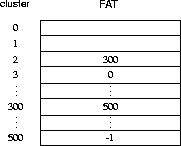
Each MS-DOS/dosFs volume contains a File Allocation Table (FAT). The FAT contains an entry for each cluster on the disk that can be allocated to a file or directory. When a cluster is unused (available for allocation), its entry is zero. If a cluster is allocated to a file, its entry is the cluster number of the next portion of the file. If a cluster is the last in a file, its entry is -1. Thus, the representation of a file (or directory) consists of a linked list of FAT entries. In the example shown in Figure 4-2, one file consists of clusters 2, 300, and 500. Cluster 3 is unused.

|
NOTE: dosFs does not map bad disk sectors to the FAT.
|
||||||||||||||||||
The FAT uses either 12 or 16 bits per entry. Disk volumes that contain up to 4085 clusters use 12-bit entries; disks with more than 4085 clusters use 16-bit entries. The entries (particularly 12-bit entries) are encoded in a specific manner, done originally to take advantage of the Intel 8088 architecture. However, all FAT handling is done by the dosFs file system; thus the encoding and decoding is of no concern to VxWorks applications.
A volume typically contains multiple copies of the FAT. This redundancy allows data recovery in the event of a media error in the first FAT copy.

|
CAUTION: The dosFs file system maintains multiple FAT copies if that is the specified configuration; however, the copies are not automatically used in the event of an error.
|
||||||||||||||||||
Each MS-DOS/dosFs volume contains a root directory. The root directory always occupies a set of contiguous disk sectors immediately following the FAT copies. The disk area occupied by the root directory is not described by entries in the FAT.
The root directory is of a fixed size; this size is specified by a field in the boot sector as the maximum allowed number of directory entries. For disks initialized using the dosFs file system, this size is specified during the dosFsDevInit( ) call, by setting a field in the volume configuration structure, DOS_VOL_CONFIG.
Because the root directory has a fixed size, an error is returned if the directory is full and an attempt is made to add entries to it.
For more information on the contents of the directory entry, see 4.2.13 Directory Entries.
In addition to the root directory, MS-DOS/dosFs volumes sometimes contain a hierarchy of subdirectories. Like the root directory, subdirectories contain entries for files and other subdirectories; however, in other ways they differ from the root directory and resemble files:
The disk space allocated to a file in the MS-DOS/dosFs file system is a set of clusters that are chained together through entries in the FAT. A file is not necessarily made up of contiguous clusters; the various clusters can be located anywhere on the disk and in any order.
Each file has a descriptive entry in the directory where it resides. This entry contains the file's name, size, last modification date and time, and a field giving several important attributes (read-only, system, hidden, modified since last archived). It also contains the starting cluster number for the file; subsequent clusters are located using the FAT.
An MS-DOS/dosFs disk can have a volume label associated with it. The volume label is a special entry in the root directory. Rather than containing the name of a file or subdirectory, the volume label entry contains a string used to identify the volume. This string can contain up to 11 characters. The volume label entry is identified by a special value of the file-attribute byte in the directory entry.
Note that a volume label entry is not reported using ls( ). However, it does occupy one of the fixed number of entries in the root directory.
The volume label can be added to a dosFs volume by using the ioctl( ) call with the FIOLABELSET function. This adds a label entry to the volume's root directory if none exists or changes the label string in an existing volume label entry. The volume label entry takes up one of the fixed number of root directory entries; attempting to add an entry when the root directory is full results in an error.
The current volume label string for a volume can be obtained by calling the ioctl( ) call with the FIOLABELGET function. If the volume has no label, this call returns ERROR and sets errno to S_dosFsLib_NO_LABEL.
Disks initialized under VxWorks or under MS-DOS 5.0 (or later) also contain the volume label string within a boot sector field.
Note that before any other operations can be performed, the dosFs file system library, dosFsLib, must be initialized by calling dosFsInit( ). This routine takes a single parameter, the maximum number of dosFs file descriptors that can be open at one time. That number of file descriptors is allocated during initialization; a descriptor is used each time your application opens a file, directory, or the file system device.
The dosFsInit( ) routine also makes an entry for the file system in the I/O system driver table (with iosDrvInstall( )). This entry specifies entry points for dosFs file operations and is used for all devices that use the dosFs file system. The driver number assigned to the dosFs file system is recorded in a global variable dosFsDrvNum.
The dosFsInit( ) routine is normally called by the usrRoot( ) task after starting the VxWorks system. To use this initialization, select INCLUDE_DOSFS for inclusion in the project facility VxWorks view, and set NUM_DOSFS_FILES to the desired maximum open file count on the Params properties tab.
After the dosFs file system is initialized, the next step is to create one or more devices. Devices are created by the device driver's device creation routine (xxDevCreate( )). The driver routine returns a pointer to a block device descriptor structure (BLK_DEV). The BLK_DEV structure describes the physical aspects of the device and specifies the routines that the device driver provides to a file system. For more information on block devices, see 3.9.4 Block Devices.
Immediately after its creation, the block device has neither a name nor a file system associated with it. To initialize a block device for use with the dosFs file system, the already-created block device must be associated with dosFs and a name must be assigned to it. This is done with the dosFsDevInit( ) routine. Its parameters are the name to be used to identify the device, a pointer to the block device descriptor structure (BLK_DEV), and a pointer to the volume configuration structure DOS_VOL_CONFIG (see 4.2.4 Volume Configuration). For example:
DOS_VOL_DESC *pVolDesc;
DOS_VOL_CONFIG configStruct;
pVolDesc = dosFsDevInit ("DEV1:", pBlkDev, &configStruct);
Initializing the device for use with dosFs does not format the disk, nor does it initialize the disk with MS-DOS structures (root directory, FAT, and so on). This permits using dosFsDevInit( )with disks that already have data in an existing MS-DOS file system; see 4.2.6 Using an Already Initialized Disk. Formatting and DOS disk initialization can be done using the ioctl( ) functions FIODISKFORMAT and FIODISKINIT, respectively.
The dosFsMkfs( ) call provides an easier method of initializing a dosFs device; it does the following:
The routine dosFsMkfs( ) by default does not enable any dosFs-specific volume options (DOS_OPT_CHANGENOWARN, DOS_OPT_AUTOSYNC, DOS_OPT_LONGNAMES, DOS_OPT_LOWERCASE, or DOS_OPT_EXPORT). To enable any combination of these options, use dosFsMkfsOptionsSet( ) before calling dosFsMkfs( ) to initialize the disk. For more information on the default configuration values, see the manual entry for dosFsMkfs( ).
The volume configuration structure, DOS_VOL_CONFIG, is used during the dosFsDevInit( ) call. This structure contains various dosFs file system variables describing the layout of data on the disk. Most of the fields in the structure correspond to those in the boot sector. Table 4-1 lists the fields in the DOS_VOL_CONFIG structure.
|
|
|||||||||||||||||||
|
|
|||||||||||||||||||
|
|
|||||||||||||||||||
Calling dosFsConfigInit( )is a convenient way to initialize DOS_VOL_CONFIG. It takes the configuration variables as parameters and fills in the structure. This is useful for initializing devices interactively from the Tornado shell (see the Tornado User's Guide: Shell). The DOS_VOL_CONFIG structure must be allocated before dosFsConfigInit( ) is called.
All but the last two DOS_VOL_CONFIG fields in Table 4-1 describe standard MS-DOS characteristics. The field dosvc_options is specific to the dosFs file system. Possible options for this field are shown in Table 4-2.
|
|
|||||||||||||||||||
|
|
|||||||||||||||||||
|
|
|||||||||||||||||||
The first two options specify the action used to synchronize the disk buffers with the physical device. The remaining options involve extensions to dosFs capabilities.
The values for dosvc_secPerClust and dosvc_secPerFat in the DOS_VOL_CONFIG structure must be calculated based on the particular device being used.

For floppy disks, a number of standard disk configurations are used in MS-DOS systems. In general, these are uniquely identified by the media-descriptor byte value (at least for a given size of floppy disk), although some manufacturers have used duplicate values for different formats. Some widely used configurations are summarized in Table 4-3.
Fixed disks do not use standard disk configurations because they are rarely attached to a foreign system. Usually fixed disks use a media format byte of 0xF8.
|
|
|||||||||||||||||||
|
|
|||||||||||||||||||
As mentioned previously, various disk configuration parameters are specified when the dosFs file system device is first initialized using dosFsDevInit( ). These parameters are kept in the volume descriptor, DOS_VOL_DESC, for the device. However, it is possible for a disk with different parameter values to be placed in a drive after the device is already initialized. If another disk is substituted for the one with the configuration parameters that were last entered into the volume descriptor, the configuration parameters of the new disk must be obtained before it can be used.
When a disk is mounted, the boot sector information is read from the disk. This data is used to update the configuration data in the volume descriptor. Note that this happens the first time the disk is accessed, and again after the volume is unmounted (using dosFsVolUnmount( )) or a ready-change operation is performed. For more information, see 4.2.17 Changing Disks.
This automatic re-initialization of the configuration data has an important implication. The volume descriptor data is used when initializing a disk (with FIODISKINIT); thus, the disk is initialized with the configuration of the most recently mounted disk, regardless of the original specification during dosFsDevInit( ). Therefore, we recommend that you use FIODISKINIT immediately after dosFsDevInit( ), before any disk is mounted. (The device is opened in raw mode, the FIODISKINIT ioctl( ) function is performed, and the device is closed.)
If you are using a disk that is already initialized with an MS-DOS boot sector, FAT, and root directory (for example, by using the FORMAT utility in MS-DOS), it is not necessary to provide the volume configuration data during dosFsDevInit( ).
You can omit the MS-DOS configuration data by specifying a NULL pointer instead of the address of a DOS_VOL_CONFIG structure during dosFsDevInit( ). However, only use this method if you are sure that the first use of the volume is with a properly formatted and initialized disk.
When mounting an already initialized disk, all standard MS-DOS configuration values are obtained from the disk's boot sector. However, the options that are specific to dosFs must be determined differently.
Disks that are already initialized with the DOS_OPT_LONGNAMES (case-sensitive file names not restricted to 8.3 convention) option are recognized automatically by a specific volume ID string that is placed in the boot sector.
The DOS_OPT_CHANGENOWARN, DOS_OPT_AUTOSYNC, DOS_OPT_LOWERCASE, and DOS_OPT_EXPORT options are recorded only in memory, not on disk. Therefore they cannot be detected when you initialize a disk with NULL in place of the DOS_VOL_CONFIG structure pointer; you must re-enable them each time you mount a disk. You can set default values for these options with the dosFsDevInitOptionsSet( )routine: the defaults apply to any dosFs file systems you initialize with dosFsDevInit( ) thereafter, unless you supply explicit DOS_VOL_CONFIG information.
You can also enable the DOS_OPT_CHANGENOWARN and DOS_OPT_AUTOSYNC options dynamically during disk operation, rather than during initialization, with the dosFsVolOptionsSet( ) routine.
Disk configuration information is available using dosFsConfigShow( )2 and dosFsConfigGet( ) from the Tornado shell. See the Tornado User's Guide: Shell.
Use dosFsConfigShow( ) to display configuration information such as the largest contiguous area and the device name. For example:
    -> dosFsConfigShow "/RAM1/"
    value = 0 = 0x0
    device name:                    /RAM1/
    total number of sectors:        400
    bytes per sector:               512
    media byte:                     0xf0
    # of sectors per cluster:       2
    # of reserved sectors:          1
    # of FAT tables:                2
    # of sectors per FAT:           1
    max # of root dir entries:      112
    # of hidden sectors:            0
    removable medium:               FALSE
    disk change w/out warning:      not enabled
    auto-sync mode:                 not enabled
    long file names:                not enabled
    exportable file system:         not enabled
    volume mode:                    O_RDWR (read/write)
    available space:                199680 bytes
    max avail. contig space:        199680 bytes
The dosFsConfigGet( ) routine stores the disk configuration information in a DOS_VOL_CONFIG structure. This can be useful if you have a pre-existing disk and want to initialize a new disk with the same parameters, or if you initialized the dosFs file system on the disk using dosFsMkfs( ) and need to obtain the actual configuration values that were calculated.
A disk volume is mounted automatically, generally during the first open( ) or creat( ) operation for a file or directory on the disk. (Certain ioctl( ) calls also cause the disk to be mounted.) If a NULL pointer is specified instead of the address of a DOS_VOL_CONFIG structure during the dosFsDevInit( ) call, the disk is mounted immediately to obtain the configuration values.
When a disk is mounted, the boot sector, FAT, and directory data are read from the disk. The volume descriptor, DOS_VOL_DESC, is updated to reflect the configuration of the newly mounted disk.
Automatic mounting occurs on the first file access following dosFsVolUnmount( )or a ready-change operation (see 4.2.17 Changing Disks), or periodically if the disk is defined during the dosFsDevInit( ) call with the option DOS_OPT_CHANGENOWARN set. Automatic mounting does not occur when a disk is opened in raw mode; see 4.2.10 Opening the Whole Device (Raw Mode).
|
|
CAUTION: Because device names are recognized by the I/O system using simple substring matching, file systems should not use a slash (/) alone as a name; unexpected results may occur.
|
||||||||||||||||||
It is possible to mount a volume with usrFdConfig( ), but this routine does not return the DOS_VOL_DESC structure. A volume mounted with usrFdConfig( ) can not be operated on with most dosFs commands, including dosFsVolUnmount( ). However, the dosFs ioctl( ) commands, including FIOUNMOUNT, access the volume information through the fd, so they can be used with usrFdConfig( ).
Files on a dosFs file system device are created, deleted, written, and read using the standard VxWorks I/O routines: creat( ), remove( ), write( ), and read( ). See 3.3 Basic I/O for more information.
It is possible to open an entire dosFs volume. This is done by specifying only the device name during the open( ) or creat( ) call. A file descriptor is returned, as when a regular file is opened; however, operations on that file descriptor affect the entire device. Opening the entire volume in this manner is called raw mode.
The most common reason for opening the entire device is to obtain a file descriptor for an ioctl( ) function that does not pertain to an individual file. An example is the FIONFREE function, which returns the number of available bytes on the volume. However, for many of these functions, the file descriptor can be any open file descriptor to the volume, even one for a specific file.
When a disk is initialized with MS-DOS data structures (boot sector, empty root directory, FAT), open the device in raw mode. The ioctl( ) function FIODISKINIT performs the initialization.
You can both read and write data on a disk in raw mode. In this mode, the entire disk data area (that is, the disk portion following the boot sector, root directory, and FAT) is treated much like a single large file. No directory entry is made to describe any data written using raw mode.
For low-level I/O to an entire device, including the area used by MS-DOS data structures, see 4.4 Raw File System: rawFs and the online reference for rawFsLib under VxWorks Reference Manual>Libraries.
Subdirectories can be created in any directory at any time, except in the root directory if it has reached its maximum entry count. Subdirectories can be created in two ways:
Each dosFs directory contains a set of entries describing its files and immediate subdirectories. Each entry contains the following information about a file or subdirectory:
Directories on dosFs volumes can be searched using the opendir( ), readdir( ), rewinddir( ), and closedir( ) routines. These calls can be used to determine the names of files and subdirectories.
To obtain more detailed information about a specific file, use the fstat( ) or stat( ) function. Along with standard file information, the structure used by these routines also returns the file-attribute byte from a directory entry.
The file-attribute byte in a dosFs directory entry consists of a set of flag bits, each indicating a particular file characteristic. The characteristics described by the file-attribute byte are shown in Table 4-4.
|
|
|||||||||||||||||||
|
|
|||||||||||||||||||
|
|
|||||||||||||||||||
DOS_ATTR_RDONLY is checked when a file is opened for O_WRONLY or O_RDWR. If the flag is set, open( )returns ERROR and sets errno to S_dosFsLib_READ_ONLY.
|
|
CAUTION: The MS-DOS hidden file and system file flags, DOS_ATTR_HIDDEN and DOS_ATTR_SYSTEM, are ignored by dosFsLib. If present, they are kept intact, but they produce no special handling (for example, entries with these flags are reported when searching directories).
|
||||||||||||||||||
The volume label flag, DOS_ATTR_VOL_LABEL, indicates that a directory entry contains the dosFs volume label for the disk. A label is not required. If used, there can be only one volume label entry per volume, in the root directory. The volume label entry is not reported when reading the contents of a directory (using readdir( )). It can only be determined using the ioctl( ) function FIOLABELGET. The volume label can be set (or reset) to any string of 11 or fewer characters, using the ioctl( ) function FIOLABELSET. Any file descriptor open to the volume can be used during these ioctl( ) calls.
The directory flag, DOS_ATTR_DIRECTORY, indicates that this entry is not a regular file, but a subdirectory.
The archive flag, DOS_ATTR_ARCHIVE, is set when a file is created or modified. This flag is intended for use by other programs that search a volume for modified files and selectively archive them. Such a program must clear the archive flag since VxWorks does not.
All the flags in the attribute byte, except the directory and volume label flags, can be set or cleared using the ioctl( ) function FIOATTRIBSET. This function is called after the opening of the specific file with the attributes to be changed. The attribute-byte value specified in the FIOATTRIBSET call is copied directly; to preserve existing flag settings, determine the current attributes using stat( ) or fstat( ), then change them using bitwise and and or operations.
#include "vxWorks.h"
#include "ioLib.h"
#include "dosFsLib.h"
#include "sys/stat.h"
#include "fcntl.h"
Directory entries contain a time and date for each file or directory. This time is set when the file is created, and it is updated when a file that was modified is closed. Entries describing subdirectories are not updated--they always contain the creation date and time for the subdirectory.
The dosFsLib library maintains the date and time in an internal structure. While there is currently no mechanism for automatically advancing the date or time, two different methods for setting the date and time are provided.
The first method involves using two routines, dosFsDateSet( ) and dosFsTimeSet( ). The following examples illustrate their use:
dosFsDateSet (1990, 12, 25);        /* set date to Dec-25-1990 */
dosFsTimeSet (14, 30, 22);          /* set time to 14:30:22    */
These routines must be called periodically to update the time and date values.
The second method requires a user-supplied hook routine. If a time and date hook routine is installed using dosFsDateTimeInstall( ), that routine is called whenever dosFsLib requires the current date and time. You can use this to take advantage of hardware time-of-day clocks that can be read to obtain the current time. It can also be used with other applications that maintain actual time and date.
Define the date/time hook routine as follows (the name dateTimeHook is an example; the actual routine name can be anything):
    void dateTimeHook
        (
        DOS_DATE_TIME * pDateTime   /* ptr to dosFs date & time struct */
        )
On entry to the hook routine, the DOS_DATE_TIME structure contains the last time and date set in dosFsLib. Next, the hook routine fills the structure with the correct values for the current time and date. Unchanged fields in the structure retain their previous values.
The MS-DOS specification provides only for 2-second granularity in file time-stamps. If the number of seconds in the time specified during dosFsTimeSet( ) or the date/time hook routine is odd, it is rounded down to the next even number.
The date and time used by dosFsLib is initially Jan-01-1980, 00:00:00.
To increase performance, the dosFs file system keeps in memory copies of directory entries and the file allocation table (FAT) for each mounted volume. While this greatly speeds up access to files, it requires that dosFsLib be notified when removable disks are changed (for example, when floppies are swapped). Two different notification methods are provided: (1) dosFsVolUnmount( ) and (2) the ready-change mechanism. The following sections are not generally applicable for non-removable media (although dosFsVolUnmount( ) can be useful in system shutdown situations).
The preferred method of announcing a disk change is to call dosFsVolUnmount( ) prior to removing the disk. This call flushes all modified data structures to disk if possible (see Synchronizing Volumes) and also marks any open file descriptors as obsolete. During the next I/O operation, the disk is remounted. The ioctl( ) call can also be used to initiate dosFsVolUnmount( ), by specifying the FIOUNMOUNT function code. Any open file descriptor to the device can be used in the ioctl( ) call.
Subsequent attempts to use obsolete file descriptors for I/O operations return an S_dosFsLib_FD_OBSOLETE error. To free such file descriptors, use close( ), as usual. This returns S_dosFsLib_FD_OBSOLETE as well, but it successfully frees the descriptor. File descriptors acquired when opening the entire volume (raw mode) are not marked as obsolete during dosFsVolUnmount( ) and can still be used.
ISRs must not call dosFsVolUnmount( ) directly, because it is possible for the call to pend while the device becomes available. The ISR can instead give a semaphore that prompts a task to unmount the volume. (Note that dosFsReadyChange( ) can be called directly from ISRs; see Announcing Disk Changes with Ready-Change.)
When dosFsVolUnmount( ) is called, it attempts to write buffered data out to the disk. Its use is therefore inappropriate for situations where the disk-change notification does not occur until a new disk is inserted, because the old buffered data would be written to the new disk. In this case, use dosFsReadyChange( ), which is described in Announcing Disk Changes with Ready-Change.
If dosFsVolUnmount( ) is called after the disk is physically removed, the data-flushing portion of its operation fails. However, the file descriptors are still marked as obsolete and the disk is marked as requiring remounting. In this situation, dosFsVolUnmount( ) does not return an error. To avoid lost data, explicitly synchronize the disk before removing it (see Synchronizing Volumes).
|
|
CAUTION: Do not attempt to unmount a volume that was mounted with usrFdConfig( ) using dosFsVolUnmount( ). This routine does not return the DOS_VOL_CONFIG structure required by dosFsVolUnmount( ). You can use ioctl( ) with FIOUNMOUNT, which accesses volume information through the fd.
|
||||||||||||||||||
The second method of informing dosFsLib that a disk change is taking place is with the ready-change mechanism. A change in the disk's ready-status is interpreted by dosFsLib as indicating that the disk must be remounted before the next I/O operation.
The ready-change mechanism does not provide the ability to flush data structures to the disk. It merely marks the volume as needing remounting. Thus, buffered data (data written to files, directory entries, or FAT changes) can be lost. This can be avoided by synchronizing the disk before asserting ready-change (see Synchronizing Volumes). The combination of synchronizing and asserting ready-change provides all the functionality of dosFsVolUnmount( ), except for marking file descriptors as obsolete.
Ready-change can be used in ISRs, because it does not attempt to flush data or perform other operations that could cause delay.
The block device driver status-check routine (identified by the bd_statusChk field in the BLK_DEV structure) can be useful for asserting ready-change for devices that detect a disk change only after the new disk is inserted. This routine is called at the beginning of each open( ) or creat( ) operation, before the file system checks for ready-change. See 3.9.4 Block Devices.
If it is not possible for dosFsVolUnmount( ) to be called or a ready-change to be announced, then each time the disk is changed, the device must be specially identified when it is initialized for use with the file system. This is done by setting DOS_OPT_CHANGENOWARN in the dosvc_options field of the DOS_VOL_CONFIG structure when calling dosFsDevInit( ); see 4.2.4 Volume Configuration.
This configuration option results in a significant performance penalty, because the disk configuration data must be read in regularly from the physical disk (in case it was removed and a new one inserted). In addition, setting DOS_OPT_CHANGENOWARN also enables auto-sync mode; see Auto-Sync Mode. Note that all that is required for disk change notification is that either the dosFsVolUnmount( ) call or ready-change be issued each time the disk is changed. It is not necessary that it be called from the device driver or an ISR. For example, if your application provided a user interface through which an operator could enter a command resulting in an dosFsVolUnmount( ) call before removing the disk, that would be sufficient, and DOS_OPT_CHANGENOWARN does not need to be set. However, it is important that the operator follow such a procedure strictly.
When a disk is synchronized, all modified buffered data is physically written to the disk, so that the disk is up to date. This includes data written to files, updated directory information, and the FAT.
To avoid loss of data, synchronize a disk before removing it. You may need to explicitly synchronize a disk, depending on when (or if) dosFsVolUnmount( ) is called. If your application does not call this routine, or it is called after the disk is removed, use ioctl( ) to explicitly write the data to the device.
When dosFsVolUnmount( ) is called, an attempt is made to synchronize the device before unmounting. If the disk is still present and writable at the time of the call, synchronization takes place, and no further action is required to protect the integrity of the data written to it before it is dismounted. However, if the dosFsVolUnmount( ) call is made after a disk is removed, it is obviously too late to synchronize, and dosFsVolUnmount( ) discards the buffered data.
To explicitly synchronize a disk before it is removed, use ioctl( ) specifying the FIOSYNC function. (This could be done in response to an operator command.) Do this if the dosFsVolUnmount( ) call is made after a disk is removed or if the routine dosFsVolUnmount( ) is never called. The file descriptor used during the ioctl( ) call is obtained when the whole volume (raw mode) is opened.
dosFsLib provides a modified mode of synchronization called auto-sync. When this option is enabled, data for modified directories and the FAT are physically written to these devices as soon as they are logically altered. (Otherwise, such changes are not necessarily written out until the involved file is closed.)
Auto-sync mode is enabled by setting DOS_OPT_AUTOSYNC in the dosvc_options field of the DOS_VOL_CONFIG structure when dosFsDevInit( ) is called; see 4.2.4 Volume Configuration. Auto-sync mode is automatically enabled if the volume does not have disk change notification (that is, if DOS_OPT_CHANGENOWARN is set by dosFsDevInit( )).
Auto-sync results in a performance penalty, but it provides the highest level of data security, because it minimizes the period during which directory and FAT data are not up to date on the disk. Auto-sync is often desirable for applications where data integrity is threatened by events such as a system crash.
The dosFs long name support allows the use of case-sensitive file names longer than MS-DOS's 8.3 convention. These names can be up to 40 characters long and can be made up of any ASCII characters. In addition, a dot ( . ), which in MS-DOS indicates a file-name extension, has no special significance.
Long name support is enabled by setting DOS_OPT_LONGNAMES in the dosvc_options field of the DOS_VOL_CONFIG structure when calling dosFsDevInit( ).

|
WARNING: If you use this feature, the disk is no longer MS-DOS compatible. Use long name support only for storing data local to VxWorks, on a disk that is initialized on a VxWorks system using dosFsDevInit( ) or dosFsMkfs( ).
|
||||||||||||||||||
The dosFs file system provides efficient handling of contiguous files. A contiguous file is made up of a series of consecutive disk sectors. This capability includes both the allocation of contiguous space to a specified file (or directory) and optimized access to such a file.
To allocate a contiguous area to a file, first create the file in the normal fashion, using open( ) or creat( ). Then use the file descriptor returned during the creation of the file to make the ioctl( ) call, specifying the FIOCONTIG function. The parameter to ioctl( ) with the FIOCONTIG function is the size of the requested contiguous area, in bytes. The FAT is searched for a suitable section of the disk, and if found, it is assigned to the file. (If there is no contiguous area on the volume large enough to satisfy the request, an error is returned.) The file can then be closed, or it can be used for further I/O operations.
#include "vxWorks.h"
#include "ioLib.h"
#include "fcntl.h"
It is also possible to request the largest available contiguous space. Use CONTIG_MAX for the size of the contiguous area. For example:
status = ioctl (fd, FIOCONTIG, CONTIG_MAX);
It is important that the file descriptor used for the ioctl( ) call be the only descriptor open to the file. Furthermore, because a file can be assigned a different area of the disk than is originally allocated, perform the ioctl( ) FIOCONTIG operation before any data is written to the file.
To deallocate unused reserved bytes, use the POSIX-compatible routine ftruncate( ) or the ioctl( ) function FIOTRUNC.
Subdirectories can also be allocated a contiguous disk area in the same manner. If the directory is created using the ioctl( ) function FIOMKDIR, it must be explicitly opened to obtain a file descriptor to it; if the directory is created using options to open( ), the returned file descriptor from that call can be used. A directory must be empty (except for the "." and ".." entries) when it has contiguous space allocated to it.
When any file is opened, it is checked for contiguity. If a file is recognized as contiguous, a more efficient technique for locating specific sections of the file is used, rather than following cluster chains in the FAT, as must be done for fragmented files. This enhanced handling of contiguous files takes place regardless of whether the space is explicitly allocated using FIOCONTIG.
To find the maximum contiguous area on a device, use the ioctl( ) function FIONCONTIG. This information can also be displayed by dosFsConfigShow( ).
In this example, the size (in bytes) of the largest contiguous area is copied to the integer pointed to by the third parameter to ioctl( ) (count).
#include "vxWorks.h"
#include "fcntl.h"
#include "ioLib.h"
The dosFs file system supports the ioctl( ) functions listed in Table 4-5. These functions are defined in the header file ioLib.h. For more information, see the manual entries for dosFsLib and for ioctl( ) in ioLib.
|
|
|||||||||||||||||||
|
|
|||||||||||||||||||
|
|
|||||||||||||||||||
VxWorks can be booted from a local SCSI device. Before you can boot from SCSI, you must make new boot ROMs that contain the SCSI library. Define INCLUDE_SCSI in the project facility and INCLUDE_SCSI_BOOT in config.h and rebuild bootrom.hex. (For configuration information, see 8.5 Configuring VxWorks; INCLUDE_SCSI_BOOT can only be configured in config.h. For boot ROM information, see 8.9 Creating Bootable Applications.)
After burning the SCSI boot ROMs, you can prepare the dosFs file system for use as a boot device. The simplest way to do this is to partition the SCSI device so that a dosFs file system starts at block 0. You can then make the new vxWorks image, place it on your SCSI boot device, and boot the new VxWorks system. These steps are shown in more detail below.
|
|
WARNING: For use as a boot device, the directory name for the dosFs file system must begin and end with slashes (as with /sd0/ used in the following example). This is an exception to the usual naming convention for dosFs file systems and is incompatible with the NFS requirement that device names not end in a slash.
|
||||||||||||||||||
pPhysDev = scsiPhysDevCreate (pSysScsiCtrl, 2, 0, 0, -1, 0, 0, 0);
pBlkDev = scsiBlkDevCreate (pPhysDev, 0, 0);
dosFsDevInit ("/sd0/", pBlkDev, 0);
-> copy "unixHost:/usr/wind/target/config/bspname/vxWorks", \
"/sd0/vxWorks"
scsi=id,lun
    [VxWorks Boot]: @
    boot device            : scsi=2,0
    processor number       : 0
    host name              : host
    file name              : /sd0/vxWorks
    inet on ethernet (e)   : 147.11.1.222:ffffff00
    host inet (h)          : 147.11.1.3
    user (u)               : jane
    flags (f)              : 0x0
    target name (tn)       : t222
    other                  : ln
    Attaching to scsi device... done.
    Loading /sd0/vxWorks... 378060 + 27484 + 21544
    Starting at 0x1000...
1: In this and subsequent sections covering the dosFs file system, the term sector refers to the minimum addressable unit on a disk, because this is the term used by most MS-DOS documentation. In VxWorks, the units are normally referred to as blocks, and a disk device is called a block device.
2: dosFsConfigShow( ) is automatically when dosFs is included in your VxWorks image.
3:
If you are using the target shell and have selected INCLUDE_NET_SYM_TBL for inclusion in the project facility VxWorks view, you must also copy the symbol table to the drive, as follows:
-> copy "unixHost:/usr/wind/target/config/bspname/vxWorks.sym", "/sd0/vxWorks.sym"