![[Contents]](icons/contents.gif)
![[Index]](icons/index.gif)
![[Top]](icons/top.gif)
![[Prev]](icons/prev.gif)
![[Next]](icons/next.gif)
The VxWorks I/O driver netDrv implements remote file access using either of the protocols, RSH or FTP. The netDrv driver uses these protocols to read the entire remote file into local memory when the file is opened, and to write the file back when it is closed (if it was modified).
The VxWorks I/O driver nfsDrv implements remote file access using NFS. This protocol transfers only the data actually read or written to the file and thus is considerably more efficient, both in terms of memory utilization and throughput. However, it is somewhat more cumbersome to set up initially than the other protocols. The following sections describe the implementation and configuration of these protocols.
A separate VxWorks I/O device is created for every host that services remote file accesses. When a file on one of these devices is accessed, netDrv uses either RSH or FTP to transfer the file to or from VxWorks:
VxWorks can also function as an FTP server. The FTP daemon running on a VxWorks server handles calls from host system and VxWorks clients, and can also boot another VxWorks system. To boot from the VxWorks server with a local disk, specify the Internet address of the VxWorks server in the host inet field of the boot parameters, supply a password in the ftp password field, and specify the shared-memory network as the boot device.
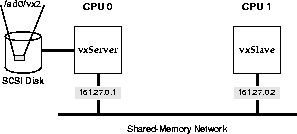
In the following example (also see Figure 11-1), a slave on the shared-memory network boots from the master CPU's local SCSI disk. (For more information on shared-memory networks, see 3.5 Shared-Memory Network on the Backplane.) Note that VxWorks requires a non-empty ftp password field. This is true even if VxWorks is configured with FTP server security turned off (the default). The relevant configuration macro is INCLUDE_FTPD_SECURITY. However, if FTP security checks are turned on, the ftp password field must contain a valid password for the specified user.
The following boot parameters are for the slave processor (vxSlave):
boot device                         : sm=0x800000
processor number                    : 1
host name                           : vxServer
file name                           : /sd0/vx2
inet on backplane (b)               : 161.27.0.2
host inet (h)                       : 161.27.0.1
user (u)                            : caraboo
ftp password (pw) (blank=use rsh)   : ignored
The FTP server daemon is initialized on the VxWorks server based on the configuration. The relevant configuration macro is INCLUDE_FTP_SERVER. See also the reference entry for ftpdLib.
An RSH request includes the name of the requesting user. The request is treated like a remote login by that user.
For Windows hosts, the availability and functionality of this facility is determined by your version of Windows and the networking software you are using. See that documentation for details.
For UNIX hosts, such remote logins are restricted by means of the host file .rhosts in the user's home directory, and more globally with the host file /etc/hosts.equiv. The .rhosts file contains a list of system names (as defined in /etc/hosts) that have access to that user's login. Therefore, make sure that the user's home directory has a .rhosts file listing the VxWorks systems, each on a separate line, that are allowed to access files remotely using the user's name.
The /etc/hosts.equiv file provides a less selective mechanism. Systems listed in this file are allowed login access to any user defined on the local system (except the super-user root). Thus, adding VxWorks system names to /etc/hosts.equiv allows those VxWorks systems to access files using any user name on the UNIX system.
The FTP protocol, unlike RSH, specifies both the user name and password on every request. Therefore, when using FTP, the UNIX system does not use the .rhosts or /etc/hosts.equiv files to authorize remote access.
The routine netDevCreate( ) is used to create a VxWorks I/O device for a particular remote host system:
netDevCreate ("devName", "host", protocol)
For example, the following call creates a new I/O device on VxWorks called mars:, which accesses files on the host system mars using RSH:
-> netDevCreate "mars:", "mars", 0
After a network device is created, files on that host can be accessed by appending the host path name to the device name. For example, the file name mars:/usr/darger/myfile refers to the file /usr/darger/myfile on the mars system. This file can be read and/or written exactly like a local file. For example, the following Tornado shell command opens that file for I/O access:
-> fd = open ("mars:/usr/darger/myfile", 2)
The VxWorks network startup routine, usrNetInit( ) in usrNetwork.c, automatically creates a network device for the host name specified in the VxWorks boot parameters. If no FTP password was specified in the boot parameters, the network device is specified with the RSH protocol. If a password was specified, FTP is used.
All FTP and RSH requests to a remote system include the user name. All FTP requests include a password as well as a user name. From VxWorks you can specify the user name and password for remote requests by calling iam( ):
iam ("username", "password")
The first argument to iam( ) is the user name that identifies you when you access remote systems. The second argument is the FTP password. This is ignored if RSH is being used, and can be specified as NULL or 0 (zero).
For example, the following command tells VxWorks that all accesses to remote systems with RSH or FTP are through user darger, and if FTP is used, the password is unreal:
-> iam "darger", "unreal"
The VxWorks network startup routine, usrNetInit( ) in usrNetwork.c, initially sets the user name and password to those specified in the boot parameters.
For a VxWorks system to have access to a particular file on a host, permissions on the host system must be set up so that the user name that VxWorks is using has permission to read that file (and write it, if necessary). This means that it must have permission to access all directories in the path, as well as the file itself.
The easiest way to check this is to log in to the host with the user name VxWorks uses, and try to read or write the file in question. If you cannot do this, neither can the VxWorks system.