TRootanaDisplay Class Reference
#include <TRootanaDisplay.hxx>
Public Member Functions | |
| TRootanaDisplay () | |
| virtual | ~TRootanaDisplay () |
| virtual void | AddAllCanvases ()=0 |
| User must. | |
| void | AddSingleCanvas (std::string name, std::string subtab_name=std::string("")) |
| Add a new canvas; user will interactively fill it. | |
| void | AddSingleCanvas (TCanvasHandleBase *handleClass, std::string subtab_name=std::string("")) |
| TMainDisplayWindow * | GetDisplayWindow () |
| virtual void | UpdateHistograms (TDataContainer &dataContainer) |
| This method can be implemented by users to update user histograms. | |
| virtual void | PlotCanvas (TDataContainer &dataContainer) |
| This method can be implemented by users to plotting of current canvas. | |
| virtual void | ResetHistograms () |
| This method can be implemented by users to plotting of current canvas. | |
| void | NextButtonPushed () |
| Method for when next button is pushed (offline mode). | |
| void | EventSkipButtonPushed () |
| Method for when skip event button is pushed (online mode). | |
| void | Reset () |
| void | UpdatePlotsAction () |
| void | QuitButtonAction () |
| Method to call when 'quit' button is pressed. | |
| void | SetNumberSkipEvent (int number) |
| std::string | GetDisplayName () |
| Get Display name. | |
| void | SetDisplayName (std::string name) |
| Set Display name. | |
| void | Initialize () |
| bool | CheckOptionRAD (std::string option) |
| void | UsageRAD () |
| Also a special version of usage for TRootanaDisplay. See CheckOptionRAD. | |
| TRootanaDisplay () | |
| virtual | ~TRootanaDisplay () |
| virtual void | AddAllCanvases ()=0 |
| User must. | |
| void | AddSingleCanvas (std::string name, std::string subtab_name=std::string("")) |
| Add a new canvas; user will interactively fill it. | |
| void | AddSingleCanvas (TCanvasHandleBase *handleClass, std::string subtab_name=std::string("")) |
| TMainDisplayWindow * | GetDisplayWindow () |
| virtual void | UpdateHistograms (TDataContainer &dataContainer) |
| This method can be implemented by users to update user histograms. | |
| virtual void | PlotCanvas (TDataContainer &dataContainer) |
| This method can be implemented by users to plotting of current canvas. | |
| virtual void | ResetHistograms () |
| This method can be implemented by users to plotting of current canvas. | |
| void | NextButtonPushed () |
| Method for when next button is pushed (offline mode). | |
| void | EventSkipButtonPushed () |
| Method for when skip event button is pushed (online mode). | |
| void | Reset () |
| void | UpdatePlotsAction () |
| void | QuitButtonAction () |
| Method to call when 'quit' button is pressed. | |
| void | SetNumberSkipEvent (int number) |
| std::string | GetDisplayName () |
| Get Display name. | |
| void | SetDisplayName (std::string name) |
| Set Display name. | |
| void | Initialize () |
| bool | CheckOptionRAD (std::string option) |
| void | UsageRAD () |
| Also a special version of usage for TRootanaDisplay. See CheckOptionRAD. | |
| TDataContainer * | GetDataContainer () |
| Method to get the data container that event loop owns. | |
| TDataContainer * | GetDataContainer () |
| Method to get the data container that event loop owns. | |
| virtual void | Finalize () |
| virtual void | Finalize () |
| virtual void | Usage (void) |
| virtual void | Usage (void) |
| virtual bool | CheckOption (std::string option) |
| virtual bool | CheckOption (std::string option) |
| virtual bool | PreFilter (TDataContainer &dataContainer) |
| virtual bool | PreFilter (TDataContainer &dataContainer) |
| bool | IsOnline () const |
| Are we processing online data? | |
| bool | IsOnline () const |
| Are we processing online data? | |
| bool | IsOffline () const |
| Are we processing offline data? | |
| bool | IsOffline () const |
| Are we processing offline data? | |
| int | GetCurrentRunNumber () const |
| Current Run Number. | |
| int | GetCurrentRunNumber () const |
| Current Run Number. | |
| void | SetCurrentRunNumber (int run) |
| Current Run Number. | |
| void | SetCurrentRunNumber (int run) |
| Current Run Number. | |
| int | ExecuteLoop (int argc, char *argv[]) |
| Method to actually process the Midas information, either as file or online. | |
| int | ExecuteLoop (int argc, char *argv[]) |
| Method to actually process the Midas information, either as file or online. | |
| int | ProcessMidasFile (TApplication *app, const char *fname) |
| int | ProcessMidasFile (TApplication *app, const char *fname) |
| void | DisableAutoMainWindow () |
| Disable automatic creation of MainWindow. | |
| void | DisableAutoMainWindow () |
| Disable automatic creation of MainWindow. | |
| VirtualOdb * | GetODB () |
| Get pointer to ODB variables. | |
| VirtualOdb * | GetODB () |
| Get pointer to ODB variables. | |
| void | OpenRootFile (int run) |
| Open output ROOT file. | |
| void | OpenRootFile (int run) |
| Open output ROOT file. | |
| void | CloseRootFile () |
| Cloe output ROOT file. | |
| void | CloseRootFile () |
| Cloe output ROOT file. | |
| bool | IsRootFileValid () |
| Check if output ROOT file is valid and open. | |
| bool | IsRootFileValid () |
| Check if output ROOT file is valid and open. | |
| void | DisableRootOutput (bool disable=true) |
| void | DisableRootOutput (bool disable=true) |
| int | IsRootOutputEnabled () |
| int | IsRootOutputEnabled () |
| void | SetOutputFilename (std::string name) |
| void | SetOutputFilename (std::string name) |
| void | SetOnlineName (std::string name) |
| void | SetOnlineName (std::string name) |
| void | ProcessThisEventID (int eventID) |
| void | ProcessThisEventID (int eventID) |
| bool | CheckEventID (int eventId) |
| Little helper method to check if EventID matchs requested EventID list. | |
| bool | CheckEventID (int eventId) |
| Little helper method to check if EventID matchs requested EventID list. | |
| void | SuppressTimestampWarnings () |
| void | SuppressTimestampWarnings () |
| bool | GetSuppressTimestampWarnings () |
| Suppress timestamp warnings? true = suppress warnings. | |
| bool | GetSuppressTimestampWarnings () |
| Suppress timestamp warnings? true = suppress warnings. | |
Static Public Member Functions | |
| static TRootanaEventLoop & | Get (void) |
| static TRootanaEventLoop & | Get (void) |
| template<typename T > | |
| static void | CreateSingleton () |
| template<typename T > | |
| static void | CreateSingleton () |
Protected Member Functions | |
| bool | CreateOutputFile (std::string name, std::string options="RECREATE") |
| bool | CreateOutputFile (std::string name, std::string options="RECREATE") |
Protected Attributes | |
| TDirectory * | fOnlineHistDir |
| TDirectory for online histograms. | |
Static Protected Attributes | |
| static TRootanaEventLoop * | fTRootanaEventLoop = NULL |
| The static pointer to the singleton instance. | |
Private Member Functions | |
| void | InitializeMainWindow () |
| Method to initialize the Main display window. | |
| bool | ProcessMidasEvent (TDataContainer &dataContainer) |
| Process each midas event. | |
| void | BeginRun (int transition, int run, int time) |
| void | EndRun (int transition, int run, int time) |
| void | SetCachedDataContainer (TDataContainer &dataContainer) |
| void | InitializeMainWindow () |
| Method to initialize the Main display window. | |
| bool | ProcessMidasEvent (TDataContainer &dataContainer) |
| Process each midas event. | |
| void | BeginRun (int transition, int run, int time) |
| void | EndRun (int transition, int run, int time) |
| void | SetCachedDataContainer (TDataContainer &dataContainer) |
Private Attributes | |
| bool | waitingForNextButton |
| int | fNumberSkipEventsOnline |
| int | fNumberSkipEventsOffline |
| int | fNumberProcessed |
| bool | fQuitPushed |
| Flag to keep track of if quite button has been pushed. | |
| TMainDisplayWindow * | fMainWindow |
| The pointer to our display window. | |
| TDataContainer * | fCachedDataContainer |
| We keep a cached copy of the midas event (so that it can used for callback). | |
| std::string | fDisplayName |
| Display name. | |
| std::vector< std::pair < std::pair< int, int > ,TCanvasHandleBase * > > | fCanvasHandlers |
Detailed Description
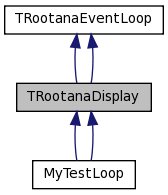
This is an abstract base class for event displays. Users need to define a class that derives from this class in order to make an event display. The only method that users must implement is the method AddAllCanvas(), where the user defines which tabs to use.
The user then needs to define how they what to update and plot histograms. The updating of histograms happens for each event. In online mode, the plotting of histograms only happens for each XX events; for offline mode the plotting happens for each event.
There are two ways that users can decide to update and plot histograms:
1) They can create histograms in their event display class and then fill the methods UpdateHistograms(TDataContainer) and PlotCanvas(TDataContainer). This histograms can then file in the canvases that are added using AddSingleCanvas(std::string name).
2) They can create classes that are derived from TCanvasHandleBase. The derived classes are then added using the method AddSingleCanvas(TCanvasHandleBase* handleClass).
There is no substantial difference between the two methods. The second method is mainly meant to allow the user to separate the methods into separate files for code cleaniness.
Examples of both these methods are available in examples/display_example.cxx
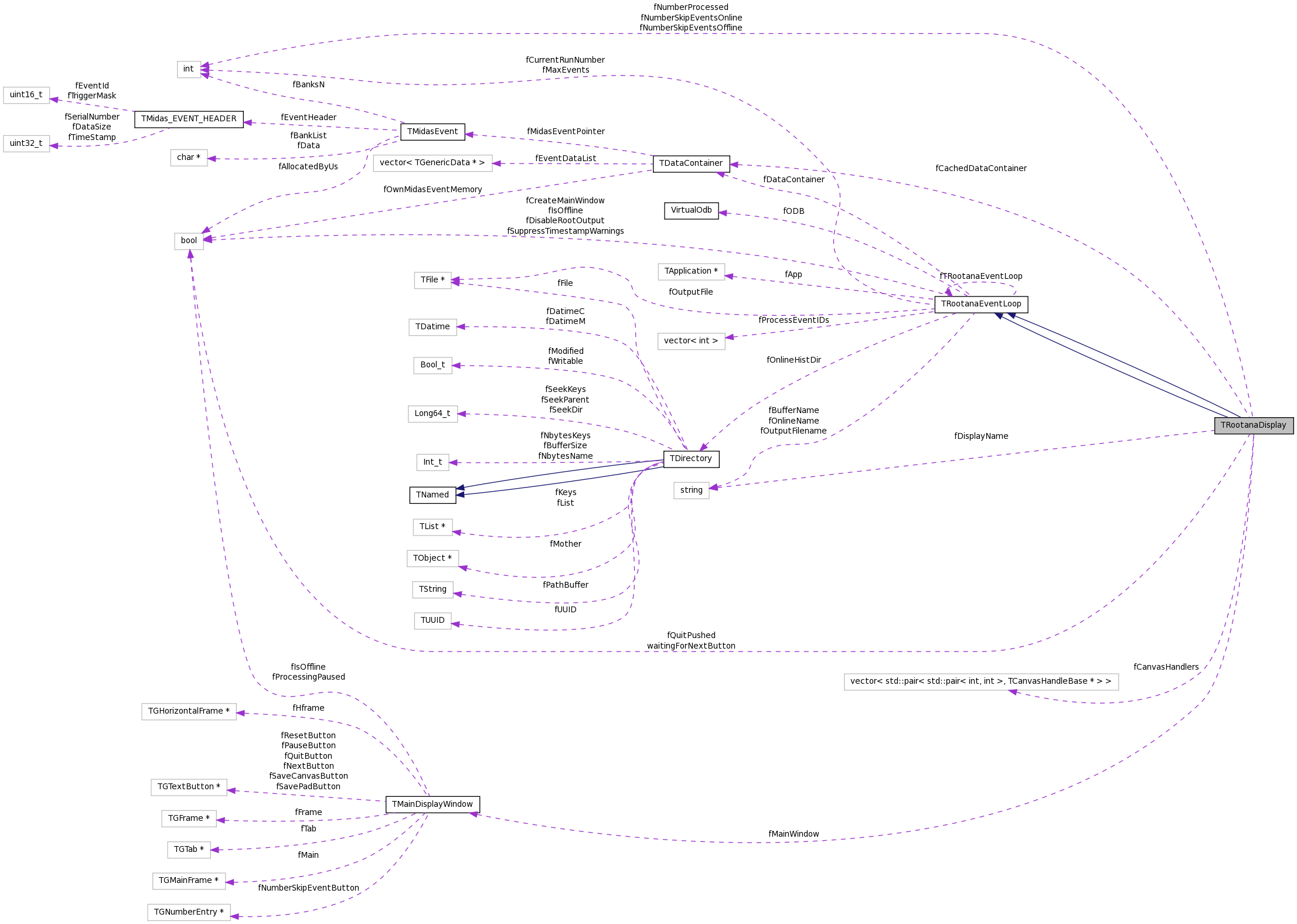
The actual ROOT GUI is encapsulated in a separate class TMainDisplayWindow. The TRootanaDisplay has an instance of this TMainDisplayWindow class. Users will be need to access the TMainDisplayWindow by calling
TRootanaDisplay::GetDisplayWindow()
in order to grab the particular canvas that we want plot on.
There is also the functionality to add sub-tab groups to a particular tab, so that you can have a set of tabs of tabs. To use this functionality you use the syntax
AddSingleCanvas(..., <tab name="" string>="">)
to add a new tab to the top level tab named 'tab name string'.
Definition at line 57 of file TRootanaDisplay.hxx.
Constructor & Destructor Documentation
| TRootanaDisplay::TRootanaDisplay | ( | ) |
| TRootanaDisplay::~TRootanaDisplay | ( | ) | [virtual] |
Definition at line 27 of file TRootanaDisplay.cxx.
References fCanvasHandlers.
00027                                   {
00028
00029   for(unsigned int i = 0; i < fCanvasHandlers.size(); i++)
00030     delete fCanvasHandlers[i].second;
00031
00032 };
| TRootanaDisplay::TRootanaDisplay | ( | ) |
| virtual TRootanaDisplay::~TRootanaDisplay | ( | ) | [virtual] |
Member Function Documentation
| virtual void TRootanaDisplay::AddAllCanvases | ( | ) | [pure virtual] |
User must.
Implemented in MyTestLoop, and MyTestLoop.
| virtual void TRootanaDisplay::AddAllCanvases | ( | ) | [pure virtual] |
User must.
Implemented in MyTestLoop, and MyTestLoop.
Referenced by InitializeMainWindow().

| void TRootanaDisplay::AddSingleCanvas | ( | TCanvasHandleBase * | handleClass, | |
| std::string | subtab_name = std::string("") | |||
| ) |
Add a new canvas, using a TCanvasHandleBase class. TRootanaDisplay will take ownership of pointer and delete memory it points to.
| void TRootanaDisplay::AddSingleCanvas | ( | std::string | name, | |
| std::string | subtab_name = std::string("") | |||
| ) | [inline] |
Add a new canvas; user will interactively fill it.
Definition at line 70 of file TRootanaDisplay.hxx.
References TMainDisplayWindow::AddCanvas(), and fMainWindow.
00070                                                                              {
00071     fMainWindow->AddCanvas(name,subtab_name);
00072   }

| void TRootanaDisplay::AddSingleCanvas | ( | TCanvasHandleBase * | handleClass, | |
| std::string | subtab_name = std::string("") | |||
| ) |
Add a new canvas, using a TCanvasHandleBase class. TRootanaDisplay will take ownership of pointer and delete memory it points to.
Definition at line 74 of file TRootanaDisplay.cxx.
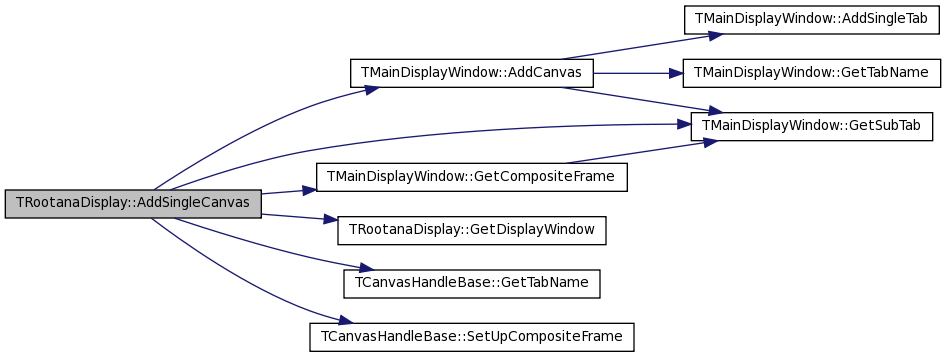
References TMainDisplayWindow::AddCanvas(), fCanvasHandlers, TMainDisplayWindow::GetCompositeFrame(), GetDisplayWindow(), TMainDisplayWindow::GetSubTab(), TCanvasHandleBase::GetTabName(), and TCanvasHandleBase::SetUpCompositeFrame().
00074                                                                                           {
00075
00076   std::pair<int,int> index = GetDisplayWindow()->AddCanvas(handleClass->GetTabName(),subtab_name);
00077
00078   std::pair< std::pair<int,int>, TCanvasHandleBase*> tmp(index,handleClass);
00079
00080   fCanvasHandlers.push_back(tmp);
00081   // Now set up the embedded canvas, if user so desires.
00082   TGCompositeFrame* embed = GetDisplayWindow()->GetCompositeFrame(index);//ssGetTab()->GetTabContainer(tab_index);
00083   handleClass->SetUpCompositeFrame(embed,this);
00084
00085   // If we just created a new sub-tab, grab the tab and add
00086   // call-back to UpdatePlot
00087   if(index.second == 0){
00088     TGTab* tab = GetDisplayWindow()->GetSubTab(index.first);
00089     tab->Connect("Selected(Int_t)", "TRootanaDisplay", this, "UpdatePlotsAction()");
00090   }
00091
00092
00093 }
| void TRootanaDisplay::AddSingleCanvas | ( | std::string | name, | |
| std::string | subtab_name = std::string("") | |||
| ) | [inline] |
Add a new canvas; user will interactively fill it.
Definition at line 70 of file TRootanaDisplay.hxx.
References TMainDisplayWindow::AddCanvas(), and fMainWindow.
Referenced by MyTestLoop::AddAllCanvases().
00070                                                                              {
00071     fMainWindow->AddCanvas(name,subtab_name);
00072   }

| void TRootanaDisplay::BeginRun | ( | int | transition, | |
| int | run, | |||
| int | time | |||
| ) | [private, virtual] |
Called before the first event of a file is read, but you should prefer Initialize() for general initialization. This method will be called once for each input file.
Reimplemented from TRootanaEventLoop.
Reimplemented in MyTestLoop.
| void TRootanaDisplay::BeginRun | ( | int | transition, | |
| int | run, | |||
| int | time | |||
| ) | [private, virtual] |
Called before the first event of a file is read, but you should prefer Initialize() for general initialization. This method will be called once for each input file.
Reimplemented from TRootanaEventLoop.
Reimplemented in MyTestLoop.
Definition at line 163 of file TRootanaDisplay.cxx.
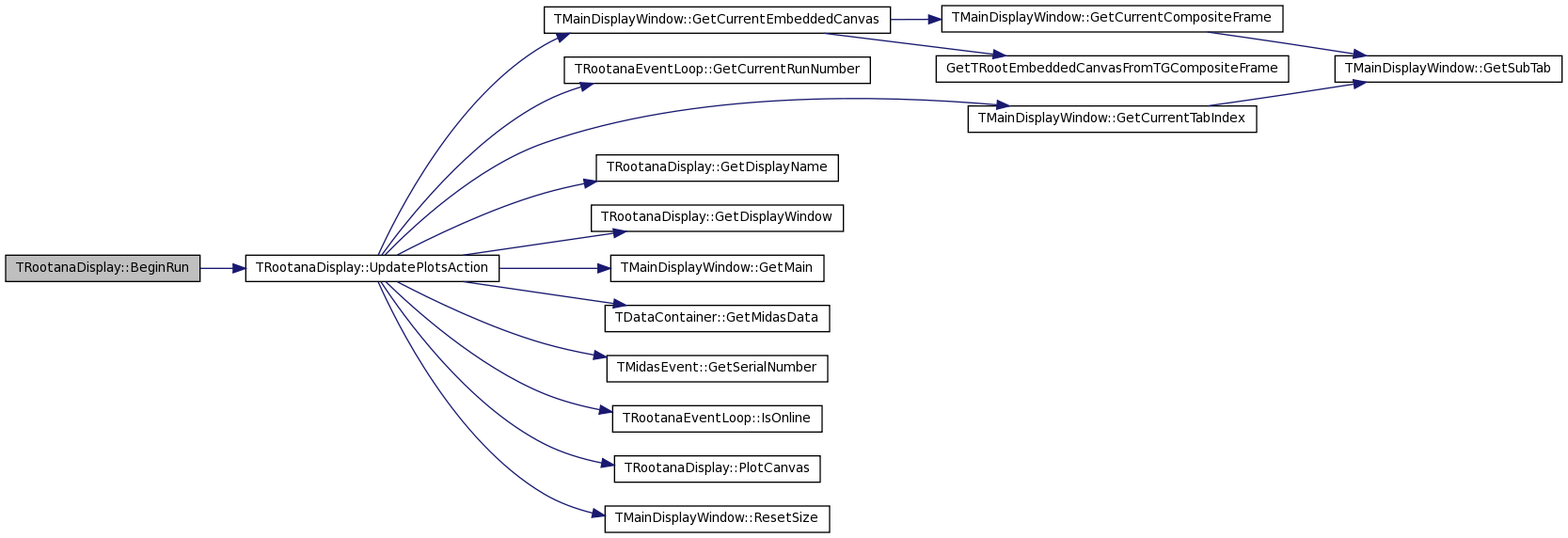
References fCanvasHandlers, and UpdatePlotsAction().
00163                                                              {
00164
00165   std::cout << "Begin of run " << run << " at time " << time << std::endl;
00166   for(unsigned int i = 0; i < fCanvasHandlers.size(); i++)
00167     fCanvasHandlers[i].second->BeginRun(transition,run,time);
00168   UpdatePlotsAction();
00169 }
| bool TRootanaEventLoop::CheckEventID | ( | int | eventId | ) | [inherited] |
Little helper method to check if EventID matchs requested EventID list.
| bool TRootanaEventLoop::CheckEventID | ( | int | eventId | ) | [inherited] |
Little helper method to check if EventID matchs requested EventID list.
Definition at line 120 of file TRootanaEventLoop.cxx.
References TRootanaEventLoop::fProcessEventIDs.
Referenced by TRootanaEventLoop::ProcessMidasFile().
00120                                                {
00121
00122   // If we didn't specify list of accepted IDs, then accept all.
00123   if(fProcessEventIDs.size()==0) return true;
00124
00125   // Otherwise check event ID against list
00126   for(unsigned int i = 0; i < fProcessEventIDs.size(); i++){
00127     if(fProcessEventIDs[i] == (eventId & 0xFFFF))
00128       return true;
00129   }
00130
00131   return false;
00132 }

| virtual bool TRootanaEventLoop::CheckOption | ( | std::string | option | ) | [virtual, inherited] |
Check an option and return true if it is valid. The return value is used to flag errors during option handling. If the options are valid, then CheckOption should return true to indicate success. If there is a problem processing the options, then CheckOption should return false. If this returns false, then the event loop will print the Usage message and exit with a non zero value (i.e. indicate failure).
Reimplemented in MyTestLoop.
| bool TRootanaEventLoop::CheckOption | ( | std::string | option | ) | [virtual, inherited] |
Check an option and return true if it is valid. The return value is used to flag errors during option handling. If the options are valid, then CheckOption should return true to indicate success. If there is a problem processing the options, then CheckOption should return false. If this returns false, then the event loop will print the Usage message and exit with a non zero value (i.e. indicate failure).
Reimplemented in MyTestLoop.
Definition at line 116 of file TRootanaEventLoop.cxx.
Referenced by TRootanaEventLoop::ExecuteLoop().

| bool TRootanaDisplay::CheckOptionRAD | ( | std::string | option | ) | [inline, virtual] |
This is a special version of CheckOption that is only used by TRootanaDisplay. This is just so that users still have the ability to set options for executables derived from TRootanaDisplay.
Reimplemented from TRootanaEventLoop.
Definition at line 131 of file TRootanaDisplay.hxx.
References fNumberSkipEventsOffline.
00131                                        {
00132     if(option.find("-s") != std::string::npos){
00133       std::string sub = option.substr(2);
00134       fNumberSkipEventsOffline = atoi(sub.c_str());
00135       printf("Will process %i events before plotting first event.\n",fNumberSkipEventsOffline);
00136       return true;
00137     }
00138     return false;
00139   }
| bool TRootanaDisplay::CheckOptionRAD | ( | std::string | option | ) | [inline, virtual] |
This is a special version of CheckOption that is only used by TRootanaDisplay. This is just so that users still have the ability to set options for executables derived from TRootanaDisplay.
Reimplemented from TRootanaEventLoop.
Definition at line 131 of file TRootanaDisplay.hxx.
References fNumberSkipEventsOffline.
00131                                        {
00132     if(option.find("-s") != std::string::npos){
00133       std::string sub = option.substr(2);
00134       fNumberSkipEventsOffline = atoi(sub.c_str());
00135       printf("Will process %i events before plotting first event.\n",fNumberSkipEventsOffline);
00136       return true;
00137     }
00138     return false;
00139   }
| void TRootanaEventLoop::CloseRootFile | ( | ) | [inherited] |
Cloe output ROOT file.
| void TRootanaEventLoop::CloseRootFile | ( | ) | [inherited] |
Cloe output ROOT file.
Definition at line 397 of file TRootanaEventLoop.cxx.
References TRootanaEventLoop::fOutputFile.
Referenced by TRootanaEventLoop::ProcessMidasFile(), QuitButtonAction(), and TRootanaEventLoop::~TRootanaEventLoop().
00397                                      {
00398
00399   if(fOutputFile) {
00400                 std::cout << "Closing ROOT file " << std::endl;
00401     fOutputFile->Write();
00402     fOutputFile->Close();
00403     fOutputFile=0;
00404   }
00405
00406 }

| bool TRootanaEventLoop::CreateOutputFile | ( | std::string | name, | |
| std::string | options = "RECREATE" | |||
| ) | [inline, protected, inherited] |
Definition at line 184 of file TRootanaEventLoop.hxx.
References TRootanaEventLoop::fOutputFile.
00184                                                                        {
00185
00186     fOutputFile = new TFile(name.c_str(),options.c_str());
00187
00188     return true;
00189   }
| bool TRootanaEventLoop::CreateOutputFile | ( | std::string | name, | |
| std::string | options = "RECREATE" | |||
| ) | [inline, protected, inherited] |
Definition at line 184 of file TRootanaEventLoop.hxx.
References TRootanaEventLoop::fOutputFile.
00184                                                                        {
00185
00186     fOutputFile = new TFile(name.c_str(),options.c_str());
00187
00188     return true;
00189   }
| static void TRootanaEventLoop::CreateSingleton | ( | ) | [inline, static, inherited] |
This static templated function will make it a little easier for users to create the singleton instance.
Definition at line 125 of file TRootanaEventLoop.hxx.
References TRootanaEventLoop::fTRootanaEventLoop.
00126   {
00127     if(fTRootanaEventLoop)
00128       std::cout << "Singleton has already been created" << std::endl;
00129     else
00130       fTRootanaEventLoop = new T();
00131   }
| static void TRootanaEventLoop::CreateSingleton | ( | ) | [inline, static, inherited] |
This static templated function will make it a little easier for users to create the singleton instance.
Definition at line 125 of file TRootanaEventLoop.hxx.
References TRootanaEventLoop::fTRootanaEventLoop.
00126   {
00127     if(fTRootanaEventLoop)
00128       std::cout << "Singleton has already been created" << std::endl;
00129     else
00130       fTRootanaEventLoop = new T();
00131   }
| void TRootanaEventLoop::DisableAutoMainWindow | ( | ) | [inline, inherited] |
Disable automatic creation of MainWindow.
Definition at line 135 of file TRootanaEventLoop.hxx.
References TRootanaEventLoop::fCreateMainWindow.
00135 { fCreateMainWindow = false;}
| void TRootanaEventLoop::DisableAutoMainWindow | ( | ) | [inline, inherited] |
Disable automatic creation of MainWindow.
Definition at line 135 of file TRootanaEventLoop.hxx.
References TRootanaEventLoop::fCreateMainWindow.
Referenced by Analyzer::Analyzer().
00135 { fCreateMainWindow = false;}

| void TRootanaEventLoop::DisableRootOutput | ( | bool | disable = true |
) | [inline, inherited] |
Definition at line 154 of file TRootanaEventLoop.hxx.
References TRootanaEventLoop::fDisableRootOutput.
00154 {fDisableRootOutput = disable;};
| void TRootanaEventLoop::DisableRootOutput | ( | bool | disable = true |
) | [inline, inherited] |
Definition at line 154 of file TRootanaEventLoop.hxx.
References TRootanaEventLoop::fDisableRootOutput.
Referenced by MyTestLoop::MyTestLoop().
00154 {fDisableRootOutput = disable;};

| void TRootanaDisplay::EndRun | ( | int | transition, | |
| int | run, | |||
| int | time | |||
| ) | [private, virtual] |
Called after the last event of a file is read, but you should prefer Finalize() for general finalization. This method will be called once for each input file.
Reimplemented from TRootanaEventLoop.
Reimplemented in MyTestLoop.
| void TRootanaDisplay::EndRun | ( | int | transition, | |
| int | run, | |||
| int | time | |||
| ) | [private, virtual] |
Called after the last event of a file is read, but you should prefer Finalize() for general finalization. This method will be called once for each input file.
Reimplemented from TRootanaEventLoop.
Reimplemented in MyTestLoop.
Definition at line 171 of file TRootanaDisplay.cxx.
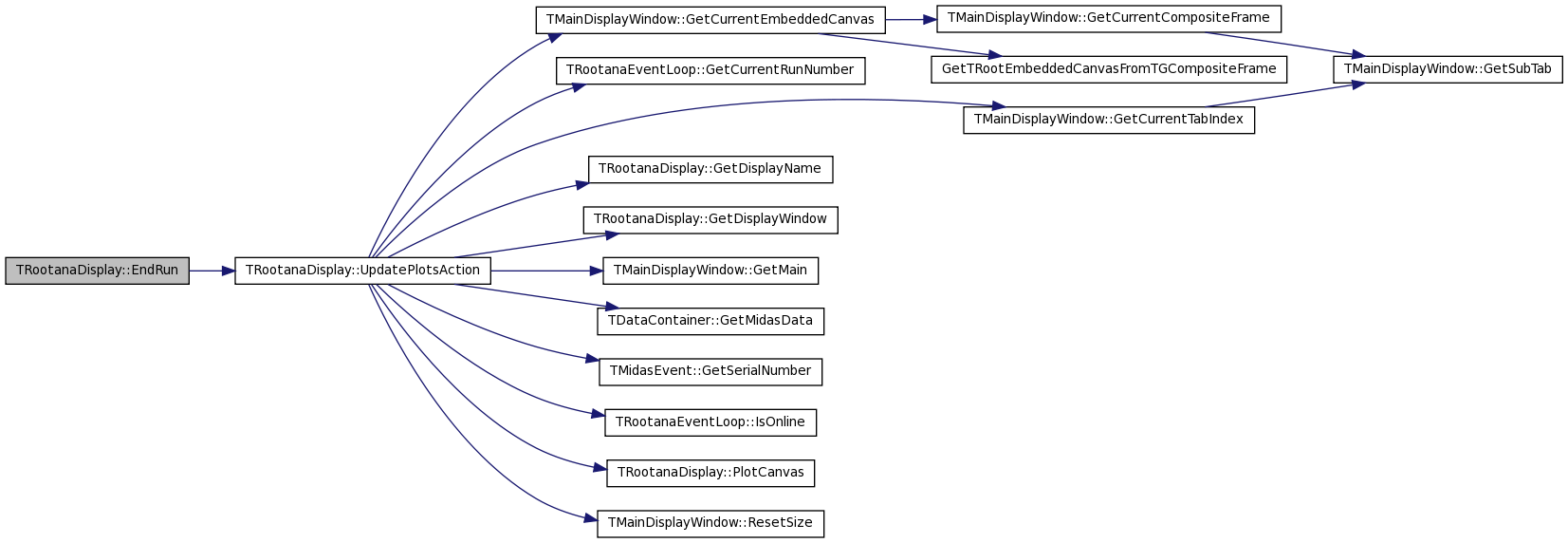
References fCanvasHandlers, and UpdatePlotsAction().
Referenced by QuitButtonAction().
00171                                                            {
00172
00173   std::cout << "End of run " << run << " at time " << time << std::endl;
00174   for(unsigned int i = 0; i < fCanvasHandlers.size(); i++)
00175     fCanvasHandlers[i].second->EndRun(transition,run,time);
00176   UpdatePlotsAction();
00177
00178 }

| void TRootanaDisplay::EventSkipButtonPushed | ( | ) | [inline] |
Method for when skip event button is pushed (online mode).
Definition at line 98 of file TRootanaDisplay.hxx.
References fMainWindow, fNumberSkipEventsOnline, and TMainDisplayWindow::GetSkipEventButton().
00098                               {
00099     fNumberSkipEventsOnline = fMainWindow->GetSkipEventButton()->GetNumberEntry()->GetIntNumber();
00100   }

| void TRootanaDisplay::EventSkipButtonPushed | ( | ) | [inline] |
Method for when skip event button is pushed (online mode).
Definition at line 98 of file TRootanaDisplay.hxx.
References fMainWindow, fNumberSkipEventsOnline, and TMainDisplayWindow::GetSkipEventButton().
00098                               {
00099     fNumberSkipEventsOnline = fMainWindow->GetSkipEventButton()->GetNumberEntry()->GetIntNumber();
00100   }
| int TRootanaEventLoop::ExecuteLoop | ( | int | argc, | |
| char * | argv[] | |||
| ) | [inherited] |
Method to actually process the Midas information, either as file or online.
| int TRootanaEventLoop::ExecuteLoop | ( | int | argc, | |
| char * | argv[] | |||
| ) | [inherited] |
Method to actually process the Midas information, either as file or online.
Definition at line 159 of file TRootanaEventLoop.cxx.
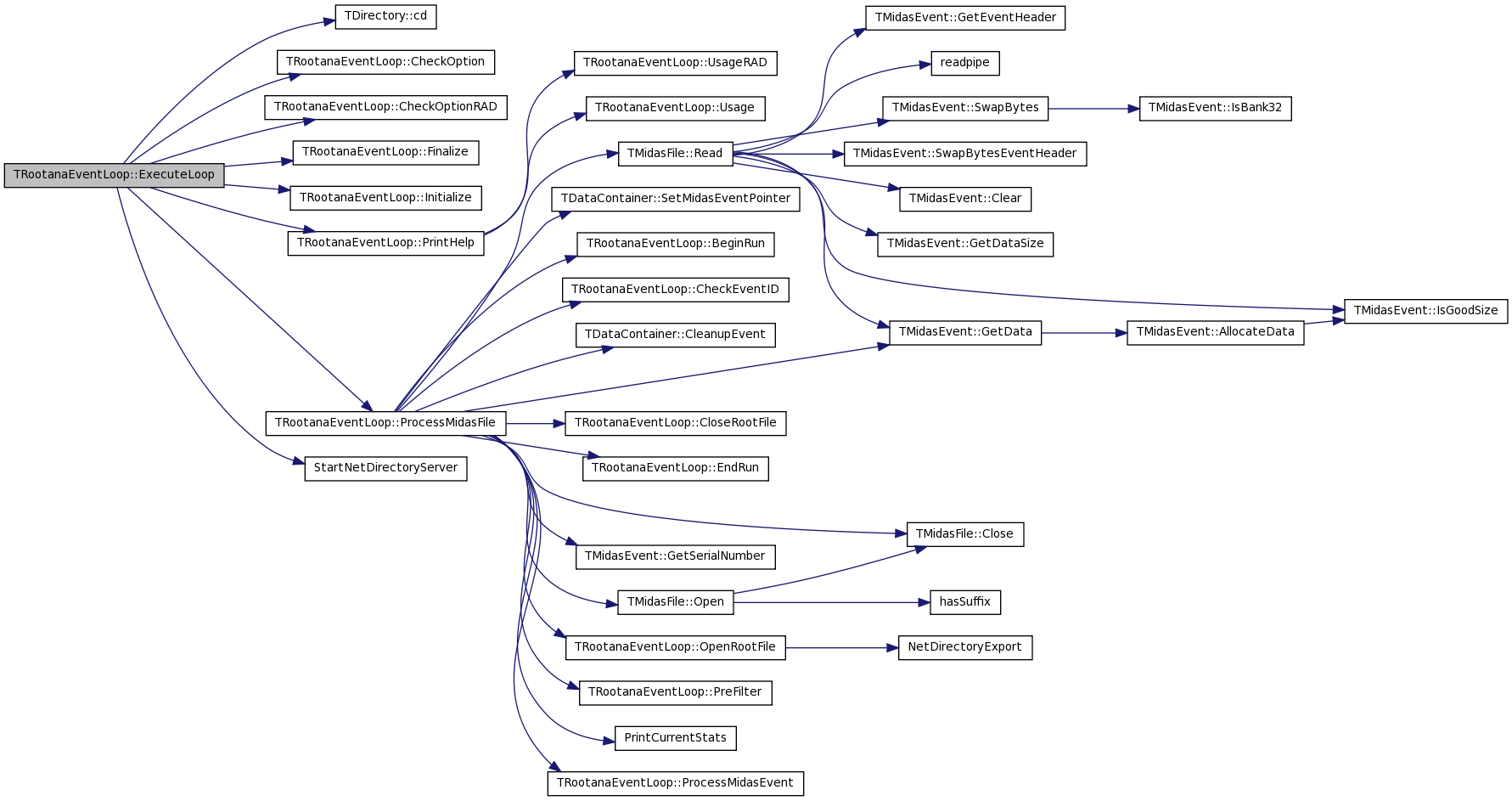
References TDirectory::cd(), TRootanaEventLoop::CheckOption(), TRootanaEventLoop::CheckOptionRAD(), TRootanaEventLoop::fApp, TRootanaEventLoop::fBufferName, TRootanaEventLoop::fCreateMainWindow, TRootanaEventLoop::Finalize(), TRootanaEventLoop::fIsOffline, TRootanaEventLoop::fMaxEvents, TRootanaEventLoop::fOnlineHistDir, TRootanaEventLoop::Initialize(), TRootanaEventLoop::PrintHelp(), TRootanaEventLoop::ProcessMidasFile(), and StartNetDirectoryServer().
Referenced by main().
00159                                                         {
00160
00161   setbuf(stdout,NULL);
00162   setbuf(stderr,NULL);
00163
00164   signal(SIGILL,  SIG_DFL);
00165   signal(SIGBUS,  SIG_DFL);
00166   signal(SIGSEGV, SIG_DFL);
00167
00168   std::vector<std::string> args;
00169   for (int i=0; i<argc; i++)
00170     {
00171       if (strcmp(argv[i],"-h")==0)
00172         PrintHelp(); // does not return
00173       args.push_back(argv[i]);
00174     }
00175
00176
00177   if(gROOT->IsBatch()) {
00178     printf("Cannot run in batch mode\n");
00179     return 1;
00180   }
00181
00182   bool forceEnableGraphics = false;
00183   bool testMode = false;
00184   int  tcpPort = 0;
00185   const char* hostname = NULL;
00186   const char* exptname = NULL;
00187
00188   for (unsigned int i=1; i<args.size(); i++) // loop over the commandline options
00189     {
00190       const char* arg = args[i].c_str();
00191       //printf("argv[%d] is %s\n",i,arg);
00192
00193       if (strncmp(arg,"-e",2)==0)  // Event cutoff flag (only applicable in offline mode)
00194         fMaxEvents = atoi(arg+2);
00195       else if (strncmp(arg,"-m",2)==0) // Enable memory debugging
00196         ;//      gEnableShowMem = true;
00197       else if (strncmp(arg,"-P",2)==0) // Set the histogram server port
00198         tcpPort = atoi(arg+2);
00199       else if (strcmp(arg,"-T")==0)
00200         testMode = true;
00201       else if (strcmp(arg,"-g")==0)
00202         forceEnableGraphics = true;
00203       else if (strncmp(arg,"-H",2)==0)
00204         hostname = strdup(arg+2);
00205       else if (strncmp(arg,"-E",2)==0)
00206         exptname = strdup(arg+2);
00207       else if (strncmp(arg,"-b",2)==0){
00208         fBufferName = std::string(arg+2);
00209       }else if (strcmp(arg,"-h")==0)
00210         PrintHelp(); // does not return
00211       else if(arg[0] == '-')// Check if a TRootanaDisplay or user-defined options
00212         if(!CheckOptionRAD(args[i]))
00213           if(!CheckOption(args[i]))
00214             PrintHelp(); // does not return
00215     }
00216
00217   // Do quick check if we are processing online or offline.
00218   // Want to know before we initialize.
00219   fIsOffline = false;
00220   for (unsigned int i=1; i<args.size(); i++){
00221     const char* arg = args[i].c_str();
00222     if (arg[0] != '-')
00223       {
00224         fIsOffline = true;
00225       }
00226   }
00227
00228
00229   MainWindow *mainWindow=0;
00230   if(fCreateMainWindow){
00231     mainWindow = new MainWindow(gClient->GetRoot(), 200, 300);
00232   }
00233
00234    gROOT->cd();
00235    fOnlineHistDir = new TDirectory("rootana", "rootana online plots");
00236
00237 #ifdef HAVE_LIBNETDIRECTORY
00238    if (tcpPort)
00239      StartNetDirectoryServer(tcpPort, fOnlineHistDir);
00240 #else
00241    if (tcpPort)
00242      fprintf(stderr,"ERROR: No support for the TNetDirectory server!\n");
00243 #endif
00244
00245    // Initialize the event loop with user initialization.
00246    Initialize();
00247
00248    for (unsigned int i=1; i<args.size(); i++){
00249      const char* arg = args[i].c_str();
00250      if (arg[0] != '-')
00251        {
00252            ProcessMidasFile(fApp,arg);
00253        }
00254    }
00255
00256    if (testMode){
00257      std::cout << "Entering test mode." << std::endl;
00258      fOnlineHistDir->cd();
00259      TH1D* hh = new TH1D("test", "test", 100, 0, 100);
00260      hh->Fill(1);
00261      hh->Fill(10);
00262      hh->Fill(50);
00263
00264      fApp->Run(kTRUE);
00265      if(fCreateMainWindow) delete mainWindow;
00266      return 0;
00267    }
00268
00269    // if we processed some data files,
00270    // do not go into online mode.
00271    if (fIsOffline){
00272      if(fCreateMainWindow) delete mainWindow;
00273      return 0;
00274    }
00275
00276 #ifdef HAVE_MIDAS
00277    ProcessMidasOnline(fApp, hostname, exptname);;
00278 #endif
00279
00280    if(fCreateMainWindow) delete mainWindow;
00281
00282    Finalize();
00283
00284    return 0;
00285
00286 }

| virtual void TRootanaEventLoop::Finalize | ( | ) | [virtual, inherited] |
Called after the last event has been processed, but before any open output files are closed.
| void TRootanaEventLoop::Finalize | ( | ) | [virtual, inherited] |
Called after the last event has been processed, but before any open output files are closed.
Definition at line 110 of file TRootanaEventLoop.cxx.
Referenced by TRootanaEventLoop::ExecuteLoop().

| static TRootanaEventLoop& TRootanaEventLoop::Get | ( | void | ) | [static, inherited] |
| TRootanaEventLoop & TRootanaEventLoop::Get | ( | void | ) | [static, inherited] |
Definition at line 59 of file TRootanaEventLoop.cxx.
References TRootanaEventLoop::fTRootanaEventLoop.
Referenced by main().
00059                                               {
00060
00061   if(!fTRootanaEventLoop){
00062     std::cerr << "Singleton Not Instantiated! "
00063               << " Need to call something like SomeClass::CreateSingleton<SomeClass>(); Exiting!"
00064               <<std::endl; exit(0);
00065   }
00066   return *fTRootanaEventLoop;
00067 }

| int TRootanaEventLoop::GetCurrentRunNumber | ( | ) | const [inline, inherited] |
Current Run Number.
Definition at line 107 of file TRootanaEventLoop.hxx.
References TRootanaEventLoop::fCurrentRunNumber.
00107 {return fCurrentRunNumber;};
| int TRootanaEventLoop::GetCurrentRunNumber | ( | ) | const [inline, inherited] |
Current Run Number.
Definition at line 107 of file TRootanaEventLoop.hxx.
References TRootanaEventLoop::fCurrentRunNumber.
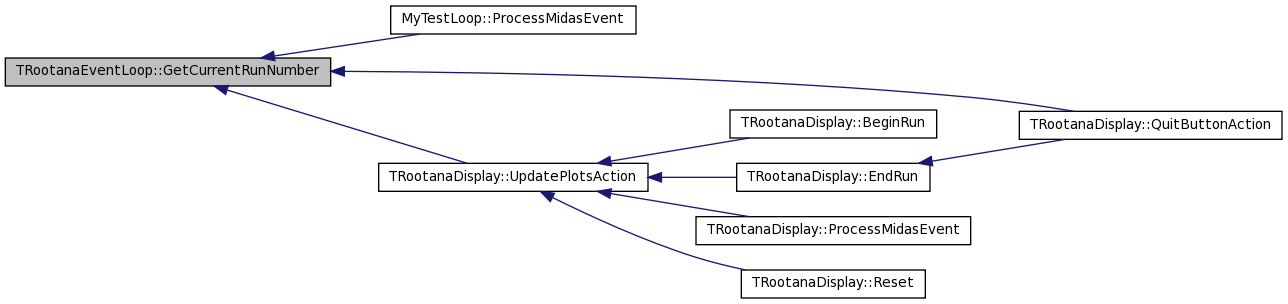
Referenced by MyTestLoop::ProcessMidasEvent(), QuitButtonAction(), and UpdatePlotsAction().
00107 {return fCurrentRunNumber;};
| TDataContainer* TRootanaEventLoop::GetDataContainer | ( | ) | [inline, inherited] |
Method to get the data container that event loop owns.
Definition at line 49 of file TRootanaEventLoop.hxx.
References TRootanaEventLoop::fDataContainer.
00049 {return fDataContainer;};
| TDataContainer* TRootanaEventLoop::GetDataContainer | ( | ) | [inline, inherited] |
Method to get the data container that event loop owns.
Definition at line 49 of file TRootanaEventLoop.hxx.
References TRootanaEventLoop::fDataContainer.
00049 {return fDataContainer;};
| std::string TRootanaDisplay::GetDisplayName | ( | ) | [inline] |
Get Display name.
Definition at line 123 of file TRootanaDisplay.hxx.
References fDisplayName.
00123 {return fDisplayName;}
| std::string TRootanaDisplay::GetDisplayName | ( | ) | [inline] |
Get Display name.
Definition at line 123 of file TRootanaDisplay.hxx.
References fDisplayName.
Referenced by UpdatePlotsAction().
00123 {return fDisplayName;}

| TMainDisplayWindow* TRootanaDisplay::GetDisplayWindow | ( | ) | [inline] |
Retrieve the main display window, so that users can do things like grab the canvases and update them.
Definition at line 82 of file TRootanaDisplay.hxx.
References fMainWindow.
00082 { return fMainWindow;}
| TMainDisplayWindow* TRootanaDisplay::GetDisplayWindow | ( | ) | [inline] |
Retrieve the main display window, so that users can do things like grab the canvases and update them.
Definition at line 82 of file TRootanaDisplay.hxx.
References fMainWindow.
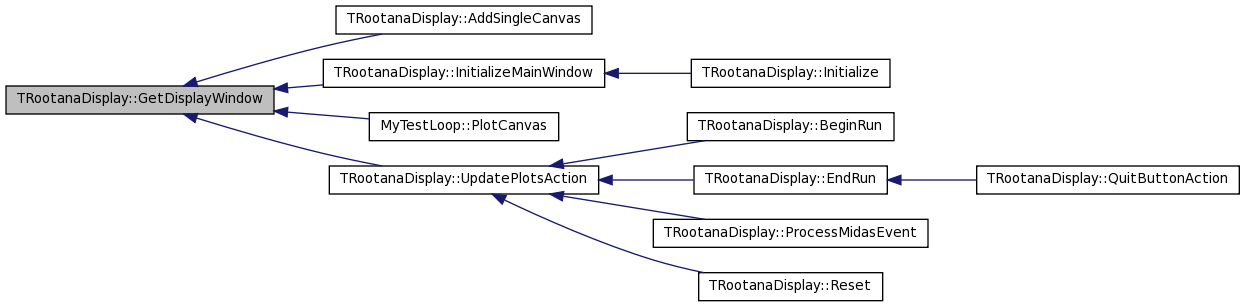
Referenced by AddSingleCanvas(), InitializeMainWindow(), MyTestLoop::PlotCanvas(), and UpdatePlotsAction().
00082 { return fMainWindow;}
| VirtualOdb* TRootanaEventLoop::GetODB | ( | ) | [inline, inherited] |
Get pointer to ODB variables.
Definition at line 138 of file TRootanaEventLoop.hxx.
References TRootanaEventLoop::fODB.
00138 {return fODB;}
| VirtualOdb* TRootanaEventLoop::GetODB | ( | ) | [inline, inherited] |
Get pointer to ODB variables.
Definition at line 138 of file TRootanaEventLoop.hxx.
References TRootanaEventLoop::fODB.
00138 {return fODB;}
| bool TRootanaEventLoop::GetSuppressTimestampWarnings | ( | ) | [inline, inherited] |
Suppress timestamp warnings? true = suppress warnings.
Definition at line 179 of file TRootanaEventLoop.hxx.
References TRootanaEventLoop::fSuppressTimestampWarnings.
00179 { return fSuppressTimestampWarnings;};
| bool TRootanaEventLoop::GetSuppressTimestampWarnings | ( | ) | [inline, inherited] |
Suppress timestamp warnings? true = suppress warnings.
Definition at line 179 of file TRootanaEventLoop.hxx.
References TRootanaEventLoop::fSuppressTimestampWarnings.
00179 { return fSuppressTimestampWarnings;};
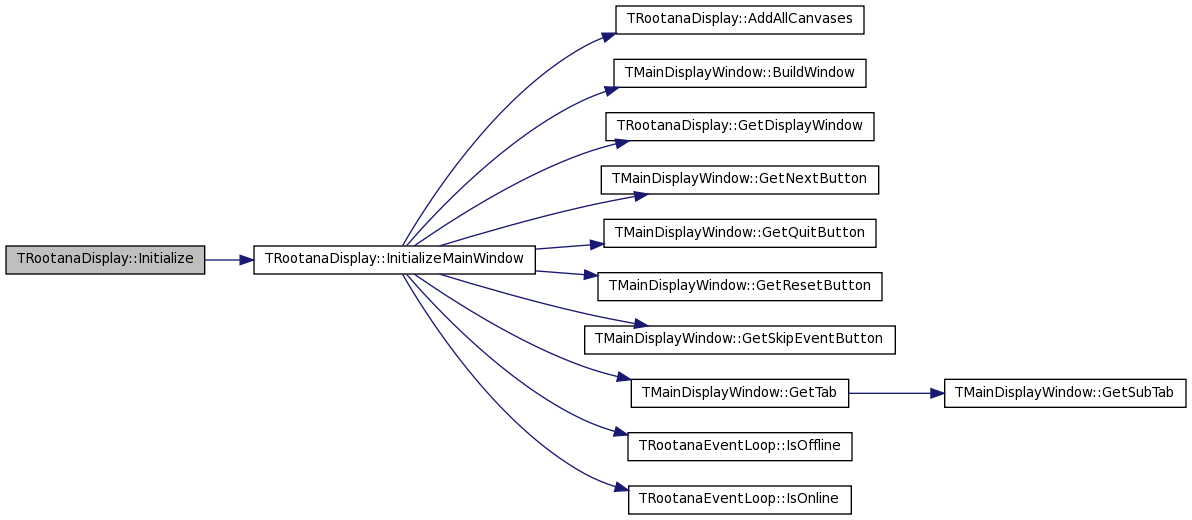
| void TRootanaDisplay::Initialize | ( | void | ) | [inline, virtual] |
Called after the arguments are processes but before reading the first event is read
Reimplemented from TRootanaEventLoop.
Definition at line 127 of file TRootanaDisplay.hxx.
References InitializeMainWindow().
00127                    {
00128     InitializeMainWindow();
00129   }
| void TRootanaDisplay::Initialize | ( | void | ) | [inline, virtual] |
Called after the arguments are processes but before reading the first event is read
Reimplemented from TRootanaEventLoop.
Definition at line 127 of file TRootanaDisplay.hxx.
References InitializeMainWindow().
00127                    {
00128     InitializeMainWindow();
00129   }
| void TRootanaDisplay::InitializeMainWindow | ( | ) | [private] |
Method to initialize the Main display window.
| void TRootanaDisplay::InitializeMainWindow | ( | ) | [private] |
Method to initialize the Main display window.
Definition at line 34 of file TRootanaDisplay.cxx.
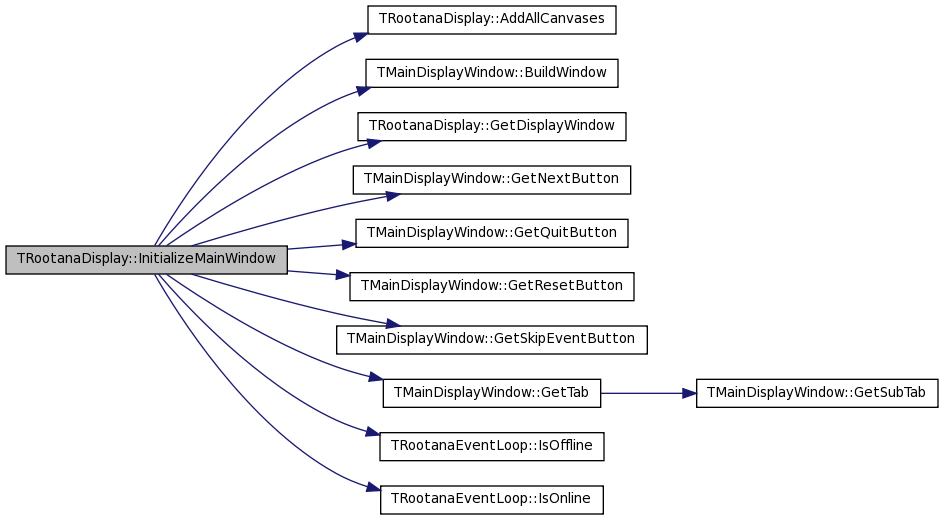
References AddAllCanvases(), TMainDisplayWindow::BuildWindow(), fMainWindow, fNumberSkipEventsOnline, GetDisplayWindow(), TMainDisplayWindow::GetNextButton(), TMainDisplayWindow::GetQuitButton(), TMainDisplayWindow::GetResetButton(), TMainDisplayWindow::GetSkipEventButton(), TMainDisplayWindow::GetTab(), TRootanaEventLoop::IsOffline(), and TRootanaEventLoop::IsOnline().
Referenced by Initialize().
00034                                           {
00035
00036   fMainWindow = new TMainDisplayWindow(gClient->GetRoot(),1200,800,IsOffline());
00037
00038   // Link the a bunch of buttons in TMainWindowDisplay to functions in TRootanaDisplay.
00039   // This bit of ROOT magic requires that the TRootanaDisplay class get rootcint-ed.
00040   // It also requires that TRootanaDisplay methods be public (protected doesn't work).
00041
00042   // The reset button
00043   fMainWindow->GetResetButton()->Connect("Clicked()", "TRootanaDisplay", this, "Reset()");
00044
00045   // The tab buttons
00046   fMainWindow->GetTab()->Connect("Selected(Int_t)", "TRootanaDisplay", this, "UpdatePlotsAction()");
00047
00048   // The quit button
00049   fMainWindow->GetQuitButton()->Connect("Clicked()", "TRootanaDisplay", this, "QuitButtonAction()");
00050
00051
00052   // The next button
00053   if(IsOffline())
00054     fMainWindow->GetNextButton()->Connect("Clicked()", "TRootanaDisplay", this, "NextButtonPushed()");
00055
00056   // The event skip counter
00057   if(IsOnline()){
00058     TGNumberEntry *skipButton = fMainWindow->GetSkipEventButton();
00059     skipButton->Connect("ValueSet(Long_t)", "TRootanaDisplay",this, "EventSkipButtonPushed()");
00060     skipButton->GetNumberEntry()->Connect("ReturnPressed()", "TRootanaDisplay", this, "EventSkipButtonPushed()");
00061     fNumberSkipEventsOnline = skipButton->GetNumberEntry()->GetIntNumber();
00062   }
00063
00064   // Let the user add all the canvases they want.
00065   AddAllCanvases();
00066
00067   // Now map out window.
00068   GetDisplayWindow()->BuildWindow();
00069
00070
00071 }

| bool TRootanaEventLoop::IsOffline | ( | ) | const [inline, inherited] |
Are we processing offline data?
Definition at line 104 of file TRootanaEventLoop.hxx.
References TRootanaEventLoop::fIsOffline.
00104 {return fIsOffline;};
| bool TRootanaEventLoop::IsOffline | ( | ) | const [inline, inherited] |
Are we processing offline data?
Definition at line 104 of file TRootanaEventLoop.hxx.
References TRootanaEventLoop::fIsOffline.
Referenced by InitializeMainWindow().
00104 {return fIsOffline;};

| bool TRootanaEventLoop::IsOnline | ( | ) | const [inline, inherited] |
Are we processing online data?
Definition at line 101 of file TRootanaEventLoop.hxx.
References TRootanaEventLoop::fIsOffline.
00101 {return !fIsOffline;};
| bool TRootanaEventLoop::IsOnline | ( | ) | const [inline, inherited] |
Are we processing online data?
Definition at line 101 of file TRootanaEventLoop.hxx.
References TRootanaEventLoop::fIsOffline.
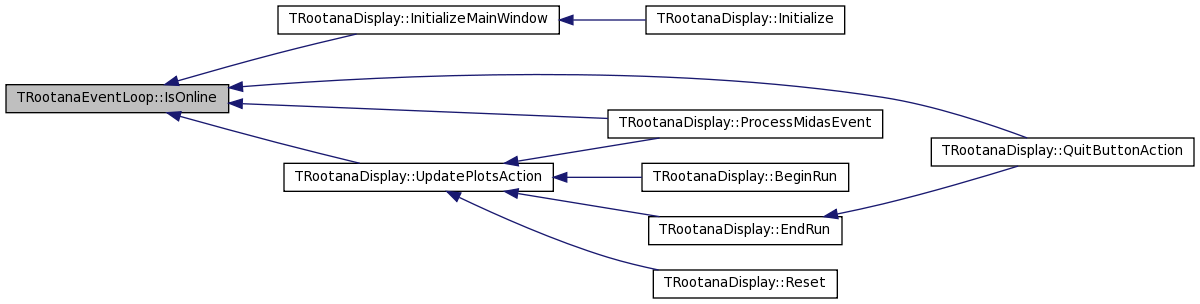
Referenced by InitializeMainWindow(), ProcessMidasEvent(), QuitButtonAction(), and UpdatePlotsAction().
00101 {return !fIsOffline;};
| bool TRootanaEventLoop::IsRootFileValid | ( | ) | [inline, inherited] |
Check if output ROOT file is valid and open.
Definition at line 148 of file TRootanaEventLoop.hxx.
References TRootanaEventLoop::fOutputFile.
00148                         {
00149     if(fOutputFile) return true;
00150     return false;
00151   }
| bool TRootanaEventLoop::IsRootFileValid | ( | ) | [inline, inherited] |
Check if output ROOT file is valid and open.
Definition at line 148 of file TRootanaEventLoop.hxx.
References TRootanaEventLoop::fOutputFile.
00148                         {
00149     if(fOutputFile) return true;
00150     return false;
00151   }
| int TRootanaEventLoop::IsRootOutputEnabled | ( | ) | [inline, inherited] |
Definition at line 156 of file TRootanaEventLoop.hxx.
References TRootanaEventLoop::fDisableRootOutput.
00156 {return !fDisableRootOutput;};
| int TRootanaEventLoop::IsRootOutputEnabled | ( | ) | [inline, inherited] |
Definition at line 156 of file TRootanaEventLoop.hxx.
References TRootanaEventLoop::fDisableRootOutput.
00156 {return !fDisableRootOutput;};
| void TRootanaDisplay::NextButtonPushed | ( | ) | [inline] |
Method for when next button is pushed (offline mode).
Definition at line 94 of file TRootanaDisplay.hxx.
References waitingForNextButton.
00094                          {
00095     waitingForNextButton = false;
00096   }
| void TRootanaDisplay::NextButtonPushed | ( | ) | [inline] |
Method for when next button is pushed (offline mode).
Definition at line 94 of file TRootanaDisplay.hxx.
References waitingForNextButton.
00094                          {
00095     waitingForNextButton = false;
00096   }
| void TRootanaEventLoop::OpenRootFile | ( | int | run | ) | [inherited] |
Open output ROOT file.
| void TRootanaEventLoop::OpenRootFile | ( | int | run | ) | [inherited] |
Open output ROOT file.
Definition at line 375 of file TRootanaEventLoop.cxx.
References TRootanaEventLoop::fDisableRootOutput, TRootanaEventLoop::fOutputFile, TRootanaEventLoop::fOutputFilename, and NetDirectoryExport().
Referenced by TRootanaEventLoop::ProcessMidasFile().
00375                                            {
00376
00377   if(fDisableRootOutput) return;
00378
00379   if(fOutputFile) {
00380     fOutputFile->Write();
00381     fOutputFile->Close();
00382     fOutputFile=0;
00383   }
00384
00385   char filename[1024];
00386   sprintf(filename, "%s%05d.root",fOutputFilename.c_str(), run);
00387   fOutputFile = new TFile(filename,"RECREATE");
00388   std::cout << "Opened output file with name : " << filename << std::endl;
00389
00390
00391 #ifdef HAVE_LIBNETDIRECTORY
00392   NetDirectoryExport(fOutputFile, "outputFile");
00393 #endif
00394 }


| virtual void TRootanaDisplay::PlotCanvas | ( | TDataContainer & | dataContainer | ) | [inline, virtual] |
This method can be implemented by users to plotting of current canvas.
Reimplemented in MyTestLoop, and MyTestLoop.
Definition at line 88 of file TRootanaDisplay.hxx.
| virtual void TRootanaDisplay::PlotCanvas | ( | TDataContainer & | dataContainer | ) | [inline, virtual] |
This method can be implemented by users to plotting of current canvas.
Reimplemented in MyTestLoop, and MyTestLoop.
Definition at line 88 of file TRootanaDisplay.hxx.
Referenced by UpdatePlotsAction().

| virtual bool TRootanaEventLoop::PreFilter | ( | TDataContainer & | dataContainer | ) | [inline, virtual, inherited] |
The PreFilter method allows user to specify whether to ignore a particular event. Specifically, if PreFilter returns
true -> then ProcessMidasEvent will be called or false -> then ProcessMidasEvent will not be called
This is particularly useful for the RootanaDisplay, where you might want to only process and plot certain events.
Definition at line 98 of file TRootanaEventLoop.hxx.
| virtual bool TRootanaEventLoop::PreFilter | ( | TDataContainer & | dataContainer | ) | [inline, virtual, inherited] |
The PreFilter method allows user to specify whether to ignore a particular event. Specifically, if PreFilter returns
true -> then ProcessMidasEvent will be called or false -> then ProcessMidasEvent will not be called
This is particularly useful for the RootanaDisplay, where you might want to only process and plot certain events.
Definition at line 98 of file TRootanaEventLoop.hxx.
Referenced by TRootanaEventLoop::ProcessMidasFile().

| bool TRootanaDisplay::ProcessMidasEvent | ( | TDataContainer & | dataContainer | ) | [private, virtual] |
| bool TRootanaDisplay::ProcessMidasEvent | ( | TDataContainer & | dataContainer | ) | [private, virtual] |
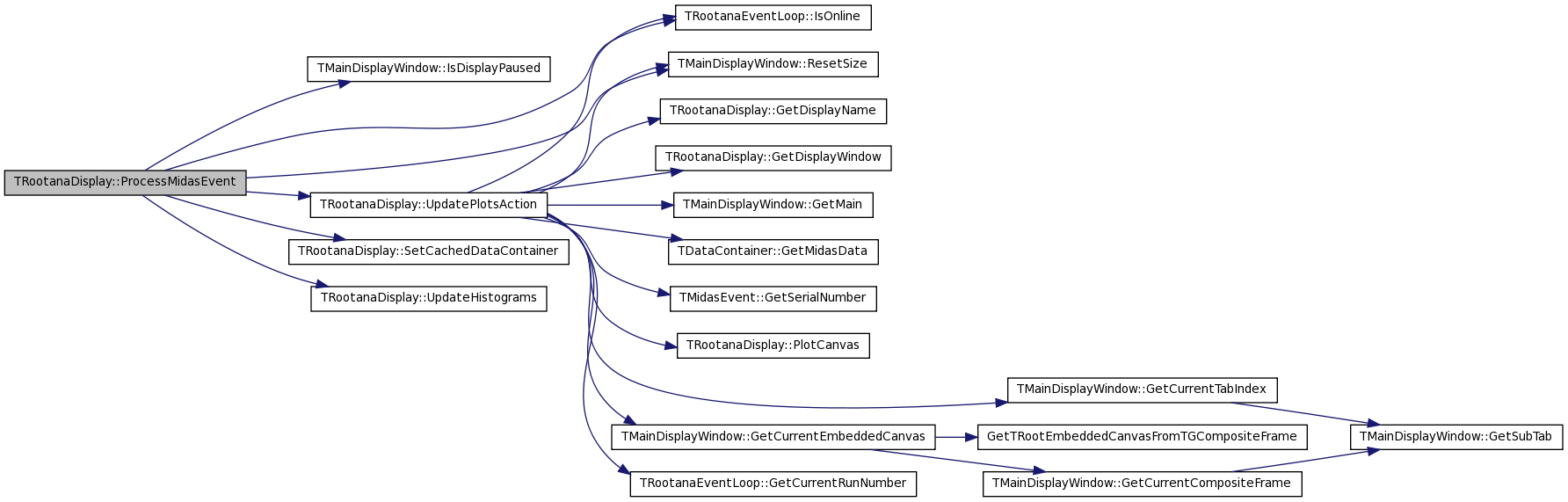
Process each midas event.
Implements TRootanaEventLoop.
Reimplemented in MyTestLoop.
Definition at line 96 of file TRootanaDisplay.cxx.
References fCachedDataContainer, fCanvasHandlers, fMainWindow, fNumberProcessed, fNumberSkipEventsOffline, fNumberSkipEventsOnline, fQuitPushed, TMainDisplayWindow::IsDisplayPaused(), TRootanaEventLoop::IsOnline(), TMainDisplayWindow::ResetSize(), SetCachedDataContainer(), UpdateHistograms(), UpdatePlotsAction(), and waitingForNextButton.
00096                                                                     {
00097
00098   fMainWindow->ResetSize();
00099   fNumberProcessed++;
00100
00101   // Only update histograms if we are "offline" or "online and but paused".
00102   // This ensures that we don't update if the user pressed 'pause' since the
00103   // last event.
00104   if(!IsOnline() || (IsOnline() && !fMainWindow->IsDisplayPaused())){
00105     SetCachedDataContainer(dataContainer);
00106
00107     // Perform any histogram updating from user code.
00108     UpdateHistograms(*fCachedDataContainer);
00109     for(unsigned int i = 0; i < fCanvasHandlers.size(); i++)
00110       fCanvasHandlers[i].second->UpdateCanvasHistograms(*fCachedDataContainer);
00111   }
00112
00113   // If processing online and if processing is not paused, then just plot and return
00114   if(IsOnline() && !fMainWindow->IsDisplayPaused() ){
00115
00116     // Do canvas plotting from user code;
00117     // only do plot if we have processed enough events
00118     if(fNumberSkipEventsOnline == 1 || fNumberProcessed % fNumberSkipEventsOnline  == 1){
00119       UpdatePlotsAction();
00120     }
00121
00122     return true;
00123   }
00124
00125   // If processing offline, make sure we have skipped the right number of events.
00126   if(!IsOnline() && fNumberSkipEventsOffline >= fNumberProcessed){
00127     return true;
00128   }
00129
00130   UpdatePlotsAction();
00131
00132   // If offline, then keep looping till the next event button is pushed.
00133   // If online, then keep looping till the resume button is pushed.
00134   waitingForNextButton = true;
00135   while(1){
00136
00137     // Add some sleeps; otherwise program takes 100% of CPU...
00138     usleep(1000);
00139
00140     // ROOT signal/slot trick; this variable will magically
00141     // get changed to false once the next button is pushed.
00142     if(!waitingForNextButton) break;
00143
00144     // Alternately, break out if in online mode and
00145     // no longer in paused state.  Again, the state of variable
00146     // will be changed by ROOT signal/slot callback.
00147     if(IsOnline() && !fMainWindow->IsDisplayPaused()) break;
00148
00149                 // Check if quit button has been pushed.  See QuitButtonAction() for details
00150                 if(IsOnline() && fQuitPushed) break;
00151
00152     // Resize windows, if needed.
00153     fMainWindow->ResetSize();
00154
00155     // handle GUI events
00156     bool result = gSystem->ProcessEvents();
00157
00158   }
00159   return true;
00160
00161 }
| int TRootanaEventLoop::ProcessMidasFile | ( | TApplication * | app, | |
| const char * | fname | |||
| ) | [inherited] |
| int TRootanaEventLoop::ProcessMidasFile | ( | TApplication * | app, | |
| const char * | fname | |||
| ) | [inherited] |
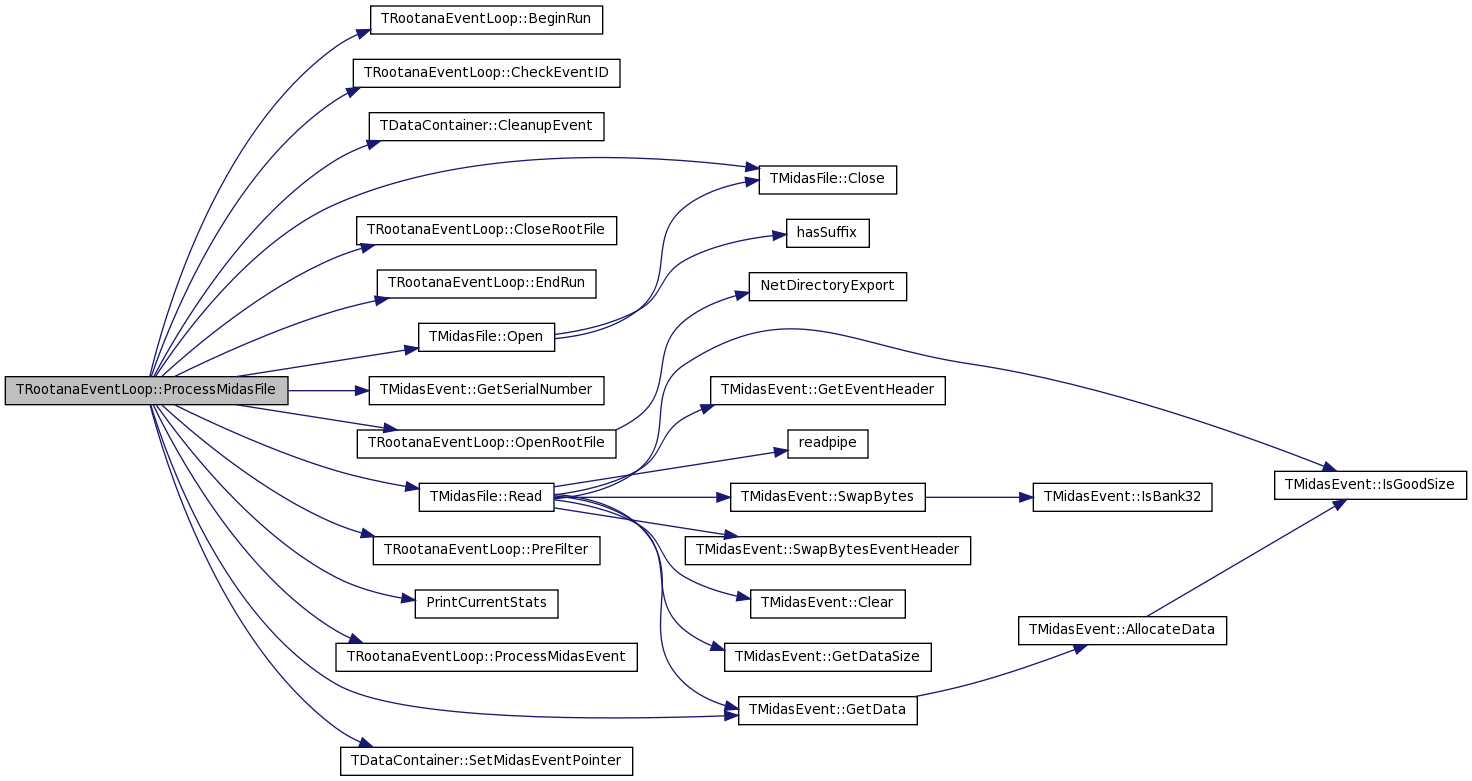
Treat the begin run and end run events differently.
Definition at line 290 of file TRootanaEventLoop.cxx.
References TRootanaEventLoop::BeginRun(), TRootanaEventLoop::CheckEventID(), TDataContainer::CleanupEvent(), TMidasFile::Close(), TRootanaEventLoop::CloseRootFile(), TRootanaEventLoop::EndRun(), TRootanaEventLoop::fCurrentRunNumber, TRootanaEventLoop::fDataContainer, TRootanaEventLoop::fMaxEvents, TRootanaEventLoop::fODB, TMidasEvent::GetData(), TMidasEvent::GetSerialNumber(), TMidasFile::Open(), TRootanaEventLoop::OpenRootFile(), TRootanaEventLoop::PreFilter(), PrintCurrentStats(), TRootanaEventLoop::ProcessMidasEvent(), TMidasFile::Read(), and TDataContainer::SetMidasEventPointer().
Referenced by TRootanaEventLoop::ExecuteLoop().
00291 {
00292   TMidasFile f;
00293   bool tryOpen = f.Open(fname);
00294
00295   if (!tryOpen){
00296     printf("Cannot open input file \"%s\"\n",fname);
00297     return -1;
00298   }
00299
00300
00301   int i=0;
00302   while (1)
00303     {
00304       TMidasEvent event;
00305       if (!f.Read(&event))
00306         break;
00307
00308       /// Treat the begin run and end run events differently.
00309       int eventId = event.GetEventId();
00310
00311
00312
00313       if ((eventId & 0xFFFF) == 0x8000){// begin run event
00314
00315         event.Print();
00316
00317         // Load ODB contents from the ODB XML file
00318         if (fODB) delete fODB;
00319         fODB = new XmlOdb(event.GetData(),event.GetDataSize());
00320
00321         fCurrentRunNumber = event.GetSerialNumber();
00322         OpenRootFile(fCurrentRunNumber);
00323         BeginRun(0,event.GetSerialNumber(),0);
00324
00325       } else if ((eventId & 0xFFFF) == 0x8001){// end run event
00326
00327         event.Print();
00328         //EndRun(0,fCurrentRunNumber,0);
00329
00330
00331       } else if ((eventId & 0xFFFF) == 0x8002){
00332
00333         event.Print();
00334         printf("Log message: %s\n", event.GetData());
00335
00336       }else if(CheckEventID(eventId)){ // all other events; check that this event ID should be processed.
00337
00338         // Set the bank list for midas event.
00339         event.SetBankList();
00340
00341         // Set the midas event pointer in the physics event.
00342         fDataContainer->SetMidasEventPointer(event);
00343
00344         //ProcessEvent if prefilter is satisfied...
00345                                 if(PreFilter(*fDataContainer))
00346                                          ProcessMidasEvent(*fDataContainer);
00347
00348         // Cleanup the information for this event.
00349         fDataContainer->CleanupEvent();
00350
00351       }
00352
00353       PrintCurrentStats();
00354
00355       // Check if we have processed desired number of events.
00356       i++;
00357       if ((fMaxEvents!=0)&&(i>=fMaxEvents)){
00358         printf("Reached event %d, exiting loop.\n",i);
00359         break;
00360       }
00361     }
00362
00363   f.Close();
00364
00365   EndRun(0,fCurrentRunNumber,0);
00366   CloseRootFile();
00367
00368   // start the ROOT GUI event loop
00369   //  app->Run(kTRUE);
00370
00371   return 0;
00372 }

| void TRootanaEventLoop::ProcessThisEventID | ( | int | eventID | ) | [inline, inherited] |
Provide a way to force program to only process certain event IDs. This method can be called repeatedly to specify several different event IDs to accept. If the method is not called then all eventIDs are accepted.
Definition at line 167 of file TRootanaEventLoop.hxx.
References TRootanaEventLoop::fProcessEventIDs.
00167                                       {
00168     fProcessEventIDs.push_back(eventID);
00169   };
| void TRootanaEventLoop::ProcessThisEventID | ( | int | eventID | ) | [inline, inherited] |
Provide a way to force program to only process certain event IDs. This method can be called repeatedly to specify several different event IDs to accept. If the method is not called then all eventIDs are accepted.
Definition at line 167 of file TRootanaEventLoop.hxx.
References TRootanaEventLoop::fProcessEventIDs.
00167                                       {
00168     fProcessEventIDs.push_back(eventID);
00169   };
| void TRootanaDisplay::QuitButtonAction | ( | ) |
Method to call when 'quit' button is pressed.
| void TRootanaDisplay::QuitButtonAction | ( | ) |
Method to call when 'quit' button is pressed.
Definition at line 234 of file TRootanaDisplay.cxx.
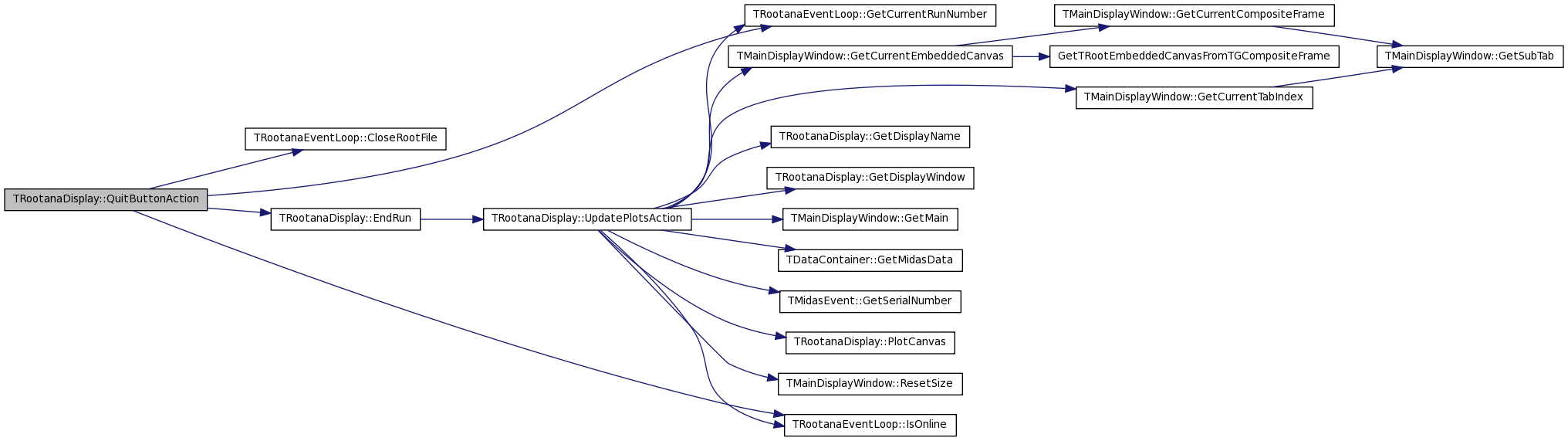
References TRootanaEventLoop::CloseRootFile(), EndRun(), fQuitPushed, TRootanaEventLoop::GetCurrentRunNumber(), and TRootanaEventLoop::IsOnline().
00235 {
00236   // If we are offline, then we close the ROOT file here.
00237   // If we are online then the control will return to TRootanaEventLoop::ProcessMidasOnline
00238   // which will take care of closing the file.
00239
00240   if(!IsOnline()){
00241     EndRun(0,GetCurrentRunNumber(),0);
00242     CloseRootFile();
00243   }
00244
00245         // Set a flag so that we can breakout of loop if
00246         // we are ONLINE and PAUSED.
00247         // It is odd that gApplication->Terminate(0) doesn't
00248         // finish, but somehow it seems to wait for the the
00249         // RootanaDisplay::ProcessMidasEvent() to finish.
00250         fQuitPushed = true;
00251   gApplication->Terminate(0);
00252 }
| void TRootanaDisplay::Reset | ( | ) |
This method calls a couple other methods for resets the histograms. This method is attached using the ROOT signal/input system to the reset button on the canvas.
| void TRootanaDisplay::Reset | ( | ) |
This method calls a couple other methods for resets the histograms. This method is attached using the ROOT signal/input system to the reset button on the canvas.
Definition at line 224 of file TRootanaDisplay.cxx.
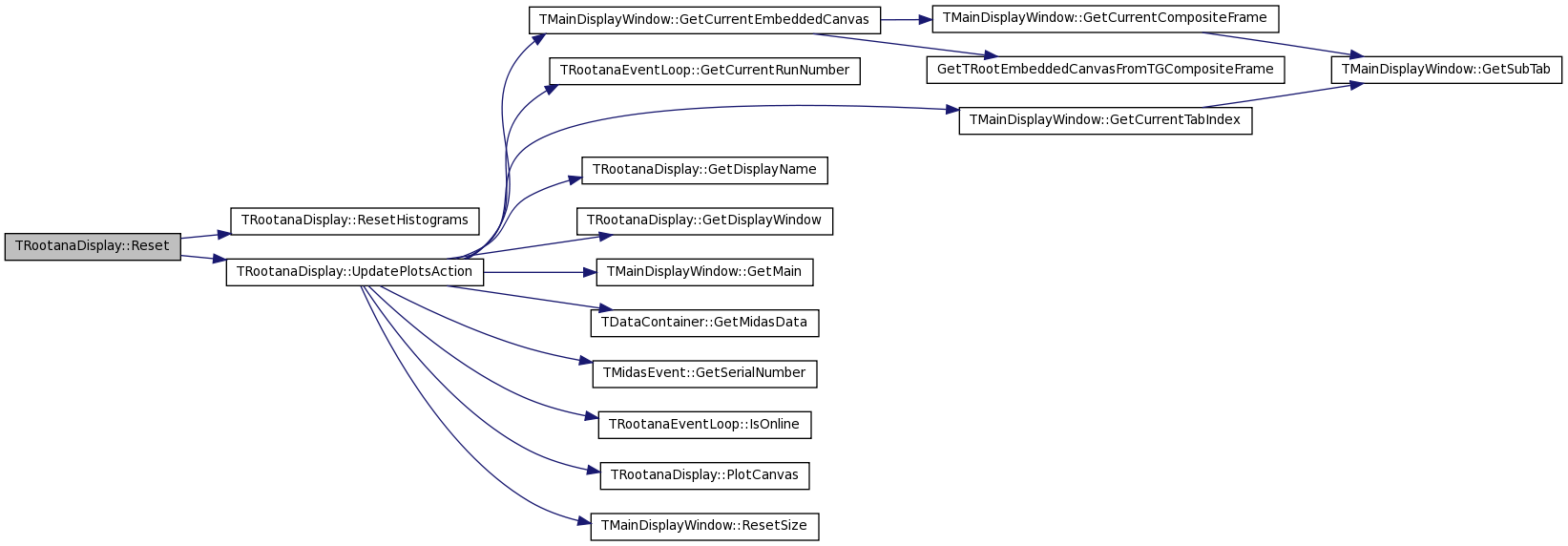
References fCanvasHandlers, ResetHistograms(), and UpdatePlotsAction().
00224                            {
00225   // Call the reset functions defined in user event loop.
00226   ResetHistograms();
00227   // Call the user defined canvas classes.
00228   for(unsigned int i = 0; i < fCanvasHandlers.size(); i++)
00229       fCanvasHandlers[i].second->ResetCanvasHistograms();
00230   UpdatePlotsAction();
00231 }
| virtual void TRootanaDisplay::ResetHistograms | ( | ) | [inline, virtual] |
This method can be implemented by users to plotting of current canvas.
Reimplemented in MyTestLoop, and MyTestLoop.
Definition at line 91 of file TRootanaDisplay.hxx.
| virtual void TRootanaDisplay::ResetHistograms | ( | ) | [inline, virtual] |
This method can be implemented by users to plotting of current canvas.
Reimplemented in MyTestLoop, and MyTestLoop.
Definition at line 91 of file TRootanaDisplay.hxx.
Referenced by Reset().

| void TRootanaDisplay::SetCachedDataContainer | ( | TDataContainer & | dataContainer | ) | [inline, private] |
Set the cached copy of midas dataContainer. !!! This is very questionable! Caching each dataContainer might add a considerable overhead to the processing!
Definition at line 189 of file TRootanaDisplay.hxx.
References fCachedDataContainer.
00189                                                             {
00190     if(fCachedDataContainer) delete fCachedDataContainer;
00191     fCachedDataContainer = new TDataContainer(dataContainer);
00192   }
| void TRootanaDisplay::SetCachedDataContainer | ( | TDataContainer & | dataContainer | ) | [inline, private] |
Set the cached copy of midas dataContainer. !!! This is very questionable! Caching each dataContainer might add a considerable overhead to the processing!
Definition at line 189 of file TRootanaDisplay.hxx.
References fCachedDataContainer.
Referenced by ProcessMidasEvent().
00189                                                             {
00190     if(fCachedDataContainer) delete fCachedDataContainer;
00191     fCachedDataContainer = new TDataContainer(dataContainer);
00192   }

| void TRootanaEventLoop::SetCurrentRunNumber | ( | int | run | ) | [inline, inherited] |
Current Run Number.
Definition at line 110 of file TRootanaEventLoop.hxx.
References TRootanaEventLoop::fCurrentRunNumber.
00110 {fCurrentRunNumber = run;};
| void TRootanaEventLoop::SetCurrentRunNumber | ( | int | run | ) | [inline, inherited] |
Current Run Number.
Definition at line 110 of file TRootanaEventLoop.hxx.
References TRootanaEventLoop::fCurrentRunNumber.
00110 {fCurrentRunNumber = run;};
| void TRootanaDisplay::SetDisplayName | ( | std::string | name | ) | [inline] |
Set Display name.
Definition at line 125 of file TRootanaDisplay.hxx.
References fDisplayName.
00125 {fDisplayName = name;}
| void TRootanaDisplay::SetDisplayName | ( | std::string | name | ) | [inline] |
Set Display name.
Definition at line 125 of file TRootanaDisplay.hxx.
References fDisplayName.
Referenced by MyTestLoop::AddAllCanvases().
00125 {fDisplayName = name;}

| void TRootanaDisplay::SetNumberSkipEvent | ( | int | number | ) | [inline] |
Function so that user can specify at outset how many events to skip before refreshing display (in online mode).
Definition at line 116 of file TRootanaDisplay.hxx.
References fMainWindow, fNumberSkipEventsOnline, and TMainDisplayWindow::GetSkipEventButton().
00116                                      {
00117     fNumberSkipEventsOnline = number;
00118     if(fMainWindow->GetSkipEventButton())
00119       fMainWindow->GetSkipEventButton()->GetNumberEntry()->SetIntNumber(number);
00120   }

| void TRootanaDisplay::SetNumberSkipEvent | ( | int | number | ) | [inline] |
Function so that user can specify at outset how many events to skip before refreshing display (in online mode).
Definition at line 116 of file TRootanaDisplay.hxx.
References fMainWindow, fNumberSkipEventsOnline, and TMainDisplayWindow::GetSkipEventButton().
Referenced by MyTestLoop::AddAllCanvases().
00116                                      {
00117     fNumberSkipEventsOnline = number;
00118     if(fMainWindow->GetSkipEventButton())
00119       fMainWindow->GetSkipEventButton()->GetNumberEntry()->SetIntNumber(number);
00120   }

| void TRootanaEventLoop::SetOnlineName | ( | std::string | name | ) | [inline, inherited] |
Definition at line 162 of file TRootanaEventLoop.hxx.
References TRootanaEventLoop::fOnlineName.
00162 {fOnlineName = name;};
| void TRootanaEventLoop::SetOnlineName | ( | std::string | name | ) | [inline, inherited] |
Definition at line 162 of file TRootanaEventLoop.hxx.
References TRootanaEventLoop::fOnlineName.
00162 {fOnlineName = name;};
| void TRootanaEventLoop::SetOutputFilename | ( | std::string | name | ) | [inline, inherited] |
Set the output filename. File name will be XXX.root, where XXX is run number
Definition at line 160 of file TRootanaEventLoop.hxx.
References TRootanaEventLoop::fOutputFilename.
00160 {fOutputFilename = name;};
| void TRootanaEventLoop::SetOutputFilename | ( | std::string | name | ) | [inline, inherited] |
Set the output filename. File name will be XXX.root, where XXX is run number
Definition at line 160 of file TRootanaEventLoop.hxx.
References TRootanaEventLoop::fOutputFilename.
Referenced by MyTestLoop::MyTestLoop().
00160 {fOutputFilename = name;};

| void TRootanaEventLoop::SuppressTimestampWarnings | ( | ) | [inline, inherited] |
Suppress the warning methods regarding old timestamp events for online ie warnings about analyzer falling behind data taking.
Definition at line 176 of file TRootanaEventLoop.hxx.
References TRootanaEventLoop::fSuppressTimestampWarnings.
00176 { fSuppressTimestampWarnings = true;};
| void TRootanaEventLoop::SuppressTimestampWarnings | ( | ) | [inline, inherited] |
Suppress the warning methods regarding old timestamp events for online ie warnings about analyzer falling behind data taking.
Definition at line 176 of file TRootanaEventLoop.hxx.
References TRootanaEventLoop::fSuppressTimestampWarnings.
00176 { fSuppressTimestampWarnings = true;};
| virtual void TRootanaDisplay::UpdateHistograms | ( | TDataContainer & | dataContainer | ) | [inline, virtual] |
This method can be implemented by users to update user histograms.
Reimplemented in MyTestLoop, and MyTestLoop.
Definition at line 85 of file TRootanaDisplay.hxx.
| virtual void TRootanaDisplay::UpdateHistograms | ( | TDataContainer & | dataContainer | ) | [inline, virtual] |
This method can be implemented by users to update user histograms.
Reimplemented in MyTestLoop, and MyTestLoop.
Definition at line 85 of file TRootanaDisplay.hxx.
Referenced by ProcessMidasEvent().

| void TRootanaDisplay::UpdatePlotsAction | ( | ) |
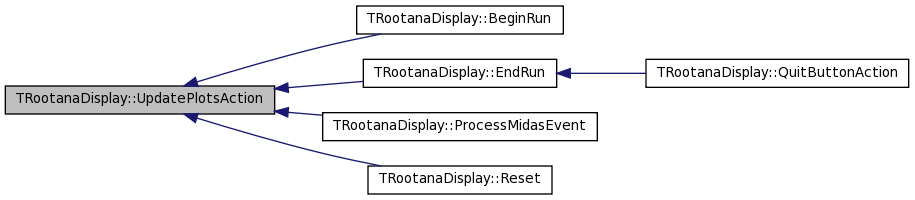
This is a generic action to call when some button gets pushed. Also called in regular event handling loop
| void TRootanaDisplay::UpdatePlotsAction | ( | ) |
This is a generic action to call when some button gets pushed. Also called in regular event handling loop
Definition at line 182 of file TRootanaDisplay.cxx.
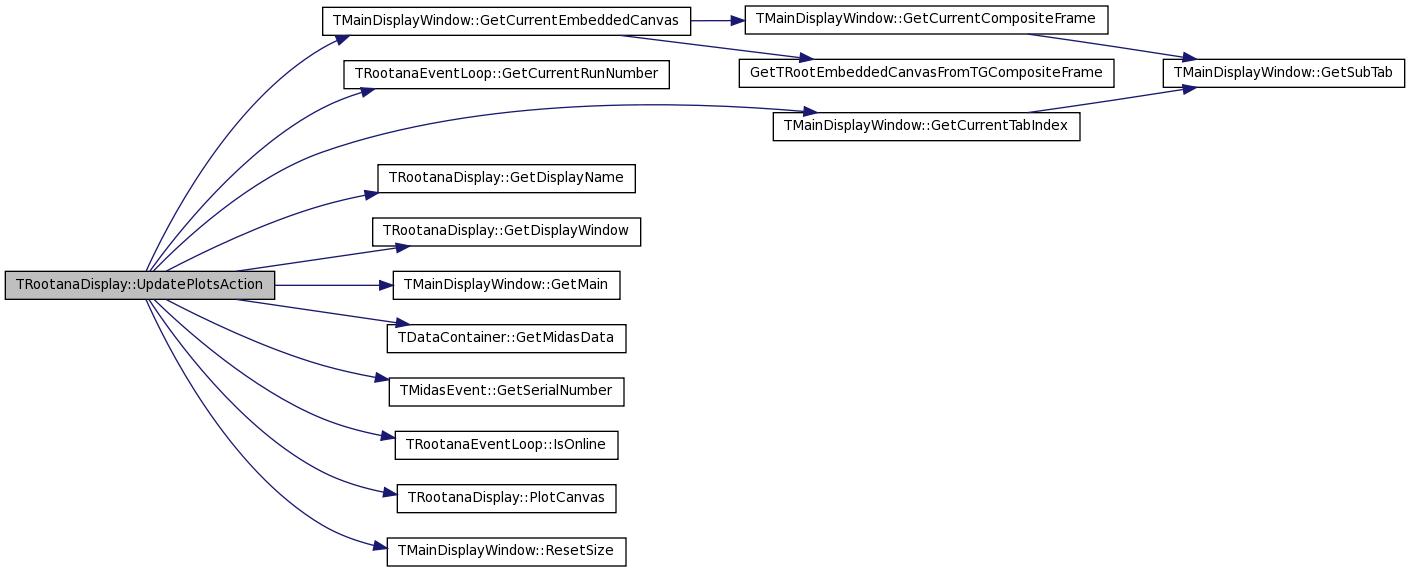
References fCachedDataContainer, fCanvasHandlers, fMainWindow, TMainDisplayWindow::GetCurrentEmbeddedCanvas(), TRootanaEventLoop::GetCurrentRunNumber(), TMainDisplayWindow::GetCurrentTabIndex(), GetDisplayName(), GetDisplayWindow(), TMainDisplayWindow::GetMain(), TDataContainer::GetMidasData(), TMidasEvent::GetSerialNumber(), TRootanaEventLoop::IsOnline(), PlotCanvas(), and TMainDisplayWindow::ResetSize().
Referenced by BeginRun(), EndRun(), ProcessMidasEvent(), and Reset().
00182                                        {
00183
00184   if(!fCachedDataContainer){
00185     char displayTitle[200];
00186     sprintf(displayTitle,"%s (): run %i (no events yet)",
00187             GetDisplayName().c_str(),GetCurrentRunNumber());
00188     GetDisplayWindow()->GetMain()->SetWindowName(displayTitle);
00189     return;
00190   }
00191
00192   // Execute the plotting actions from user event loop.
00193   PlotCanvas(*fCachedDataContainer);
00194
00195   // See if we find a user class that describes this tab.
00196   std::pair<int,int> tabdex = GetDisplayWindow()->GetCurrentTabIndex();
00197   for(unsigned int i = 0; i < fCanvasHandlers.size(); i++){
00198     if(tabdex == fCanvasHandlers[i].first){
00199       TRootEmbeddedCanvas* embed = GetDisplayWindow()->GetCurrentEmbeddedCanvas();
00200       fCanvasHandlers[i].second->PlotCanvas(*fCachedDataContainer,embed);
00201     }
00202   }
00203
00204
00205   // Set the display title
00206   char displayTitle[200];
00207   if(IsOnline())
00208     sprintf(displayTitle,"%s (online): run %i event %i",
00209             GetDisplayName().c_str(),GetCurrentRunNumber(),
00210             fCachedDataContainer->GetMidasData().GetSerialNumber());
00211   else
00212     sprintf(displayTitle,"%s (offline): run %i event %i",
00213             GetDisplayName().c_str(),GetCurrentRunNumber(),
00214             fCachedDataContainer->GetMidasData().GetSerialNumber());
00215
00216   GetDisplayWindow()->GetMain()->SetWindowName(displayTitle);
00217
00218
00219   // Update canvas and window sizes
00220   fMainWindow->ResetSize();
00221
00222 }
| virtual void TRootanaEventLoop::Usage | ( | void | ) | [virtual, inherited] |
Called when there is a usage error. This code should print a usage message and then return.
Reimplemented in MyTestLoop.
| void TRootanaEventLoop::Usage | ( | void | ) | [virtual, inherited] |
Called when there is a usage error. This code should print a usage message and then return.
Reimplemented in MyTestLoop.
Definition at line 112 of file TRootanaEventLoop.cxx.
Referenced by TRootanaEventLoop::PrintHelp().

| void TRootanaDisplay::UsageRAD | ( | void | ) | [inline, virtual] |
Also a special version of usage for TRootanaDisplay. See CheckOptionRAD.
Reimplemented from TRootanaEventLoop.
Definition at line 140 of file TRootanaDisplay.hxx.
| void TRootanaDisplay::UsageRAD | ( | void | ) | [inline, virtual] |
Also a special version of usage for TRootanaDisplay. See CheckOptionRAD.
Reimplemented from TRootanaEventLoop.
Definition at line 140 of file TRootanaDisplay.hxx.
Member Data Documentation
TDataContainer * TRootanaDisplay::fCachedDataContainer [private] |
We keep a cached copy of the midas event (so that it can used for callback).
Definition at line 184 of file TRootanaDisplay.hxx.
Referenced by ProcessMidasEvent(), SetCachedDataContainer(), and UpdatePlotsAction().
std::vector< std::pair< std::pair< int, int >,TCanvasHandleBase * > > TRootanaDisplay::fCanvasHandlers [private] |
This is a vector of user-defined canvas handler classes. The first part of pair is the tab number.
Definition at line 199 of file TRootanaDisplay.hxx.
Referenced by AddSingleCanvas(), BeginRun(), EndRun(), ProcessMidasEvent(), Reset(), UpdatePlotsAction(), and ~TRootanaDisplay().
std::string TRootanaDisplay::fDisplayName [private] |
Display name.
Definition at line 195 of file TRootanaDisplay.hxx.
Referenced by GetDisplayName(), and SetDisplayName().
TMainDisplayWindow * TRootanaDisplay::fMainWindow [private] |
The pointer to our display window.
Definition at line 167 of file TRootanaDisplay.hxx.
Referenced by AddSingleCanvas(), EventSkipButtonPushed(), GetDisplayWindow(), InitializeMainWindow(), ProcessMidasEvent(), SetNumberSkipEvent(), and UpdatePlotsAction().
int TRootanaDisplay::fNumberProcessed [private] |
Definition at line 161 of file TRootanaDisplay.hxx.
Referenced by ProcessMidasEvent().
int TRootanaDisplay::fNumberSkipEventsOffline [private] |
Variable to keep track of how many events to skip when running offline; defined by command line argument.
Definition at line 158 of file TRootanaDisplay.hxx.
Referenced by CheckOptionRAD(), and ProcessMidasEvent().
int TRootanaDisplay::fNumberSkipEventsOnline [private] |
Variable to keep track of how many events to skip before updating display; we have separate variable for online and offline modes.
Definition at line 154 of file TRootanaDisplay.hxx.
Referenced by EventSkipButtonPushed(), InitializeMainWindow(), ProcessMidasEvent(), and SetNumberSkipEvent().
TDirectory * TRootanaEventLoop::fOnlineHistDir [protected, inherited] |
TDirectory for online histograms.
Definition at line 198 of file TRootanaEventLoop.hxx.
Referenced by TRootanaEventLoop::ExecuteLoop(), MyTestLoop::ProcessMidasEvent(), and TRootanaEventLoop::TRootanaEventLoop().
bool TRootanaDisplay::fQuitPushed [private] |
Flag to keep track of if quite button has been pushed.
Definition at line 164 of file TRootanaDisplay.hxx.
Referenced by ProcessMidasEvent(), and QuitButtonAction().
static TRootanaEventLoop * TRootanaEventLoop::fTRootanaEventLoop = NULL [static, protected, inherited] |
The static pointer to the singleton instance.
Definition at line 195 of file TRootanaEventLoop.hxx.
Referenced by TRootanaEventLoop::CreateSingleton(), and TRootanaEventLoop::Get().
bool TRootanaDisplay::waitingForNextButton [private] |
Definition at line 150 of file TRootanaDisplay.hxx.
Referenced by NextButtonPushed(), and ProcessMidasEvent().
The documentation for this class was generated from the following files:
- include/TRootanaDisplay.hxx
- libAnalyzerDisplay/TRootanaDisplay.hxx
- libAnalyzerDisplay/TRootanaDisplay.cxx