| ID |
Date |
Author |
Topic |
Subject |
|
3113
|
13 Nov 2025 |
Stefan Ritt | Bug Report | broken scroll on midas web pages |
I confirm the problem is there (at least under MacOSX Safari) and I will take care of it.

Stefan |
|
3114
|
13 Nov 2025 |
Stefan Ritt | Suggestion | Python sc_frontend.py Display and History variables |
> We would like to write an sc_frontend in Python instead of C++. All our drivers
> work correctly, as well as the creation of the database in the ODB, including the
> creation of Commons, Statistics, Variables, and Settings.
> However, we are unable to correctly create the database entries needed to manage
> History and Display.
>
> As we understand it, in C++ this is handled by setting the EQ_SLOW flag, which
> doesn’t seem to be implemented in the Python libraries.
> How can we manually create the necessary variables for Display and History?

I'm not an expert of the Python part of MIDAS (Ben Smith is), but I know that you have
functions to create keys and set values in the ODB, so you should be able to create
these things manually as you need them.

Stefan |
|
3116
|
14 Nov 2025 |
Stefan Ritt | Bug Report | broken scroll on midas web pages |
This problem was introduced by ZS in March 2023 with these commits:

https://bitbucket.org/tmidas/midas/commits/25b13f875ff1f7e2f4e987273c81d6356dd2ff53
https://bitbucket.org/tmidas/midas/commits/2a9e902e07156e12edecb5c2257e4dbd944f8377

by setting

 d.style.position = "fixed";

which prevents the scrolling. I have no idea why this change was made, so it should be fixed by the original
author.

Stefan |
|
3132
|
24 Nov 2025 |
Stefan Ritt | Forum | Control external process from inside MIDAS |
Dear all,
Stefan wants to run an external EPICS driver process as a detached process and somehow "glue" it to midas to control it. Actually a similar requirement led to the development of MIDAS in the '90s. We had too many configuration files lying around, to many process to control and interact together with each other and so on. With the development of MIDAS I wanted to integrate all that. There is one ODB to control an parasitize everything, one central process handling to see if processes are alive, raise an alarm if they die, automatically restart them if necessary and so on. Doing this now externally again is orthogonal to the original design concept of MIDAS and will cause many problems. I therefore strongly recommend to to juggle around with systemctl and syslog, but to make everything a MIDAS process. It's simply a "cm_connect_experiment()" and "cm_disconnect_experiment()" in the end. Then you set
/programs/requited = y
and
/programs/start command = <cmd>
You can set the "alarm class" to raise an alarm if the program crashes, and you will see all messages if you use "cm_msg()" inside the program rather than "printf()". Injecting a separate .log file into the system will show things on the message page, but these messages do not go through the SYSMSG buffer, and cannot received by other programs. Maybe you noticed that mhttpd on the status page always shows the last message it received, which can be very helpful. To see if a program is running, you only need a cm_exist() call, which also exists for custom web pages.
Rather than investing time to re-invent the wheel here, better try to modify your EPICS driver process to become a midas process.
If you have an external process which you absolutely cannot modify, I would rather write a wrapper midas program to start the external process, intercept it's output via a pipe, and put its output properly into the midas message system with cm_msg(). In the main loop of your wrapper function you check the external process via whatever you want, and if it dies trigger an alarm or restart it from your wrapper program. You can then set an alarm on your wrapper program to make sure this one is always running.
Best regards,
StefanR |
|
3133
|
24 Nov 2025 |
Stefan Ritt | Info | switch midas to c++17 |
> > > Following discussions at the MIDAS workshop, we propose to move MIDAS from c++11 to c++17.
> > We shall move forward with this change.
>
> It is done. Last c++11 MIDAS is midas-2025-11-a (plus the db_delete_key merge).
>
> I notice the cmake does not actually pass "-std=c++17" to the c++ compiler, and on U-20, it is likely
> the default c++14 is used. cmake always does the wrong thing and this will need to be fixed later.
>
> K.O.

We should either use

set(CMAKE_CSS_STANDARD 17)

or

target_compile_features(<target> PUBLIC cxx_std_17)

but not mix both. We have already the second one for the midas library, like

target_compile_features(objlib PUBLIC cxx_std_17)

which correctly causes a

c++ -std=gnu++17 ...

(at leas in my case).

If the compiler flag is missing for a target, we should add the target_compile_feature above for that target.

Stefan |
|
3134
|
24 Nov 2025 |
Stefan Ritt | Bug Report | Cannot edit values in a subtree containing only a single array of BOOLs using the ODB web interface |
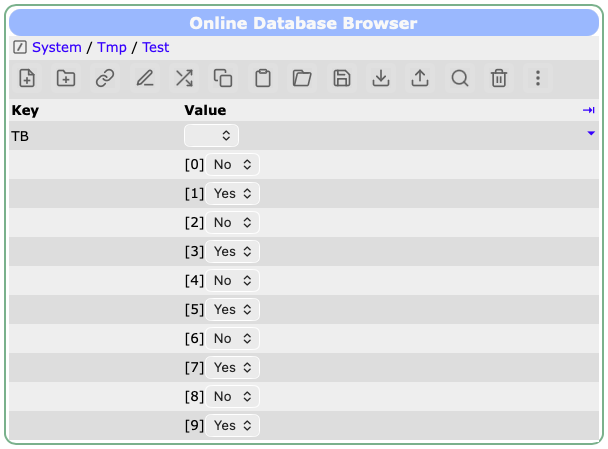
Can you please update to the latest develop versiokn of midas, and clear your browser cache so that the updated JavaScript midas library is loaded. Should be fixed by now. See attached screen shot where I changed every second value via the ODB editor.
Stefan
|
| Attachment 1: Screenshot_2025-11-24_at_15.32.12.png
|
|
|
3136
|
25 Nov 2025 |
Stefan Ritt | Bug Fix | ODB update, branch feature/db_delete_key merged into develop |
Thanks for the fixes, which I all approve.

There is still a "follow_links" in midas_c_compat.h line 70 for Python. Probably Ben has to look into that. Also
client.py has it.

Stefan |
|
3144
|
26 Nov 2025 |
Stefan Ritt | Info | switch midas to c++17 |
I switched from

  target_compile_features(<target> PUBLIC css_std_17)

to

  set(CMAKE_CXX_STANDARD 17)
  set(CMAKE_CXX_STANDARD_REQUIRED ON)
  set(CMAKE_CXX_EXTENSIONS OFF)   # optional: disables GNU extensions

Which is now global in the CMakeLists.txt, so we only have to deal with one location if we want to change it. It also turns off the g++ options. On my
Mac I get now a clean

  -std=c++17

Please everybody test on your side. Change is committed.

Stefan |
|
3148
|
27 Nov 2025 |
Stefan Ritt | Bug Report | Error(?) in custom page documentation |
Indeed a bug. Fixed in commit

https://bitbucket.org/tmidas/midas/commits/5c1133df073f493d74d1fc4c03fbcfe80a3edae4

Stefan |
|
3149
|
27 Nov 2025 |
Stefan Ritt | Suggestion | Improve process for adding new variables that can be shown in history plots |
> I assume that mlogger rescanning ODB is somewhat intensive process; and that's why we don't want rescanning to
> happen every time the ODB is changed?

A rescan maybe takes some tens of milliseconds. Something you can do on every run, but not on every ODB change (like writing to the slow control values).
We would need a somehow more clever code which keeps a copy of the variable names for each equipment. If the names change or the array size changes,
the scan can be triggered.


> Stopping/restarting mlogger is okay.  But would it be better to have some alternate way to force mlogger to
> rescan the ODB?  Like an odbedit command like 'mlogger_rescan'; or some magic ODB key to force the rescan.  I
> guess neither of these options is really any easier for the developer.  It just seems awkward to need to restart
> mlogger for this.

Indeed. But whatever "new" we design for the scan will users complain "last week it was enough to restart the logger, now what do I have to do". So nothing
is perfect. But having a button in the ODB editor like "Rebuild history database" might look more elegant. One issue is that it needs special treatment, since
the logger (in the Mu3e experiment) needs >10s for the scan, so a simple rpc call will timeout.

Let's see what KO has to say on this.

Best,
Stefan |
|
3157
|
27 Nov 2025 |
Stefan Ritt | Suggestion | Improve process for adding new variables that can be shown in history plots |
> 1) history is independent from "runs", we see a change, we apply it (even if it takes 10 sec or 2 minutes).
>
> 2) "nothing should change during a run", we must process all changes before we start a run (starting a run takes forever),
>    and we must ignore changes during a run (i.e. updated frontend starts to write new data to history). (this is why
>    the trick to "start a new run twice" used to work).

"nothing should change during a run" violates the action when a user adds a new variable during a run. So if the user does that, they don't
care if things change during a run. Then we can also modify the history DB during the run. Note that some MIDAS installations are purely
slow control (kind of a replacement of LabView, have no runs at all). In those installations runs do not make sense at all, so keeping the
history independent of runs makes sense to me.

> It is "free" to rescan ODB every 10 second or so. Then we can output a midas message "please restart the logger",
> and set an ODB flag, then when user opens the history panel editor, it will see this flag
> and tell the user "please restart the logger to see the latest changes in history". It can even list
> the specific changes, if we want ot be verbose about it.

Sounds good to me.

> I say, let's take the low road for now and see if it's good enough:
>
> a) have the history system report any changes in midas.log - "history event added", "new history variable added" (or "renamed"),
>    this will let user see that their changes to the equipment frontend "took" and flag any accidental/unwanted changes.
>
> b) have mlogger periodically scan ODB and set a "please restart me" flag. observe this flag in the history editor
>    and tell the user "please restart the logger to see latest changes in the history".

Actually you don't have to actively "scan" the ODB. You have hotlinks to the logger anyway from the equipment variables. All we need
in addition is a hotline to the settings array in the ODB. The logger receives the hotline update, checks if the names changed or got
extended, then flags this as a change.

Stefan |
|
3158
|
27 Nov 2025 |
Stefan Ritt | Suggestion | mvodb WS and family type matching |
> 2) "advanced" c++ code:
>
> void foo(const std::string& xxx) { ... };
> int main() { foo("bar"); }
>
> copy-created 2nd string is avoided, but string object to hold "bar" is still must be
> made, 1 malloc(), 1 memcpy().

Are you sure about this? I always thought that foo only receives a pointer to xxx which it puts on the stack, so
no additional malloc/free is involved.

Have a look here: https://en.cppreference.com/w/cpp/language/reference.html

It says "References are not objects; they do not necessarily occupy storage".

Stefan |
|
3167
|
04 Dec 2025 |
Stefan Ritt | Suggestion | Improve process for adding new variables that can be shown in history plots |
> Now, mlogger just silently continues not writing to history. There is no ongoing error message, there is no
> ongoing alarm, only sign of trouble is empty history plots and history files not growing.

I would recommend to use an "internal alarm". This is not an "ODB alarm" where values are compared limits, but it is directly triggered by C code. To do
so, call

  if (disk_full)
     al_trigger-alarm("Disk full", "Disk full, no history will be written", "Alarm", "Disk full", AT_INTERNAL);

This will cause an alarm to show up prominently on the status page and beep every few minutes.

Stefan |
|
3176
|
09 Dec 2025 |
Stefan Ritt | Bug Report | odbxx memory leak with JSON ODB dump |
Thanks for reporting this. It was caused by a

  MJsonNode* node = MJsonNode::Parse(str.c_str());

not followed by a

  delete node;

I added that now in odb::odb_from_json_string(). Can you try again?

Stefan |
|
3180
|
10 Dec 2025 |
Stefan Ritt | Bug Report | odbxx memory leak with JSON ODB dump |
> BTW, it looks like we are parsing the whole JSON ODB dump (200k+) on every odbxx access. Can you parse it just once?

You are right. I changed the code so that the dump is only parsed once. Please give it a try.

Stefan |
|
3184
|
12 Dec 2025 |
Stefan Ritt | Bug Report | odbxx memory leak with JSON ODB dump |
> Confirmed fixed, thanks! There are 2 small changes I made in odbxx.h, please pull.

There was one missing enable_jsroot in manalyzer, please pull yourself.

Stefan |
|
3187
|
04 Jan 2026 |
Stefan Ritt | Info | Ad-hoc history plots of slow control equipment |
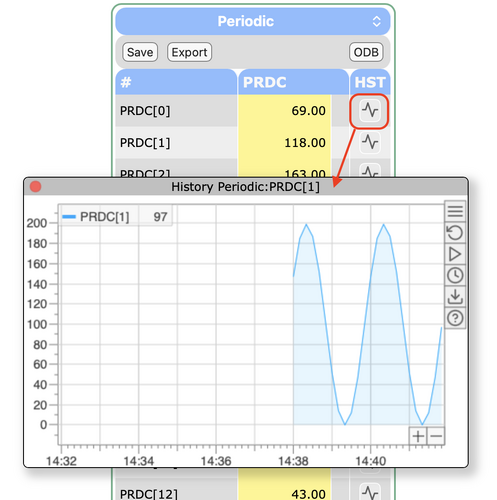
After popular demand and during some quite holidays I implemented ad-hoc history plots. To enable this
for a certain equipment, put

  /Equipment/<name>/Settings/History buttons = true

into the ODB. You will then see a graph button after each variable. Pressing this button reveals the history
for this variable, see attachment.

Stefan |
| Attachment 1: Screenshot_2026-01-04_at_14.41.55.png
|
|
|
3188
|
09 Jan 2026 |
Stefan Ritt | Forum | MIDAS installation |
Since we have no many RaspberryPi based control systems running at our lab with midas, I want to
streamline the midas installation, such that a non-expert can install it on these devices.

First, midas has to be cloned under "midas" in the user's home directory with

git clone https://bitbucket.org/tmidas/midas.git --recurse-submodules

For simplicity, this puts midas right into /home/<user>/midas, and not into any "packages" subdirectory
which I believe is not necessary.

Then I wrote a setup script midas/midas_setup.sh which does the following:

- Add midas environment variables to .bashrc / .zschenv depending on the shell being used

- Compile and install midas to midas/bin

- Load an initial ODB which allows insecure http access to port 8081

- Install mhttpd as a system service and start it via systemctl

Since I'm not a linux system expert, the current file might be a bit clumsy. I know that automatic shell
detection can be made much more elaborate, but I wanted a script which can easy be understood even by
non-experts and adapted slightly if needed.

If you know about shell scripts and linux administration, please have a quick look at the attached script
and give me any feedback.

Stefan |
| Attachment 1: midas_setup.sh
|
#!/bin/sh

#
# Change environment
#

f="$HOME/.bashrc"
[ -f "$HOME/.zshenv" ] && f="$HOME/.zshenv"

grep -q '>>> MIDAS >>>' "$f" 2>/dev/null || cat >>"$f" <<'EOF'

# >>> MIDAS >>>
export PATH="$HOME/midas/bin:$PATH"
export MIDASSYS="$HOME/midas"
export MIDAS_DIR="$HOME/online"
export MIDAS_EXPT_NAME="Online"
# <<< MIDAS <<<
EOF

. "$f"

printf '\033[1;33m★\033[0m %s\n' "Environment variables written to $f"

#
# Compile MIDAS
#
printf '\033[1;33m★\033[0m %s\n' "Compiling and installing MIDAS"

mkdir -p "$HOME/midas/build"
cd "$HOME/midas/build"
cmake ..
make install
cd "$HOME/midas"

#
# Load initial ODB, opens port 8081 for mhttpd
#
printf '\033[1;33m★\033[0m %s\n' "Loading initial ODB"

mkdir -p "$HOME/online"
odbedit -c "load midas_setup.odb" > /dev/null

#
# Installing mhttpd servcice
#
printf '\033[1;33m★\033[0m %s\n' "Installing mhttpd service"

sudo cp mhttpd.service /etc/systemd/system/
sudo systemctl daemon-reload
sudo systemctl enable mhttpd
sudo systemctl start mhttpd

printf '\033[1;33m★\033[0m %s\n' "Finished MIDAS setup"
|
|
3190
|
13 Jan 2026 |
Stefan Ritt | Forum | MIDAS installation |
Thanks for your feedback. I reworked the installation script, and now also called it "install.sh" since it includes also the git clone. I modeled it after
homebrew a mit (https://brew.sh). This means you can now run the script on a prison linux system with:

  /bin/bash -c "$(curl -sS https://bitbucket.org/tmidas/midas/raw/HEAD/install.sh)"

It contains three defaults for MIDASSYS, MIDAS_DIR and MIDAS_EXPT_NAME, but when you run in, you can overwrite these
defaults interactively. The script creates all directories, clones midas, compiles and installs it, installs and runs mhttpd as a system
service, then starts the logger and the example frontend. I also added your PYTHONPATH variable. The RC file is now automatically
detected.

Yes one could add more config files, but I want to have this basic install as simple as possible. If more things are needed, they
should be added as separate scripts or .ODB files.

Please have a look and let me know what you think about. I tested it on a RaspberryPi, but not yet on other systems.

Stefan |
| Attachment 1: install.sh
|
#!/bin/sh

#
# This is a MIDAS install script which installes MIDAS and sets up
# a proper environment for a simple experiment
#
# On a new system you can execut it with
#
# /bin/bash -c "$(curl -sS https://bitbucket.org/tmidas/midas/raw/HEAD/install.sh)"
#

#
# Default directories
#
DEFAULT_MIDASSYS="$HOME/midas"
DEFAULT_MIDAS_DIR="$HOME/online"
DEFAULT_MIDAS_EXPT_NAME="Online"

#
# Query directories
#

# ---- MIDASSYS ----
printf "Clone MIDAS into directory [%s]: " "$DEFAULT_MIDASSYS"
read USER_MIDASSYS

# If user entered something, it must start with a /
if [ -n "$USER_MIDASSYS" ] && [ "${USER_MIDASSYS#/}" = "$USER_MIDASSYS" ]; then
   echo "Error: directory must be an absolute path starting with '/'"
   exit 1
fi

# Use default if user input is emtpy
MIDASSYS=${USER_MIDASSYS:-$DEFAULT_MIDASSYS}

# ---- MIDAS_DIR ----
printf "MIDAS experiment directory [%s]: " "$DEFAULT_MIDAS_DIR"
read USER_MIDAS_DIR

# If user entered something, it must start with a /
if [ -n "$USER_MIDAS_DIR" ] && [ "${USER_MIDAS_DIR#/}" = "$USER_MIDASDIR" ]; then
   echo "Error: directory must be an absolute path starting with '/'"
   exit 1
fi

# Use default if user input is emtpy
MIDAS_DIR=${USER_MIDAS_DIR:-$DEFAULT_MIDAS_DIR}

# ---- MIDAS_EXPT_NAME ----
printf "MIDAS experiment name [%s]: " "$DEFAULT_MIDAS_EXPT_NAME"
read USER_MIDAS_EXPT_NAME

# Use default if user input is emtpy
MIDAS_EXPT_NAME=${USER_MIDAS_EXPT_NAME:-$DEFAULT_MIDAS_EXPT_NAME}

echo "\n---------------------------------------------------------------"
printf '\033[1;33m*\033[0m %s\n' "MIDAS system directory            : $MIDASSYS"
printf '\033[1;33m*\033[0m %s\n' "MIDAS experiment directory        : $MIDAS_DIR"
printf '\033[1;33m*\033[0m %s\n' "MIDAS experiment name             : $MIDAS_EXPT_NAME"

#
# Change environment
#

detect_rc_file() {
    # $SHELL is usually reliable
    case "$(basename "$SHELL")" in
	bash)
	    [ -f "$HOME/.bashrc" ] && echo "$HOME/.bashrc" || echo "$HOME/.bash_profile"
	    ;;
	zsh)
	    # zsh always reads .zshenv
	    echo "$HOME/.zshenv"
	    ;;
	fish)
	    # fish is not POSIX, but handle gracefully
	    echo "$HOME/.config/fish/config.fish"
	    ;;
	*)
	    # fallback for sh, dash, etc.
	    echo "$HOME/.profile"
	    ;;
    esac
}

RC_FILE=$(detect_rc_file)

grep -q '>>> MIDAS >>>' "$RC_FILE" 2>/dev/null || cat >>"$RC_FILE" <<'EOF'

# >>> MIDAS >>>
export PATH="__MIDASSYS__/bin:$PATH"
export MIDASSYS="__MIDASSYS__"
export MIDAS_DIR="__MIDAS_DIR__"
export MIDAS_EXPT_NAME="__MIDAS_EXPT_NAME__"
export PYTHONPATH="$PYTHONPATH:__MIDASSYS__/python"
# <<< MIDAS <<<
EOF

# substitue placeholders
sed -i.bak \
    -e "s|__MIDASSYS__|$MIDASSYS|g" \
    -e "s|__MIDAS_DIR__|$MIDAS_DIR|g" \
    -e "s|__MIDAS_EXPT_NAME__|$MIDAS_EXPT_NAME|g" \
    "$RC_FILE"

# source environment file
. "$RC_FILE"

printf '\033[1;33m*\033[0m %s\n' "Environment variables written to  : $RC_FILE"
echo "---------------------------------------------------------------\n"
printf '\033[1;33m*\033[0m %s\n\n' "Cloning and compiling MIDAS..."

# create experiment directory
mkdir -p "$MIDAS_DIR"

# clone MIDAS
git clone https://bitbucket.org/tmidas/midas.git "$MIDASSYS" --recurse-submodules

# compile MIDAS
mkdir -p "$MIDASSYS/build"
cd "$MIDASSYS/build"
cmake .. -DCMAKE_BUILD_TYPE=RelWithDebInfo
make install

#
# Load initial ODB, opens port 8081 for mhttpd
#
printf '\n\033[1;33m*\033[0m %s\n' "Loading initial ODB"

cd "$MIDASSYS"
odbedit -c "load install.odb" > /dev/null

# start example frontend and logger
printf '\033[1;33m*\033[0m %s\n' "Starting frontend and logger"
$MIDASSYS/build/examples/experiment/frontend -D 1>/dev/null
$MIDASSYS/bin/mlogger -D 1>/dev/null

#
# Installing mhttpd servcice
#
printf '\033[1;33m*\033[0m %s\n' "Installing mhttpd service"
sudo cp mhttpd.service /etc/systemd/system/
sudo systemctl daemon-reload
sudo systemctl enable mhttpd

printf '\033[1;33m*\033[0m %s\n' "Starting mhttpd service"
sudo systemctl start mhttpd

printf '\033[1;33m*\033[0m %s\n' "Finished MIDAS setup"
|
|
3191
|
13 Jan 2026 |
Stefan Ritt | Forum | MIDAS installation |
I put the documentation under

  https://daq00.triumf.ca/MidasWiki/index.php/Install_Script

Would be good if anybody could check that.

Stefan |